Day 7 · About 6 hours, in three sessions
Ship your portfolio site
Put your portfolio site online with Vercel, add a projects page from GitHub’s API and a page of your watchlist’s SEC filings, and keep every secret out of Git.
Today’s goal
By the end of today your portfolio site is online, at an address anyone can open. Its projects page and its SEC filings page keep themselves up to date, each checked every hour:
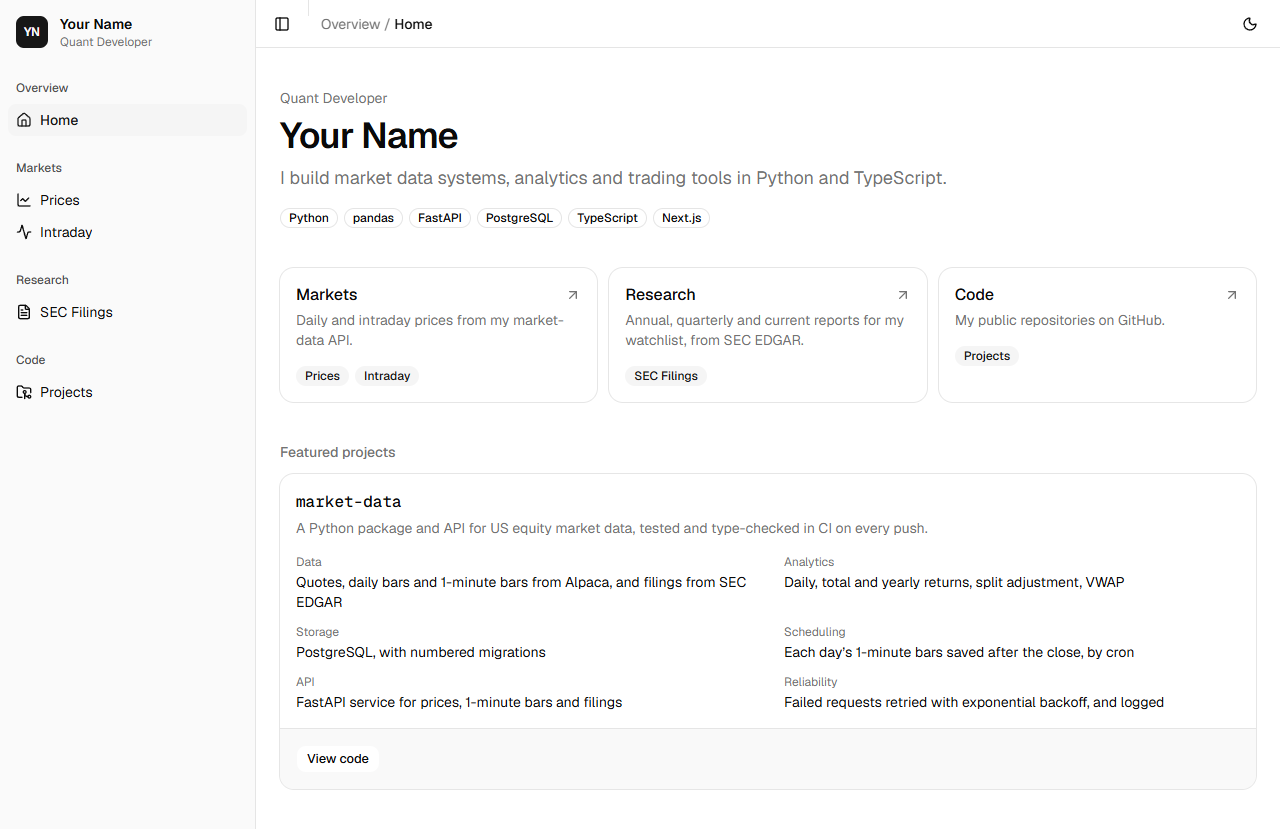
Its market pages run on your computer, beside your API, and show a note on the public site. Every secret the site uses stays out of Git.
Why it matters on a desk
Code that runs only on your own computer helps nobody else. Every system on a desk is deployed: built from its repository and run on computers that are always on, with its settings and secrets given to it there, never written in the code.
A secret committed to Git stays in the repository’s history even after the line is deleted, so it must never be committed at all. Checking that before a repository goes public is a habit every engineer needs.
A site of your own also shows your work to anyone: each project, with a link to its code.
Review
A few questions from earlier days. Answer each before you start.
Why does the intraday page ask /api/minutes on its own site instead of your API?
Show the answer
A: The route keeps the API’s address on the server The browser only ever asks your site. The route asks the API from the server, so the API’s address isn’t in the page.
Which answer from a server is worth asking again after?
Show the answer
C: 503 Service Unavailable 503 means the server is busy for now. 404 and 422 mean the request itself was wrong, and asking again gets the same answer.
The minutes job runs twice on the same day. Why does the table hold no more rows after the second run?
Show the answer
B: Its primary key and upsert update the rows already there A minute already saved has the same symbol and time, its primary key, so the upsert updates its row instead of adding one.
Session 1 The site deployed, with secrets kept out of Git
The idea
Step 1 A site on computers that are always on
Until now your site has run only on your computer, at localhost, where only you can see it. To put it online it needs a host: a company whose computers are always on and answer anyone who visits.
Vercel, the company that makes Next.js, is a host built for it. Its Hobby plan is free for personal projects that make no money, which a portfolio is. You sign up with your GitHub account and choose a repository, and Vercel builds the site and puts it online.
From then on, every push to main is a production deployment: Vercel builds the site again and puts the new version at your address. A push to any other branch is a preview deployment, the site as that branch has it, at an address of its own. A build that fails puts nothing online, so the site stays as it was.
Practice
Problem 1
2 pointsOne day you push to main 4 times and to a branch called redesign 3 times, and every build works. How many of those builds change the site at your .vercel.app address?
Hint 1
A push to main is a production deployment: the site at your address.
Hint 2
A push to any other branch makes a preview, at an address of its own.
Solution
pushes to main: 4, each a production deployment
pushes to redesign: 3, each a preview at its own address
so 4 builds change the site at your address
Which of these could safely have a name that starts NEXT_PUBLIC_?
Show the answer
C: The site’s name, shown on its pages A NEXT_PUBLIC_ value is written into the JavaScript every visitor downloads. Only something you would print on the page anyway belongs there.
In your build’s route table, /prices is marked ◐. What does that mean?
Show the answer
A: Part of the page is made ahead of time, and the prices are filled in at each request ◐ is a Partial Prerender: the header is made at the build, and the part that reads your API is filled in when someone asks.
The project, step by step
Build it yourself from this brief, then check it against the steps.
- Make a LocalOnly component, and show it in place of the prices and intraday pages when there is no MARKET_API_URL. Make the minutes route answer 404 then.
- Build the site for production and read its route table.
- Check that Git ignores .env.local, commit, and make a public GitHub repository for the portfolio with gh.
- Import the repository into Vercel and deploy it, letting Vercel see only that repository.
Step 1 Pages that say where they run
Make src/components/local-only.tsx: what the market pages show where there is no API to read.
src/components/local-only.tsximport { Laptop } from "lucide-react";import { Alert, AlertDescription, AlertTitle } from "@/components/ui/alert"; // Shown in place of a page that reads the market-data API, on a site without the API's address.export function LocalOnly() { return ( <Alert className="max-w-2xl"> <Laptop /> <AlertTitle>Shown on my computer only</AlertTitle> <AlertDescription> This page reads market data from Alpaca through my market-data API. Alpaca’s data is for personal use, so this site doesn’t publish it. </AlertDescription> </Alert> );}In the prices page, show it when there is no API address:
src/app/prices/page.tsximport type { Metadata } from "next";import Link from "next/link";import { Suspense } from "react";import { LocalOnly } from "@/components/local-only";import { PageHeader } from "@/components/page-header";import { PriceChart } from "@/components/price-chart";import { Stat } from "@/components/stat";import { Alert, AlertDescription, AlertTitle } from "@/components/ui/alert";import { buttonVariants } from "@/components/ui/button";import { Card, CardContent, CardDescription, CardHeader, CardTitle,} from "@/components/ui/card";import { Skeleton } from "@/components/ui/skeleton";import { Table, TableBody, TableCell, TableHead, TableHeader, TableRow,} from "@/components/ui/table";import { env } from "@/lib/env";import { percent, price, tone, volume } from "@/lib/format";import { getPrices, getSymbols } from "@/lib/market";import { cn } from "@/lib/utils"; export const metadata: Metadata = { title: "Prices" }; const SESSIONS = 60; export default function Prices({ searchParams }: PageProps<"/prices">) { return ( <div className="grid gap-4"> <PageHeader title="Prices" description="Daily bars from Alpaca’s market data API" /> {env.MARKET_API_URL ? ( <Suspense fallback={<Skeleton className="h-96" />}> <History searchParams={searchParams} /> </Suspense> ) : ( <LocalOnly /> )} </div> );} // The symbol in the address, as in /prices?symbol=SPY, or else the first one the API has prices for.async function History({ searchParams,}: Pick<PageProps<"/prices">, "searchParams">) { const [symbols, params] = await Promise.all([getSymbols(), searchParams]); if (symbols.length === 0) { return ( <Alert className="max-w-2xl"> <AlertTitle>No prices yet</AlertTitle> <AlertDescription> Run the recorder in market-data to save some. </AlertDescription> </Alert> ); } const symbol = typeof params.symbol === "string" && symbols.includes(params.symbol) ? params.symbol : symbols[0]; const days = await getPrices(symbol, SESSIONS); // Each session after the first, with its change from the session before. const sessions = days .slice(1) .map((d, k) => ({ ...d, change: d.close / days[k].close - 1 })); const first = days[0]; const last = sessions[sessions.length - 1]; const high = days.reduce((a, b) => (b.high > a.high ? b : a)); const low = days.reduce((a, b) => (b.low < a.low ? b : a)); const periodChange = last.close / first.close - 1; return ( <> <nav aria-label="Symbols" className="flex flex-wrap gap-1"> {symbols.map((s) => ( <Link key={s} href={`/prices?symbol=${encodeURIComponent(s)}`} aria-current={s === symbol ? "page" : undefined} className={cn( buttonVariants({ variant: s === symbol ? "secondary" : "ghost", size: "sm", }), "font-mono", )} > {s} </Link> ))} </nav> <div className="grid gap-3 sm:grid-cols-2 xl:grid-cols-4"> <Stat label="Last close" value={price(last.close)} note={`${percent(last.change)} on the day`} noteClass={tone(last.change)} /> <Stat label={`${days.length}-day return`} value={percent(periodChange)} note={`from ${price(first.close)} on ${first.day}`} /> <Stat label={`${days.length}-day high`} value={price(high.high)} note={high.day} /> <Stat label={`${days.length}-day low`} value={price(low.low)} note={low.day} /> </div> <Card> <CardHeader> <CardTitle>{symbol} daily close</CardTitle> <CardDescription> Last {days.length} sessions, {first.day} to {last.day} </CardDescription> </CardHeader> <CardContent> <PriceChart data={days.map((d) => ({ label: d.day.slice(5), close: d.close }))} /> </CardContent> </Card> <Card> <CardHeader> <CardTitle>Recent sessions</CardTitle> </CardHeader> <CardContent> <Table> <TableHeader> <TableRow> <TableHead>Date</TableHead> <TableHead className="text-right">Open</TableHead> <TableHead className="text-right">High</TableHead> <TableHead className="text-right">Low</TableHead> <TableHead className="text-right">Close</TableHead> <TableHead className="text-right">Change</TableHead> <TableHead className="text-right">Volume</TableHead> </TableRow> </TableHeader> <TableBody className="font-mono tabular-nums"> {sessions .slice(-8) .reverse() .map((d) => ( <TableRow key={d.day}> <TableCell>{d.day}</TableCell> <TableCell className="text-right"> {price(d.open)} </TableCell> <TableCell className="text-right"> {price(d.high)} </TableCell> <TableCell className="text-right">{price(d.low)}</TableCell> <TableCell className="text-right"> {price(d.close)} </TableCell> <TableCell className={cn("text-right", tone(d.change))}> {percent(d.change)} </TableCell> <TableCell className="text-right"> {volume(d.volume)} </TableCell> </TableRow> ))} </TableBody> </Table> </CardContent> </Card> </> );}- Lines 42 to 48
a ? b : cis b when a is true and c when it isn’t: with an API address, the prices as before; with none, the note. The build reads this, so on Vercel the page is made once, with the note.
Do the same in the intraday page. The minutes route answers 404, Not Found, since there is nothing for it to ask:
src/app/intraday/page.tsximport type { Metadata } from "next";import { IntradayView } from "@/components/intraday-view";import { LocalOnly } from "@/components/local-only";import { PageHeader } from "@/components/page-header";import { Badge } from "@/components/ui/badge";import { env } from "@/lib/env"; export const metadata: Metadata = { title: "Intraday" }; const SYMBOL = "AAPL"; export default function Intraday() { return ( <div className="grid gap-4"> <PageHeader title="Intraday" description="1-minute bars from Alpaca, 15 minutes behind the market" > <Badge variant="outline" className="font-mono"> {SYMBOL} </Badge> </PageHeader> {env.MARKET_API_URL ? <IntradayView symbol={SYMBOL} /> : <LocalOnly />} </div> );}src/app/api/minutes/[symbol]/route.tsimport { env } from "@/lib/env"; // The browser asks this route for a symbol's minutes, and the route asks the market-data API,// so the API's address stays on the server.export async function GET( _request: Request, context: RouteContext<"/api/minutes/[symbol]">,) { const { symbol } = await context.params; if (!env.MARKET_API_URL) { return Response.json( { detail: "Market data isn’t published on this site." }, { status: 404 }, ); } const response = await fetch( `${env.MARKET_API_URL}/minutes/${encodeURIComponent(symbol)}`, ); return new Response(response.body, { status: response.status, headers: { "content-type": "application/json" }, });}- Lines 10 to 13
- With no API address, answer 404 with a line saying why, in JSON like the API’s own errors.
cd ~/portfolionpm run lint > [email protected] lint> eslintnpm run format:check > [email protected] format:check> prettier --check . Checking formatting...All matched files use Prettier code style!
Step 2 A production build
Build the site as Vercel will:
npm run build > [email protected] build> next build ▲ Next.js 16.4.0 (Turbopack)- Environments: .env.local✓ Running next.config.ts took 29ms- Cache Components enabled- Partial Prefetching enabled Creating an optimized production build ...✓ Compiled successfully in 4.2s Running TypeScript ... Finished TypeScript in 3.6s ... Collecting page data using 8 workers ... Generating static pages using 8 workers (0/6) ... Generating static pages using 8 workers (1/6) Generating static pages using 8 workers (2/6) Generating static pages using 8 workers (4/6) ✓ Generating static pages using 8 workers (6/6) in 752ms Finalizing page optimization ... Route (app)┌ ○ /├ ○ /_not-found├ ƒ /api/minutes/[symbol]├ ○ /intraday└ ◐ /prices ○ (Static) prerendered as static content◐ (Partial Prerender) prerendered as static HTML with dynamic server-streamed contentƒ (Dynamic) server-rendered on demand
Environments: .env.localsays the build read your settings. It also checked the types (Running TypeScript), so a type error stops a build, here and on Vercel.Your .env.local gives MARKET_API_URL, so here /prices is ◐: its header is made now, and its prices at each request. /intraday is ○ even so, because its chart runs in the browser and asks the minutes route itself. On Vercel there is no .env.local, so /prices is ○ too, made once as the note.
Step 3 Secrets out of Git, and the code on GitHub
Before a repository goes public, check that Git ignores your settings.
git check-ignore -vnames the rule that ignores a file, here the.env*line of .gitignore. If it printed nothing, the file would be committed. Then commit:git check-ignore -v .env.local.gitignore:34:.env* .env.localgit add .git commit -m "Show the market pages only where the API runs"[main 537ddbb] Show the market pages only where the API runs 4 files changed, 34 insertions(+), 4 deletions(-) create mode 100644 src/components/local-only.tsx
Make the repository on GitHub and push, as on Day 4:
gh repo create portfolio --public --source . --pushgh adds the new repository as the remote called origin. Check it:
git remote -vorigin https://github.com/you/portfolio.git (fetch)origin https://github.com/you/portfolio.git (push)
Step 4 Online with Vercel
- Go to vercel.com and sign up with your GitHub account, on the free Hobby plan.
- Open vercel.com/new. To list your repositories, Vercel asks to install its app on your GitHub account. Choose Only select repositories, then portfolio, so it can see that repository and no other.
- Choose Import beside portfolio. Vercel sees a Next.js app and fills in how to build it. Leave every setting as it is, and choose Deploy.
- When the build finishes, Vercel shows your site and its address, which ends .vercel.app. Open it, then its Prices page.

Shown for the course’s sample data. Yours shows the latest. Vercel’s build log prints the same route table as yours. With no .env.local there, /prices is ○.
From now on,
git pushis how the site changes: Vercel builds every push to main and puts it online.
Session 2 A projects page from the GitHub API
The idea
Step 1 GitHub’s API
GitHub has an API too, which answers as JSON like Alpaca’s and the SEC’s. GET /users/your-username/repos lists a person’s public repositories. sort=pushed puts the most recently pushed first, and per_page=100 asks for up to 100 at once instead of the usual 30.
Each repository comes with dozens of fields, and the page uses seven: name, html_url (its address), description (the line you give it on GitHub), language (the language most of its code is in), stargazers_count (how many people starred it), pushed_at (when you last pushed) and fork.
fork is true for a copy of someone else’s repository. A copy is their work, not yours, so the page leaves it out.
Practice
Problem 2
2 points1,000 people visit your projects page in a day, some in every hour. The page is made again at most once an hour. At most how many times is GitHub asked for your repositories that day?
Hint 1
Every visit gets the page that was made last.
Hint 2
Making the page again asks GitHub once, and that happens at most once an hour.
Solution
the page asks GitHub only when it is made again
it is made again at most once an hour, so at most 24 times in 24 hours
GitHub is asked at most 24 times, however many people visit
Which token should the projects page use?
Show the answer
B: A fine-grained token with read-only access to public repositories The page only reads public repositories, so a read-only token for them is all it needs. If it leaked, it could do no harm.
You add GITHUB_TOKEN to Vercel’s settings after the site is online. When does the site start using it?
Show the answer
C: From the next deployment, after a push or a redeploy A deployment keeps the settings it was built with. A change applies only to deployments made after it.
The project, step by step
Build it yourself from this brief, then check it against the steps.
- Give both your repositories a description with gh repo edit.
- Make a fine-grained token with read-only access to public repositories. Put it in .env.local as GITHUB_TOKEN, list the name in .env.example, read it in env.ts, and add it to Vercel’s settings as a Secret.
- Write src/lib/github.ts: getRepos(user), kept for hours, sending the token if there is one, and leaving out forks.
- Make /projects, a table of each repository: its name as a link, its description, language, stars and last push. Add it to nav.ts in a Code section, lint, commit and push.
Step 1 Describe your repositories
The projects page shows each repository’s description. Give both of yours one, from each project’s folder:
cd ~/market-datagh repo edit --description "Market data in Python: quotes, daily and 1-minute bars, SEC filings, PostgreSQL and a FastAPI service."cd ~/portfoliogh repo edit --description "My portfolio site: market data, SEC filings and projects. Next.js, TypeScript and shadcn/ui."
Step 2 A token for GitHub
- On GitHub, open Settings from your picture at the top right, then Developer settings, Personal access tokens and Fine-grained tokens. Choose Generate new token.
- Name it portfolio site, and choose when it expires. When it does, make a new one and replace the old value in both places below.
- Under Repository access, choose Public repositories: read-only access to public repositories, and nothing else.
- Choose Generate token, and copy it. GitHub shows it only once.
Paste it after
GITHUB_TOKEN=in .env.local, with no spaces or quotes:.env.localMARKET_API_URL=http://127.0.0.1:8000GITHUB_TOKEN=List the name, with no value, in .env.example:
.env.example# Copy to .env.local and set your own values. .env.local is in .gitignore; this file is not.MARKET_API_URL=http://127.0.0.1:8000GITHUB_TOKEN=And read it in src/lib/env.ts:
src/lib/env.tsimport "server-only"; // The site's settings, read on the server only: from .env.local on this computer, and from// the project's environment variables on Vercel.export const env = { // The market-data API's address, from .env.local. MARKET_API_URL: process.env.MARKET_API_URL, // Optional: raises GitHub's limit from 60 requests an hour to 5,000. GITHUB_TOKEN: process.env.GITHUB_TOKEN,};Then in Vercel, open your project and go to Environment Variables. Add GITHUB_TOKEN with the token as its value, choose Secret as its type, and save. A Secret can’t be read back after it is saved, only replaced.
Step 3 Your repositories, kept for an hour
Make src/lib/github.ts:
src/lib/github.tsimport "server-only"; // A user's public repositories from GitHub's API, fetched at most once an hour. import { cacheLife } from "next/cache";import { env } from "@/lib/env"; export type Repo = { name: string; html_url: string; description: string | null; fork: boolean; language: string | null; stargazers_count: number; pushed_at: string;}; export async function getRepos(user: string): Promise<Repo[]> { "use cache"; cacheLife("hours"); const token = env.GITHUB_TOKEN; const response = await fetch( `https://api.github.com/users/${user}/repos?sort=pushed&per_page=100`, { headers: { Accept: "application/vnd.github+json", ...(token ? { Authorization: `Bearer ${token}` } : {}), }, }, ); if (!response.ok) { throw new Error(`GitHub answered ${response.status}`); } const repos: Repo[] = await response.json(); return repos.filter((repo) => !repo.fork);}- Line 5
- cacheLife sets how long a kept answer lasts.
- Lines 8 to 16
- The fields the page uses, as a TypeScript type.
string | nullis a string or null: a repository may have no description or no language. - Lines 19 to 20
- Keep the answer: make it again at most once an hour, and never use one more than a day old.
- Lines 21 to 30
- Ask for up to 100 of the user’s public repositories, most recently pushed first. With a token, send it in the Authorization header.
...copies one object’s fields into another, so with no token the header is left out. - Lines 31 to 32
- Stop with an error if GitHub refused, such as 403 or 429 when the limit is used up. A build then fails, and the site online stays as it was.
- Line 35
- Leave out forks.
Step 4 The projects page
Make src/app/projects/page.tsx. It reads your username from site.ts:
src/app/projects/page.tsximport { Star } from "lucide-react";import type { Metadata } from "next";import { PageHeader } from "@/components/page-header";import { Badge } from "@/components/ui/badge";import { Card, CardContent } from "@/components/ui/card";import { Table, TableBody, TableCell, TableHead, TableHeader, TableRow,} from "@/components/ui/table";import { getRepos } from "@/lib/github";import { SITE } from "@/lib/site"; export const metadata: Metadata = { title: "Projects" }; export default async function Projects() { const repos = await getRepos(SITE.github); return ( <div className="grid gap-4"> <PageHeader title="Projects" description="Public repositories on GitHub, most recently updated first" /> <Card> <CardContent> <Table> <TableHeader> <TableRow> <TableHead>Repository</TableHead> <TableHead>Description</TableHead> <TableHead>Language</TableHead> <TableHead className="text-right">Stars</TableHead> <TableHead className="text-right">Updated</TableHead> </TableRow> </TableHeader> <TableBody> {repos.map((repo) => ( <TableRow key={repo.name}> <TableCell> <a href={repo.html_url} className="font-mono font-medium underline-offset-4 hover:underline" > {repo.name} </a> </TableCell> <TableCell className="max-w-md whitespace-normal text-muted-foreground"> {repo.description ?? "No description"} </TableCell> <TableCell> {repo.language && ( <Badge variant="outline">{repo.language}</Badge> )} </TableCell> <TableCell className="text-right font-mono tabular-nums"> <span className="inline-flex items-center gap-1"> <Star className="size-3 text-muted-foreground" /> {repo.stargazers_count} </span> </TableCell> <TableCell className="text-right font-mono tabular-nums"> {repo.pushed_at.slice(0, 10)} </TableCell> </TableRow> ))} </TableBody> </Table> </CardContent> </Card> </div> );}- Lines 19 to 20
- An async server component: it waits for the repositories while the page is made, so it is made with them in it.
- Lines 40 to 68
- A row for each repository: its name, linked to GitHub, its description or a note that it has none, its language, its stars, and the date of its last push.
- Line 65
- The date from pushed_at: its first 10 characters, as in 2026-10-06T20:41:09Z.
Add it to nav.ts, in a Code section:
src/lib/nav.tsimport { Activity, ChartLine, FolderGit2, House, type LucideIcon,} from "lucide-react"; export type NavItem = { title: string; href: string; icon: LucideIcon };export type NavGroup = { label: string; description?: string; items: NavItem[];}; // The site's sections, in the sidebar's order. A new page is added here.export const NAV: NavGroup[] = [ { label: "Overview", items: [{ title: "Home", href: "/", icon: House }] }, { label: "Markets", description: "Daily and intraday prices from my market-data API.", items: [ { title: "Prices", href: "/prices", icon: ChartLine }, { title: "Intraday", href: "/intraday", icon: Activity }, ], }, { label: "Code", description: "My public repositories on GitHub.", items: [{ title: "Projects", href: "/projects", icon: FolderGit2 }], },];Run
npm run devand open http://localhost:3000/projects: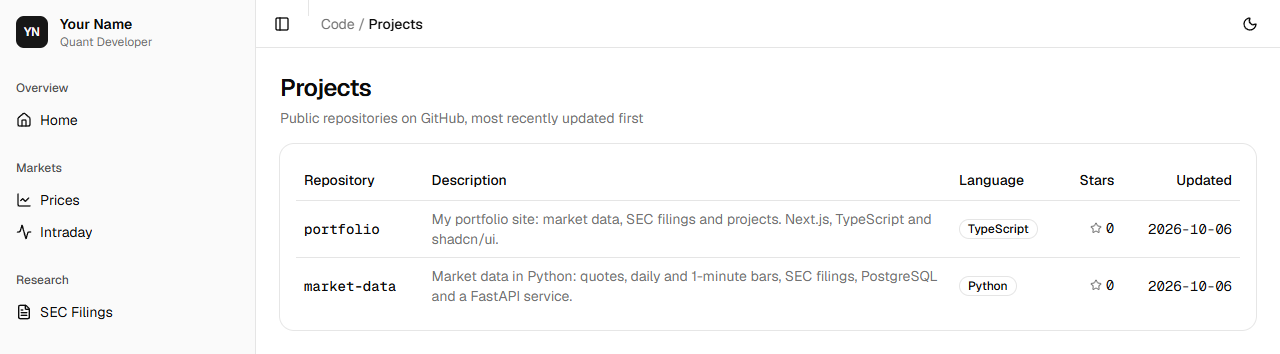
Shown for the course’s sample data. Yours shows the latest. Lint and commit:
npm run lint > [email protected] lint> eslintnpm run format:check > [email protected] format:check> prettier --check . Checking formatting...All matched files use Prettier code style!git add .git commit -m "Add a projects page that lists my GitHub repositories"[main d8ee4f6] Add a projects page that lists my GitHub repositories 5 files changed, 128 insertions(+), 2 deletions(-) create mode 100644 src/app/projects/page.tsx create mode 100644 src/lib/github.ts
Push, and Vercel builds the site with the token you gave it:
git push
Session 3 Capstone: portfolio site v1
The idea
Step 1 Filings from EDGAR
The SEC publishes every company’s filings on EDGAR, free and public. Its API answers anyone who says who they are in a User-Agent header, as on Day 4.
The site asks EDGAR itself rather than your API: your API runs on your computer, where Vercel can’t reach it, and the SEC’s data is public, so it can go on a public page.
Promise.all asks for every company at once and waits for all the answers: three requests take the time of the slowest, not of all three one after another.
Practice
Problem 3
2 pointsEach time the filings page is made, it asks the SEC once for each of the watchlist’s 3 companies. It is made again at most once an hour. At most how many requests a day does it send the SEC?
Hint 1
The page is made at most 24 times a day.
Hint 2
Each time, it sends 3 requests, one for each company.
Solution
times the page is made in a day: at most 24
requests each time: 3
24 × 3 = 72 requests a day
Why does the filings page ask the SEC itself instead of your API?
Show the answer
B: Your API runs on your computer, where Vercel can’t reach it, and filings are public The public site runs on Vercel’s computers, which can’t reach the API on yours. The SEC publishes filings for everyone, so the site can ask EDGAR directly.
Why does the online site show filings but not prices?
Show the answer
B: Prices come from Alpaca’s data, which is for personal use; filings are public The SEC publishes filings for everyone. Alpaca’s data is for your own use, so it stays on your computer.
The project, step by step
Build it yourself from this brief, then check it against the steps.
- Add SEC_USER_AGENT to .env.local, .env.example and env.ts, failing with a clear message when it is missing, and to Vercel as a plain setting.
- Write src/lib/sec.ts: getFilings(count), the watchlist’s 3 companies’ newest 10-K, 10-Q and 8-K filings from EDGAR, kept for hours, and a /filings page with a table of the newest 15. Add it to nav.ts in a Research section.
- Bring the featured project up to date with what market-data does now, and replace the README with one that says what the site is and how to run it.
- Build, commit and push. Download both projects as zips, as Module 2 starts from them.
Step 1 Say who you are to the SEC
Add your name and email to .env.local, as on Day 4:
.env.localMARKET_API_URL=http://127.0.0.1:8000GITHUB_TOKEN=SEC_USER_AGENT=Your Name [email protected]Its name, with an example, to .env.example:
.env.example# Copy to .env.local and set your own values. .env.local is in .gitignore; this file is not.MARKET_API_URL=http://127.0.0.1:8000GITHUB_TOKEN=SEC_USER_AGENT=Your Name [email protected]And read it in env.ts:
src/lib/env.tsimport "server-only"; // The site's settings, read on the server only: from .env.local on this computer, and from// the project's environment variables on Vercel.export const env = { // The market-data API's address, from .env.local. MARKET_API_URL: process.env.MARKET_API_URL, // Optional: raises GitHub's limit from 60 requests an hour to 5,000. GITHUB_TOKEN: process.env.GITHUB_TOKEN, // The SEC requires a name and an email on every request. get SEC_USER_AGENT(): string { const value = process.env.SEC_USER_AGENT; if (!value) { throw new Error( "SEC_USER_AGENT is not set. Add it to .env.local, or to Vercel's environment variables.", ); } return value; },};- Lines 11 to 19
- A getter: a property worked out when it is read. With no SEC_USER_AGENT, it stops with an error that says where to set it, instead of the SEC refusing a request with no name on it.
In Vercel’s Environment Variables, add SEC_USER_AGENT too, as a plain setting: it isn’t secret, and a plain one can be read back. Add it before you push, or the build stops with that error.
Step 2 The filings page
Make src/lib/sec.ts. It asks the SEC for the same filings as Day 4’s filings.py, so the site needs neither your database nor your API:
src/lib/sec.tsimport "server-only"; // The watchlist's newest filings, from the SEC's EDGAR, fetched at most once an hour. import { cacheLife } from "next/cache";import { env } from "@/lib/env"; // The watchlist's companies, by their CIKs, found on Day 4.const COMPANIES: Record<string, number> = { AAPL: 320193, MSFT: 789019, NVDA: 1045810,};const FORMS = ["10-K", "10-Q", "8-K"];const ITEMS: Record<string, string> = { "1.01": "Material agreement", "2.02": "Results of operations", "5.02": "Officer or director change", "5.07": "Shareholder vote", "7.01": "Regulation FD disclosure", "8.01": "Other events",}; export type Filing = { symbol: string; form: string; filed: string; about: string; url: string;}; type Recent = { accessionNumber: string[]; form: string[]; filingDate: string[]; items: string[]; primaryDocument: string[];}; function describe(form: string, items: string): string { if (form === "10-K") return "Annual report"; if (form === "10-Q") return "Quarterly report"; const reported = items .split(",") .filter((item) => item in ITEMS) .map((item) => ITEMS[item]); return reported.join(", ") || "Current report";} async function reports(symbol: string, cik: number): Promise<Filing[]> { const response = await fetch( `https://data.sec.gov/submissions/CIK${String(cik).padStart(10, "0")}.json`, { headers: { "User-Agent": env.SEC_USER_AGENT }, }, ); if (!response.ok) { throw new Error(`The SEC answered ${response.status}`); } const recent: Recent = (await response.json()).filings.recent; return recent.form.flatMap((form, k) => FORMS.includes(form) ? [ { symbol, form, filed: recent.filingDate[k], about: describe(form, recent.items[k]), url: `https://www.sec.gov/Archives/edgar/data/${cik}/${recent.accessionNumber[k].replaceAll("-", "")}/${recent.primaryDocument[k]}`, }, ] : [], );} export async function getFilings(count: number): Promise<Filing[]> { "use cache"; cacheLife("hours"); const each = await Promise.all( Object.entries(COMPANIES).map(([symbol, cik]) => reports(symbol, cik)), ); return each .flat() .sort( (a, b) => b.filed.localeCompare(a.filed) || a.symbol.localeCompare(b.symbol), ) .slice(0, count);}- Line 9
- The watchlist’s companies by their CIK, the number the SEC knows each by, found on Day 4.
- Line 14
- The filings the page shows: 10-K, the annual report; 10-Q, the quarterly report; and 8-K, the current report, news a company must report within four business days.
- Lines 15 to 22
- The SEC’s names for the commonest 8-K items, as filings.py has them.
- Lines 32 to 38
- The part of the SEC’s file the page reads: the recent filings as lists side by side, item k of each list belonging to filing k.
- Lines 40 to 47
- A filing in words: an annual report, a quarterly report, or what an 8-K’s items report, or Current report if none is known.
- Lines 50 to 54
- Ask the SEC for one company’s filings. Its address ends with CIK and the CIK padded to 10 digits, and the User-Agent header says who is asking.
- Lines 61 to 72
- For each 10-K, 10-Q or 8-K, make a Filing, its address built from the CIK, the accession number without its dashes, and the document’s name.
flatMaplets each form give one result or none. - Lines 76 to 88
- Kept for an hour, like getRepos.
Promise.allasks for every company at once. The filings go in one list, newest first, and the firstcountare kept.
Make src/app/filings/page.tsx:
src/app/filings/page.tsximport { ArrowUpRight } from "lucide-react";import type { Metadata } from "next";import { PageHeader } from "@/components/page-header";import { Badge } from "@/components/ui/badge";import { Card, CardContent } from "@/components/ui/card";import { Table, TableBody, TableCell, TableHead, TableHeader, TableRow,} from "@/components/ui/table";import { getFilings } from "@/lib/sec"; export const metadata: Metadata = { title: "SEC Filings" }; export default async function Filings() { const filings = await getFilings(15); return ( <div className="grid gap-4"> <PageHeader title="SEC Filings" description="10-K, 10-Q and 8-K filings for my watchlist · SEC EDGAR · Updated hourly" /> <Card> <CardContent> <Table> <TableHeader> <TableRow> <TableHead>Filed</TableHead> <TableHead>Company</TableHead> <TableHead>Form</TableHead> <TableHead>Description</TableHead> <TableHead className="w-8" /> </TableRow> </TableHeader> <TableBody> {filings.map((filing) => ( <TableRow key={filing.url}> <TableCell className="font-mono tabular-nums"> {filing.filed} </TableCell> <TableCell className="font-mono">{filing.symbol}</TableCell> <TableCell> <Badge variant={filing.form === "8-K" ? "secondary" : "outline"} > {filing.form} </Badge> </TableCell> <TableCell>{filing.about}</TableCell> <TableCell> <a href={filing.url} aria-label={`${filing.symbol} ${filing.form} on SEC EDGAR`} className="text-muted-foreground hover:text-foreground" > <ArrowUpRight className="size-4" /> </a> </TableCell> </TableRow> ))} </TableBody> </Table> </CardContent> </Card> </div> );}- Line 19
- The 15 newest filings.
- Lines 40 to 62
- A row for each: the date it was filed, the symbol, the form, what it reports, and a link to the document on EDGAR.
aria-labelnames the link for screen readers, since it shows only an icon.
Add it to nav.ts, in a Research section:
src/lib/nav.tsimport { Activity, ChartLine, FileText, FolderGit2, House, type LucideIcon,} from "lucide-react"; export type NavItem = { title: string; href: string; icon: LucideIcon };export type NavGroup = { label: string; description?: string; items: NavItem[];}; // The site's sections, in the sidebar's order. A new page is added here.export const NAV: NavGroup[] = [ { label: "Overview", items: [{ title: "Home", href: "/", icon: House }] }, { label: "Markets", description: "Daily and intraday prices from my market-data API.", items: [ { title: "Prices", href: "/prices", icon: ChartLine }, { title: "Intraday", href: "/intraday", icon: Activity }, ], }, { label: "Research", description: "Annual, quarterly and current reports for my watchlist, from SEC EDGAR.", items: [{ title: "SEC Filings", href: "/filings", icon: FileText }], }, { label: "Code", description: "My public repositories on GitHub.", items: [{ title: "Projects", href: "/projects", icon: FolderGit2 }], },];Open http://localhost:3000/filings:
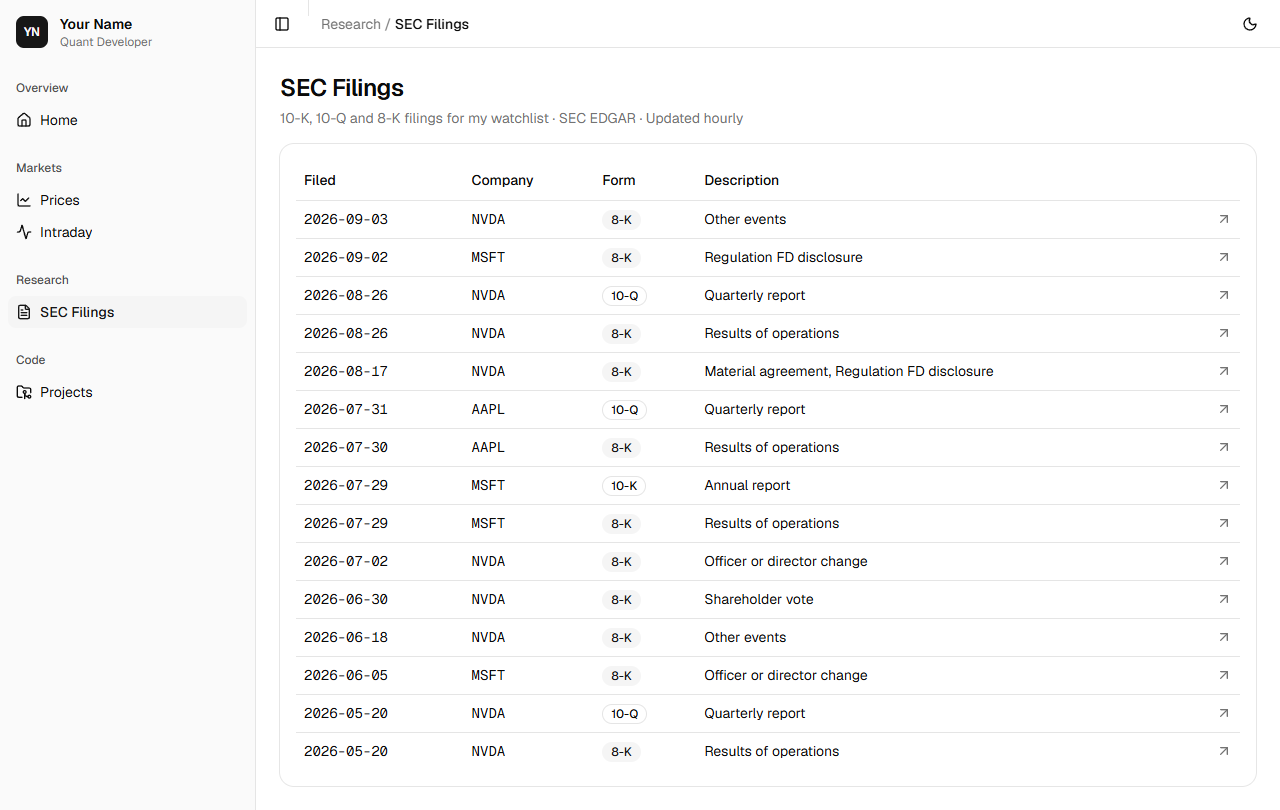
Shown for the course’s sample data. Yours shows the latest. Lint and commit:
npm run lint > [email protected] lint> eslintnpm run format:check > [email protected] format:check> prettier --check . Checking formatting...All matched files use Prettier code style!git add .git commit -m "Add an SEC filings page"[main bd06775] Add an SEC filings page 5 files changed, 177 insertions(+) create mode 100644 src/app/filings/page.tsx create mode 100644 src/lib/sec.ts
Step 3 Version 1, online
market-data has grown since Day 5. Bring its card on the home page up to date:
src/lib/featured.ts// The projects the home page features, newest first. Each new project is added here.export type Project = { name: string; summary: string; features: { label: string; detail: string }[];}; export const FEATURED: Project[] = [ { name: "market-data", summary: "A Python package and API for US equity market data, tested and type-checked in CI on every push.", features: [ { label: "Data", detail: "Quotes, daily bars and 1-minute bars from Alpaca, and filings from SEC EDGAR", }, { label: "Analytics", detail: "Daily, total and yearly returns, split adjustment, VWAP", }, { label: "Storage", detail: "PostgreSQL, with numbered migrations" }, { label: "Scheduling", detail: "Each day’s 1-minute bars saved after the close, by cron", }, { label: "API", detail: "FastAPI service for prices, 1-minute bars and filings", }, { label: "Reliability", detail: "Failed requests retried with exponential backoff, and logged", }, ], },];Replace create-next-app’s README with one that says what the site is and how to run it:
README.md# portfolio My portfolio site: market data from my own API, SEC filings for my watchlist,and my projects on GitHub. Built with Next.js, TypeScript, Tailwind CSS andshadcn/ui. | Page | What it shows || ----------- | ------------------------------------------------------------------------------------------------------------------ || Home | Who I am, the site's sections and my featured projects || Prices | Daily bars for each symbol in my database, from my [market-data](https://github.com/your-username/market-data) API || Intraday | The latest trading day's 1-minute bars, from the same API || SEC Filings | The watchlist's latest annual, quarterly and current reports, from SEC EDGAR, updated hourly || Projects | My public GitHub repositories, updated hourly | Prices and Intraday read the market-data API, which runs on my computer. On thepublic site, each shows a note in its place. ## Run it Install [Node.js](https://nodejs.org/) 24. Then, in this folder: ```npm installcp .env.example .env.localnpm run dev``` and open http://localhost:3000. Start the market-data API first to see Pricesand Intraday. ## Settings Set these in `.env.local` on your computer, and as environment variables onVercel. | Setting | What it is || ---------------- | ----------------------------------------------------------------------------------------------------------------------------------------------- || `MARKET_API_URL` | The market-data API's address, such as `http://127.0.0.1:8000`. Leave it out on Vercel. || `GITHUB_TOKEN` | Optional. A fine-grained GitHub token with read-only access to public repositories. It raises GitHub's limit from 60 requests an hour to 5,000. || `SEC_USER_AGENT` | Your name and email, which the SEC asks every program to send, such as `Jane Doe [email protected]`. | ## Checks ```npm run lintnpm run build```Build it as Vercel will, commit, and look back:
npm run build > [email protected] build> next build ▲ Next.js 16.4.0 (Turbopack)- Environments: .env.local✓ Running next.config.ts took 42ms- Cache Components enabled- Partial Prefetching enabled Creating an optimized production build ...✓ Compiled successfully in 3.0s Running TypeScript ... Finished TypeScript in 3.4s ... Collecting page data using 10 workers ... Generating static pages using 10 workers (0/8) ... Generating static pages using 10 workers (2/8) Generating static pages using 10 workers (4/8) Generating static pages using 10 workers (6/8) ✓ Generating static pages using 10 workers (8/8) in 1147ms Finalizing page optimization ... Route (app) Revalidate Expire┌ ○ /├ ○ /_not-found├ ƒ /api/minutes/[symbol]├ ○ /filings 1h 1d├ ○ /intraday├ ◐ /prices└ ○ /projects 1h 1d ○ (Static) prerendered as static content◐ (Partial Prerender) prerendered as static HTML with dynamic server-streamed contentƒ (Dynamic) server-rendered on demandgit add .git commit -m "Update the featured project, and add a README"[main 2e68403] Update the featured project, and add a README 2 files changed, 47 insertions(+), 25 deletions(-)git log --oneline2e68403 Update the featured project, and add a READMEbd06775 Add an SEC filings paged8ee4f6 Add a projects page that lists my GitHub repositoriesf5ed52f Check lint, formatting and types on every push537ddbb Show the market pages only where the API runs09729b2 Add an intraday page that refreshes every minute3284c18 Add a prices page that reads the market-data APIc1299f7 Set up the site with Next.js and shadcn/ui154b7d7 Initial commit from Create Next App
/projects and /filings are ○, with two more columns: Revalidate 1h and Expire 1d, which is cacheLife("hours").
git log --onelinetells the site’s story, from create-next-app’s first commit to today’s four.git pushVercel builds it. Open your address: your home page, your projects and your watchlist’s filings, online for anyone.
Step 4 Module 1’s projects
Here are both projects as they stand at the end of Module 1. Module 2 starts from them, so if your own differ, or you are starting the course here, download them:
- market-data.zipthe Python package and API, with its tests, migrations and CI · 142 KB
- portfolio.zipthe portfolio site, with its five pages · 130 KB
Each holds what Git holds for the project, so no settings file is in it. To run one, unzip it, copy .env.example to .env (market-data) or .env.local (portfolio) and set your own values, then install:
uv syncin market-data, andnpm installin portfolio.
Walkthrough
The whole solution, explained line by line. Open it once you have tried.
Show the walkthrough
The finished github.ts:
import "server-only"; // A user's public repositories from GitHub's API, fetched at most once an hour. import { cacheLife } from "next/cache";import { env } from "@/lib/env"; export type Repo = { name: string; html_url: string; description: string | null; fork: boolean; language: string | null; stargazers_count: number; pushed_at: string;}; export async function getRepos(user: string): Promise<Repo[]> { "use cache"; cacheLife("hours"); const token = env.GITHUB_TOKEN; const response = await fetch( `https://api.github.com/users/${user}/repos?sort=pushed&per_page=100`, { headers: { Accept: "application/vnd.github+json", ...(token ? { Authorization: `Bearer ${token}` } : {}), }, }, ); if (!response.ok) { throw new Error(`GitHub answered ${response.status}`); } const repos: Repo[] = await response.json(); return repos.filter((repo) => !repo.fork);}- Lines 19 to 20
- Kept for an hour.
- Lines 22 to 30
- The public repositories, with the token if there is one.
- Line 35
- Your own, without forks.
The finished sec.ts:
import "server-only"; // The watchlist's newest filings, from the SEC's EDGAR, fetched at most once an hour. import { cacheLife } from "next/cache";import { env } from "@/lib/env"; // The watchlist's companies, by their CIKs, found on Day 4.const COMPANIES: Record<string, number> = { AAPL: 320193, MSFT: 789019, NVDA: 1045810,};const FORMS = ["10-K", "10-Q", "8-K"];const ITEMS: Record<string, string> = { "1.01": "Material agreement", "2.02": "Results of operations", "5.02": "Officer or director change", "5.07": "Shareholder vote", "7.01": "Regulation FD disclosure", "8.01": "Other events",}; export type Filing = { symbol: string; form: string; filed: string; about: string; url: string;}; type Recent = { accessionNumber: string[]; form: string[]; filingDate: string[]; items: string[]; primaryDocument: string[];}; function describe(form: string, items: string): string { if (form === "10-K") return "Annual report"; if (form === "10-Q") return "Quarterly report"; const reported = items .split(",") .filter((item) => item in ITEMS) .map((item) => ITEMS[item]); return reported.join(", ") || "Current report";} async function reports(symbol: string, cik: number): Promise<Filing[]> { const response = await fetch( `https://data.sec.gov/submissions/CIK${String(cik).padStart(10, "0")}.json`, { headers: { "User-Agent": env.SEC_USER_AGENT }, }, ); if (!response.ok) { throw new Error(`The SEC answered ${response.status}`); } const recent: Recent = (await response.json()).filings.recent; return recent.form.flatMap((form, k) => FORMS.includes(form) ? [ { symbol, form, filed: recent.filingDate[k], about: describe(form, recent.items[k]), url: `https://www.sec.gov/Archives/edgar/data/${cik}/${recent.accessionNumber[k].replaceAll("-", "")}/${recent.primaryDocument[k]}`, }, ] : [], );} export async function getFilings(count: number): Promise<Filing[]> { "use cache"; cacheLife("hours"); const each = await Promise.all( Object.entries(COMPANIES).map(([symbol, cik]) => reports(symbol, cik)), ); return each .flat() .sort( (a, b) => b.filed.localeCompare(a.filed) || a.symbol.localeCompare(b.symbol), ) .slice(0, count);}- Lines 50 to 72
- One company’s 10-K, 10-Q and 8-K filings, each with its address and what it reports.
- Lines 76 to 88
- Every company’s, kept for an hour, newest first.
The finished env.ts:
import "server-only"; // The site's settings, read on the server only: from .env.local on this computer, and from// the project's environment variables on Vercel.export const env = { // The market-data API's address, from .env.local. MARKET_API_URL: process.env.MARKET_API_URL, // Optional: raises GitHub's limit from 60 requests an hour to 5,000. GITHUB_TOKEN: process.env.GITHUB_TOKEN, // The SEC requires a name and an email on every request. get SEC_USER_AGENT(): string { const value = process.env.SEC_USER_AGENT; if (!value) { throw new Error( "SEC_USER_AGENT is not set. Add it to .env.local, or to Vercel's environment variables.", ); } return value; },};- Line 7
- Set on your computer only.
- Line 9
- Optional, and secret.
- Lines 11 to 19
- Required, with an error that says where to set it.
Check yourself
Questions an interviewer could ask about today’s work.
01What is an environment variable, and why use one?Show answer
A setting given to a program from outside its code, a name and a value read as process.env.NAME. The same code can run in different places with different settings, and secrets stay out of the code and out of Git: in .env.local on your computer, in the project’s settings on Vercel.
02Why must a token never have a name that starts NEXT_PUBLIC_?Show answer
The build writes a NEXT_PUBLIC_ value into the JavaScript every visitor downloads, so anyone could read it. Settings without the prefix stay on the server.
03What do ○, ◐ and ƒ mean in next build’s route table?Show answer
○: a static page, made ahead of time and sent as it is. ◐: a static page with parts filled in at each request. ƒ: made at each request. Static pages are the fastest and cheapest to serve.
04What does "use cache" with cacheLife("hours") do for a page made from an API?Show answer
The function’s answer, and the page made from it, is kept and made again in the background at most once an hour, and never shown more than a day old. However many people visit, the API is asked about 24 times a day.
05Why give the site a fine-grained token with read-only access to public repositories?Show answer
A token should have only the access its job needs. This one can read public repositories and nothing else, so if it leaked it could do no harm. With it, GitHub allows 5,000 requests an hour instead of the 60 an address gets without one.
Learning points
- A host runs your site on computers that are always on. Vercel builds it from GitHub on every push, and a build that fails puts nothing online.
- A setting that differs from place to place, or is secret, is an environment variable: .env.local on your computer, the project’s settings on Vercel, its name in .env.example, never its secret value in Git.
- next build says how each page is made: ○ static, ◐ partly at each request, ƒ at each request. Make pages static unless they must change at every request.
- An API limits how often it is asked. A token with only the access its job needs raises the limit, and a cache keeps you far below it.
- Public data, such as the SEC’s filings, can go on a public page; data licensed for personal use stays on your computer.
Keep going
Running the site
Your site now changes without you: a new repository appears under Projects within the hour, and a company’s new report under SEC Filings.
When a build fails on Vercel, open the deployment and read its build log. The error is near the end and names the file and line, as on your computer, so run npm run build there to see it and fix it.
Make the site yours: your name, title and summary in site.ts, your username there too, and your own words in the README. When you have a domain of your own, such as yourname.com, you can add it in the project’s settings on Vercel.
Ship it
Push portfolio, and check the site online: Home, Projects and SEC Filings show your data, and Prices and Intraday show their note.
Add the site’s address to each repository’s page on GitHub (the About box’s Website), so anyone who finds your code finds the site.
That is Module 1, built. Module 2 is the maths of money.
For education only. Not investment advice. Terms of Use