Day 6 · About 6 hours, in three sessions
Intraday data, retries and scheduled jobs
Add an intraday page that asks your API for new bars every minute, make every request ask again when a server fails for a moment, and save each day’s 1-minute bars on a schedule.
Today’s goal
By the end of today your site has an intraday page. It shows the latest trading day’s 1-minute bars from your API, and asks for new ones every minute while it is open:
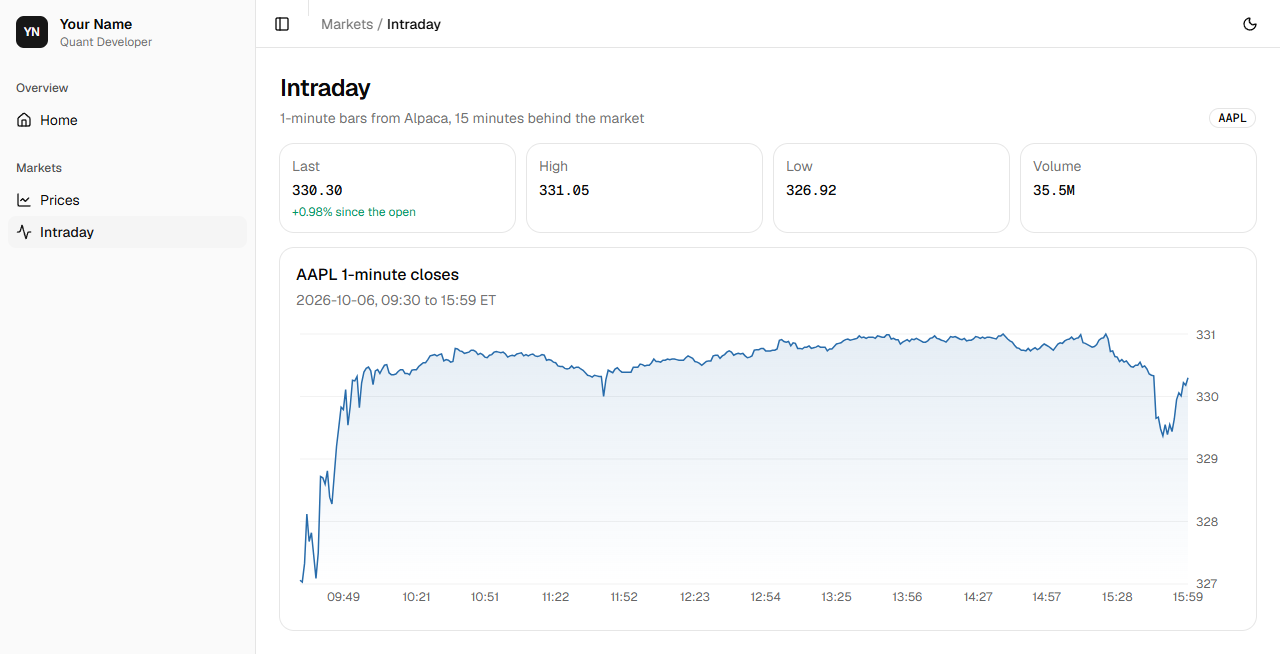
Every request your code makes now survives a server failing for a moment, and a scheduled job saves each day’s minutes in your database after the close.
Why it matters on a desk
A desk’s screens update themselves, and its systems run whether anyone is watching or not. Prices are saved every day by programs that start on a schedule, and a missed day is a hole in the data that can’t be filled later.
Every network call fails sometimes: a server is busy, a connection drops. Code that moves money expects it: it asks again, at sensible intervals, says what happened, and doesn’t stop everything because one request failed.
Review
A few questions from earlier days. Answer each before you start.
Your API answers 422. What does it mean?
Show the answer
A: The request was refused because something in it was wrong 422 means the request didn’t fit what the endpoint accepts, such as days=0 where days must be 1 or more. 404 is nothing at the address.
You add a page to your site. Which file makes it appear in the sidebar?
Show the answer
A: nav.ts The sidebar, the header and the home page all read the sections from nav.ts.
Where does a Next.js server component run?
Show the answer
B: On the server, before the page is sent It runs on the server, can wait for data there, and sends finished HTML.
Session 1 An intraday page
The idea
Step 1 Asking again every minute
A page is live when it changes without being reloaded. The simplest way is to ask again on a timer: the intraday page asks for the day’s minutes when it opens, then every minute.
The browser asks your own site, /api/minutes/AAPL, and a route there asks your API. A route is a file that answers a request with data instead of a page. The API’s address stays on the server, and the browser only ever talks to the site it is on.
Alpaca’s free minutes are 15 minutes behind the market, so this is live for a free plan. A trading screen uses a paid feed that sends every trade as it happens.
Practice
Problem 1
2 points5 browser tabs each show the intraday page, and each asks your API for the minutes once a minute. The API keeps each load of the minutes for 60 seconds. At most how many times a minute does it load AAPL’s minutes from Alpaca?
Hint 1
A request that finds a load younger than 60 seconds is answered from memory.
Hint 2
Only the first request after the load expires goes on to Alpaca.
Solution
your API gets 5 requests a minute, one from each tab
the first finds no fresh load and loads the minutes from Alpaca
the other 4 are answered from memory
so it loads them once a minute
What does "use client" at the top of intraday-view.tsx do?
Show the answer
A: It runs the component in the browser, so it can keep state and set a timer Client components run in the browser after the page arrives, so they can change on their own. They can’t read server settings such as .env.local.
Why does the intraday page ask /api/minutes on its own site rather than the API directly?
Show the answer
B: The route keeps the API’s address on the server, and the browser asks its own site The browser only ever sees your site. The route asks the API from the server, so the API’s address isn’t in the page, and the browser needs no permission to reach another site.
The project, step by step
Build it yourself from this brief, then check it against the steps.
- In the API, add /minutes/{symbol}: the latest trading day’s 1-minute bars from Alpaca as Minute models, with a last query for just the last few, keeping each symbol’s download for 60 seconds in a cache made as the API starts. Test the cache with a stand-in loader.
- Generate the site’s types again. Add a route at /api/minutes/[symbol] that asks the API and passes its answer on.
- Add /intraday: a client component that asks that route when it opens and every minute after, shows the last price, its change since the open, the day’s high, low and volume, and a chart of the closes, and says when the API isn’t answering. Add it to nav.ts.
Step 1 Minutes from the API
Add a Minute model, a cache and the minutes endpoint to api.py:
src/market_data/api.py"""Prices, 1-minute bars and SEC filings over HTTP, as JSON. Usage: uv run fastapi dev src/market_data/api.py Interactive documentation is at http://127.0.0.1:8000/docs.""" import timefrom collections.abc import AsyncIterator, Callable, Iteratorfrom contextlib import asynccontextmanagerfrom datetime import date, datetimefrom typing import Annotated import psycopgfrom fastapi import Depends, FastAPI, HTTPException, Query, Requestfrom psycopg.rows import dict_rowfrom psycopg_pool import ConnectionPoolfrom pydantic import BaseModel, TypeAdapter from market_data.config import get_settingsfrom market_data.filings import describefrom market_data.intraday import get_minutes PRICES = """SELECT day, open, high, low, close, volumeFROM pricesWHERE symbol = %sORDER BY day DESCLIMIT %s""" FILINGS = """SELECT filed, symbol, form, items, urlFROM filingsORDER BY filed DESC, symbol, accession DESCLIMIT %s""" class Price(BaseModel): """One day's bar.""" day: date open: float high: float low: float close: float volume: int class Minute(BaseModel): """One 1-minute bar.""" time: datetime open: float high: float low: float close: float volume: int class Filing(BaseModel): """An SEC filing and its main document.""" filed: date symbol: str form: str description: str url: str # Checks a list of plain rows against Minute, and builds the models.MINUTES = TypeAdapter(list[Minute]) def latest_minutes(symbol: str) -> list[Minute]: """The latest trading day's minutes, from Alpaca.""" bars = get_minutes(symbol).reset_index() return MINUTES.validate_python(bars.to_dict("records")) class MinutesCache: """Each symbol's minutes, reloaded at most once per `seconds`.""" def __init__(self, load: Callable[[str], list[Minute]], seconds: float) -> None: self.load = load self.seconds = seconds self.saved: dict[str, tuple[float, list[Minute]]] = {} def get(self, symbol: str) -> list[Minute]: loaded_at, minutes = self.saved.get(symbol, (0.0, [])) if time.monotonic() - loaded_at > self.seconds: minutes = self.load(symbol) self.saved[symbol] = (time.monotonic(), minutes) return minutes @asynccontextmanagerasync def lifespan(app: FastAPI) -> AsyncIterator[None]: """Open a pool of database connections on startup; close it on shutdown.""" with ConnectionPool(get_settings().database_url) as pool: app.state.pool = pool # Alpaca's minutes change once a minute, so each symbol is fetched at most that often. app.state.minutes = MinutesCache(latest_minutes, seconds=60) yield app = FastAPI(title="market-data", lifespan=lifespan) def get_conn(request: Request) -> Iterator[psycopg.Connection]: """A pooled connection for the length of one request.""" with request.app.state.pool.connection() as conn: yield conn Conn = Annotated[psycopg.Connection, Depends(get_conn)] @app.get("/symbols")def symbols(conn: Conn) -> list[str]: """Every symbol with daily prices.""" rows = conn.execute("SELECT DISTINCT symbol FROM prices ORDER BY symbol") return [symbol for (symbol,) in rows] @app.get("/prices/{symbol}")def prices( conn: Conn, symbol: str, days: Annotated[int, Query(ge=1, le=6000)] = 30) -> list[Price]: """A symbol's latest daily bars, oldest first.""" rows = conn.cursor(row_factory=dict_row).execute(PRICES, (symbol, days)) latest = [Price(**row) for row in rows] if not latest: raise HTTPException(status_code=404, detail=f"No prices for {symbol}") return latest[::-1] @app.get("/minutes/{symbol}")def minutes( request: Request, symbol: str, last: Annotated[int | None, Query(ge=1)] = None) -> list[Minute]: """The latest trading day's 1-minute bars, at most a minute old.""" bars: list[Minute] = request.app.state.minutes.get(symbol) return bars[-last:] if last else bars @app.get("/filings")def filings( conn: Conn, limit: Annotated[int, Query(ge=1, le=100)] = 10) -> list[Filing]: """The newest filings across the watchlist.""" rows = conn.cursor(row_factory=dict_row).execute(FILINGS, (limit,)) return [ Filing( filed=row["filed"], symbol=row["symbol"], form=row["form"], description=describe(row["form"], row["items"]), url=row["url"], ) for row in rows ]- Line 10
time, for its monotonic clock.- Line 24
- Day 3’s function, which downloads the latest day.
- Lines 53 to 61
- One 1-minute bar, as the API sends it.
- Line 75
- A TypeAdapter checks plain data against a type, here a list of Minute, and builds the models: for a whole list, what
Price(**row)does for one row. - Lines 78 to 81
- get_minutes gives a table indexed by time.
reset_indexmakes the time a column again, named time as the model’s field is, andto_dict("records")turns each row into a dictionary. - Lines 84 to 97
- The cache: for each symbol, when its minutes were loaded, and the minutes.
getloads them again only once they are older thanseconds. It is given its loader, so a test can give it a stand-in. - Lines 105 to 106
- One cache for the API, made as it starts.
- Lines 141 to 147
- The minutes, from the cache.
int | Nonemeans a whole number or nothing, andbars[-last:]is the list’s lastlastitems.
With
fastapi devrunning, ask for the last 3 minutes:http://127.0.0.1:8000/minutes/AAPL?last=3200 OK[ { "time": "2026-10-06T15:57:00-04:00", "open": 329.93, "high": 330.32, "low": 329.83, "close": 330.22, "volume": 242140 }, { "time": "2026-10-06T15:58:00-04:00", "open": 330.26, "high": 330.34, "low": 329.98, "close": 330.18, "volume": 263471 }, { "time": "2026-10-06T15:59:00-04:00", "open": 330.18, "high": 330.3, "low": 330.13, "close": 330.3, "volume": 507952 }]
Shown for the course’s sample data. Yours shows the latest.
Test the cache without a network: give it a loader that notes each call. Add to tests/test_api.py:
tests/test_api.pyfrom collections.abc import Iteratorfrom datetime import datetimefrom zoneinfo import ZoneInfo import psycopgimport pytestfrom fastapi.testclient import TestClient from market_data import apifrom market_data.config import get_settings PRICES = [ ("AAPL", "2026-10-01", 310.49, 318.71, 309.90, 316.80, 61_000_000), ("AAPL", "2026-10-02", 318.80, 328.60, 315.21, 326.04, 46_100_000), ("AAPL", "2026-10-05", 323.68, 328.43, 322.77, 326.80, 42_600_000), ("SPY", "2026-10-05", 671.10, 674.20, 669.80, 673.50, 51_000_000),]FILINGS = [ ("0000320193-26-000071", "AAPL", "10-Q", "2026-07-31", "2026-06-27", "", "a"), ("0001045810-26-000201", "NVDA", "8-K", "2026-09-03", "2026-09-03", "8.01", "b"),] @pytest.fixturedef client(database: str, monkeypatch: pytest.MonkeyPatch) -> Iterator[TestClient]: """The API on the test database, holding the rows above.""" with psycopg.connect(database) as conn: conn.execute("TRUNCATE prices, filings") with conn.cursor() as cur: cur.executemany( "INSERT INTO prices VALUES (%s, %s, %s, %s, %s, %s, %s)", PRICES ) cur.executemany( "INSERT INTO filings VALUES (%s, %s, %s, %s, %s, %s, %s)", FILINGS ) monkeypatch.setenv("DATABASE_URL", database) get_settings.cache_clear() with TestClient(api.app) as test_client: yield test_client get_settings.cache_clear() def test_symbols(client: TestClient) -> None: assert client.get("/symbols").json() == ["AAPL", "SPY"] def test_prices_are_the_latest_days_oldest_first(client: TestClient) -> None: days = client.get("/prices/AAPL?days=2").json() assert [d["day"] for d in days] == ["2026-10-02", "2026-10-05"] assert days[-1]["close"] == 326.80 def test_an_unknown_symbol_is_404(client: TestClient) -> None: response = client.get("/prices/ZZZZ") assert response.status_code == 404 assert response.json() == {"detail": "No prices for ZZZZ"} def test_days_must_be_at_least_1(client: TestClient) -> None: assert client.get("/prices/AAPL?days=0").status_code == 422 def test_filings_are_newest_first_and_described(client: TestClient) -> None: filings = client.get("/filings").json() assert [(f["symbol"], f["description"]) for f in filings] == [ ("NVDA", "Other events"), ("AAPL", "Quarterly report"), ] def test_minutes_are_loaded_at_most_once_a_minute() -> None: loads: list[str] = [] def load(symbol: str) -> list[api.Minute]: loads.append(symbol) return [ api.Minute( time=datetime(2026, 10, 5, 9, 31, tzinfo=ZoneInfo("America/New_York")), open=323.68, high=323.9, low=323.6, close=323.7, volume=100, ) ] cache = api.MinutesCache(load, seconds=60) cache.get("AAPL") cache.get("AAPL") assert loads == ["AAPL"]- Lines 71 to 90
- Asked twice within a minute, the cache loads once.
uv run pytest============================= test session starts ==============================platform linux -- Python 3.14.8, pytest-9.1.1, pluggy-1.6.0rootdir: /home/you/market-dataconfigfile: pyproject.tomlplugins: anyio-4.15.1collected 18 items tests/test_adjust.py ..... [ 27%]tests/test_api.py ...... [ 61%]tests/test_intraday.py ... [ 77%]tests/test_returns.py .... [100%] ============================== 18 passed in 4.45s ==============================git add .git commit -m "Serve the latest day's 1-minute bars, cached for a minute"[main 5ff9def] Serve the latest day's 1-minute bars, cached for a minute 2 files changed, 78 insertions(+), 4 deletions(-)
Step 2 Types for the minutes
The API has a new model, so generate the site’s types again, with the API running:
cd ~/portfolionpx openapi-typescript http://127.0.0.1:8000/openapi.json -o src/lib/api.d.ts✨ openapi-typescript 7.13.0🚀 http://127.0.0.1:8000/openapi.json → src/lib/api.d.ts [85ms]git diff --stat src/lib/api.d.ts | 74 ++++++++++++++++++++++++++++++++++++++++++++++++++++++++ 1 file changed, 74 insertions(+)
Only api.d.ts changed: the minutes path and the Minute model were added.
Show api.d.ts
src/lib/api.d.ts/** * This file was auto-generated by openapi-typescript. * Do not make direct changes to the file. */ export interface paths { "/symbols": { parameters: { query?: never; header?: never; path?: never; cookie?: never; }; /** * Symbols * @description Every symbol with daily prices. */ get: operations["symbols_symbols_get"]; put?: never; post?: never; delete?: never; options?: never; head?: never; patch?: never; trace?: never; }; "/prices/{symbol}": { parameters: { query?: never; header?: never; path?: never; cookie?: never; }; /** * Prices * @description A symbol's latest daily bars, oldest first. */ get: operations["prices_prices__symbol__get"]; put?: never; post?: never; delete?: never; options?: never; head?: never; patch?: never; trace?: never; }; "/minutes/{symbol}": { parameters: { query?: never; header?: never; path?: never; cookie?: never; }; /** * Minutes * @description The latest trading day's 1-minute bars, at most a minute old. */ get: operations["minutes_minutes__symbol__get"]; put?: never; post?: never; delete?: never; options?: never; head?: never; patch?: never; trace?: never; }; "/filings": { parameters: { query?: never; header?: never; path?: never; cookie?: never; }; /** * Filings * @description The newest filings across the watchlist. */ get: operations["filings_filings_get"]; put?: never; post?: never; delete?: never; options?: never; head?: never; patch?: never; trace?: never; };}export type webhooks = Record<string, never>;export interface components { schemas: { /** * Filing * @description An SEC filing and its main document. */ Filing: { /** * Filed * Format: date */ filed: string; /** Symbol */ symbol: string; /** Form */ form: string; /** Description */ description: string; /** Url */ url: string; }; /** HTTPValidationError */ HTTPValidationError: { /** Detail */ detail?: components["schemas"]["ValidationError"][]; }; /** * Minute * @description One 1-minute bar. */ Minute: { /** * Time * Format: date-time */ time: string; /** Open */ open: number; /** High */ high: number; /** Low */ low: number; /** Close */ close: number; /** Volume */ volume: number; }; /** * Price * @description One day's bar. */ Price: { /** * Day * Format: date */ day: string; /** Open */ open: number; /** High */ high: number; /** Low */ low: number; /** Close */ close: number; /** Volume */ volume: number; }; /** ValidationError */ ValidationError: { /** Location */ loc: (string | number)[]; /** Message */ msg: string; /** Error Type */ type: string; /** Input */ input?: unknown; /** Context */ ctx?: Record<string, never>; }; }; responses: never; parameters: never; requestBodies: never; headers: never; pathItems: never;}export type $defs = Record<string, never>;export interface operations { symbols_symbols_get: { parameters: { query?: never; header?: never; path?: never; cookie?: never; }; requestBody?: never; responses: { /** @description Successful Response */ 200: { headers: { [name: string]: unknown; }; content: { "application/json": string[]; }; }; }; }; prices_prices__symbol__get: { parameters: { query?: { days?: number; }; header?: never; path: { symbol: string; }; cookie?: never; }; requestBody?: never; responses: { /** @description Successful Response */ 200: { headers: { [name: string]: unknown; }; content: { "application/json": components["schemas"]["Price"][]; }; }; /** @description Validation Error */ 422: { headers: { [name: string]: unknown; }; content: { "application/json": components["schemas"]["HTTPValidationError"]; }; }; }; }; minutes_minutes__symbol__get: { parameters: { query?: { last?: number | null; }; header?: never; path: { symbol: string; }; cookie?: never; }; requestBody?: never; responses: { /** @description Successful Response */ 200: { headers: { [name: string]: unknown; }; content: { "application/json": components["schemas"]["Minute"][]; }; }; /** @description Validation Error */ 422: { headers: { [name: string]: unknown; }; content: { "application/json": components["schemas"]["HTTPValidationError"]; }; }; }; }; filings_filings_get: { parameters: { query?: { limit?: number; }; header?: never; path?: never; cookie?: never; }; requestBody?: never; responses: { /** @description Successful Response */ 200: { headers: { [name: string]: unknown; }; content: { "application/json": components["schemas"]["Filing"][]; }; }; /** @description Validation Error */ 422: { headers: { [name: string]: unknown; }; content: { "application/json": components["schemas"]["HTTPValidationError"]; }; }; }; };}Step 3 A route in the site
In the portfolio app, make src/app/api/minutes/[symbol]/route.ts. The brackets make symbol a part of the address, as
{symbol}does in FastAPI:src/app/api/minutes/[symbol]/route.tsimport { env } from "@/lib/env"; // The browser asks this route for a symbol's minutes, and the route asks the market-data API,// so the API's address stays on the server.export async function GET( _request: Request, context: RouteContext<"/api/minutes/[symbol]">,) { const { symbol } = await context.params; const response = await fetch( `${env.MARKET_API_URL}/minutes/${encodeURIComponent(symbol)}`, ); return new Response(response.body, { status: response.status, headers: { "content-type": "application/json" }, });}- Lines 5 to 9
- A route answers requests with functions named for their methods.
context.paramsholds the address’s parts; awaiting it gives the symbol. - Line 10
- Ask the API, at the address env.ts reads.
- Lines 13 to 16
- Pass the API’s answer on as it is: its body, its status, and that it is JSON.
Step 4 The intraday page
Make src/components/intraday-view.tsx:
src/components/intraday-view.tsx"use client"; import { useEffect, useState } from "react";import { PriceChart } from "@/components/price-chart";import { Stat } from "@/components/stat";import { Alert, AlertDescription, AlertTitle } from "@/components/ui/alert";import { Card, CardContent, CardDescription, CardHeader, CardTitle,} from "@/components/ui/card";import { Skeleton } from "@/components/ui/skeleton";import type { components } from "@/lib/api";import { percent, price, tone, volume } from "@/lib/format"; type Minute = components["schemas"]["Minute"]; // The API's minutes change once a minute, so the page asks for them again every minute.const REFRESH_MS = 60_000; export function IntradayView({ symbol }: { symbol: string }) { const [minutes, setMinutes] = useState<Minute[]>([]); const [failed, setFailed] = useState(false); useEffect(() => { let active = true; async function load() { try { const response = await fetch( `/api/minutes/${encodeURIComponent(symbol)}`, ); if (!response.ok) { throw new Error(String(response.status)); } const bars: Minute[] = await response.json(); if (active) { setMinutes(bars); setFailed(false); } } catch { if (active) { setFailed(true); } } } load(); const timer = setInterval(load, REFRESH_MS); return () => { active = false; clearInterval(timer); }; }, [symbol]); if (minutes.length === 0) { return failed ? <Unavailable /> : <Skeleton className="h-96" />; } const first = minutes[0]; const last = minutes[minutes.length - 1]; const change = last.close / first.open - 1; const high = Math.max(...minutes.map((m) => m.high)); const low = Math.min(...minutes.map((m) => m.low)); const traded = minutes.reduce((sum, m) => sum + m.volume, 0); return ( <div className="grid gap-4"> {failed && <Unavailable />} <div className="grid gap-3 sm:grid-cols-2 xl:grid-cols-4"> <Stat label="Last" value={price(last.close)} note={`${percent(change)} since the open`} noteClass={tone(change)} /> <Stat label="High" value={price(high)} /> <Stat label="Low" value={price(low)} /> <Stat label="Volume" value={volume(traded)} /> </div> <Card> <CardHeader> <CardTitle>{symbol} 1-minute closes</CardTitle> <CardDescription> {first.time.slice(0, 10)}, {first.time.slice(11, 16)} to{" "} {last.time.slice(11, 16)} ET </CardDescription> </CardHeader> <CardContent> <PriceChart data={minutes.map((m) => ({ label: m.time.slice(11, 16), close: m.close, }))} /> </CardContent> </Card> </div> );} function Unavailable() { return ( <Alert variant="destructive"> <AlertTitle>Market data unavailable</AlertTitle> <AlertDescription> The market-data API isn’t responding. Showing the last data received. </AlertDescription> </Alert> );}- Line 1
- A client component: it runs in the browser, where it can keep asking.
- Line 18
- The API’s Minute, from the generated types.
- Line 21
- A minute, in milliseconds.
_groups the digits, as a comma does on paper. - Lines 24 to 25
- Two pieces of state: the minutes so far, and whether the last request failed.
- Lines 27 to 54
- Ask now, then every minute.
activeturns false when the component goes, so a late answer is ignored, and the returned function stops the timer.[symbol]starts it all again if the symbol changes. - Lines 56 to 57
- Before the first answer: a placeholder, or the alert if the API isn’t answering.
- Lines 59 to 64
- The change since the open, from the first bar’s open to the last close; the day’s high and low, from the bars’ highs and lows; and the shares traded.
...spreads a list into separate arguments for Math.max. - Lines 82 to 85
- The day, and the first and last minute shown, in New York time: characters 0 to 10 of a time are its date, and 11 to 16 its hour and minute.
- Lines 100 to 107
- Shown above the chart when a request fails, which keeps the last minutes it received.
Then the page, src/app/intraday/page.tsx. It is a server component; only the view inside it runs in the browser:
src/app/intraday/page.tsximport type { Metadata } from "next";import { IntradayView } from "@/components/intraday-view";import { PageHeader } from "@/components/page-header";import { Badge } from "@/components/ui/badge"; export const metadata: Metadata = { title: "Intraday" }; const SYMBOL = "AAPL"; export default function Intraday() { return ( <div className="grid gap-4"> <PageHeader title="Intraday" description="1-minute bars from Alpaca, 15 minutes behind the market" > <Badge variant="outline" className="font-mono"> {SYMBOL} </Badge> </PageHeader> <IntradayView symbol={SYMBOL} /> </div> );}Add it to nav.ts, under Markets:
src/lib/nav.tsimport { Activity, ChartLine, House, type LucideIcon } from "lucide-react"; export type NavItem = { title: string; href: string; icon: LucideIcon };export type NavGroup = { label: string; description?: string; items: NavItem[];}; // The site's sections, in the sidebar's order. A new page is added here.export const NAV: NavGroup[] = [ { label: "Overview", items: [{ title: "Home", href: "/", icon: House }] }, { label: "Markets", description: "Daily and intraday prices from my market-data API.", items: [ { title: "Prices", href: "/prices", icon: ChartLine }, { title: "Intraday", href: "/intraday", icon: Activity }, ], },];With the API running, open http://localhost:3000/intraday:
Shown for the course’s sample data. Yours shows the latest. Leave it open: during the trading day a new minute appears every minute. Lint and commit:
npm run lint > [email protected] lint> eslintnpm run format:check > [email protected] format:check> prettier --check . Checking formatting...All matched files use Prettier code style!git add .git commit -m "Add an intraday page that refreshes every minute"[main a7de0cf] Add an intraday page that refreshes every minute 5 files changed, 230 insertions(+), 3 deletions(-) create mode 100644 src/app/api/minutes/[symbol]/route.ts create mode 100644 src/app/intraday/page.tsx create mode 100644 src/components/intraday-view.tsx
Session 2 Retries and logging
The idea
Step 1 How requests fail
A request can fail for a moment or for good. The connection can drop or time out; a busy server answers 503, Service Unavailable; a failing one 500, 502 or 504; and one that wants you to slow down answers 429, Too Many Requests. Asked again a little later, these often work.
Others will fail every time: 404, nothing at that address; 422, a wrong request; 401 and 403, not allowed. Asking again only adds load, so the code stops and says what happened.
Every network call can fail, so code that runs unattended, such as tonight’s job, must expect it.
Practice
Problem 2
2 pointsget_json waits 1, then 2, then 4 seconds between its 4 attempts, leaving out the random part. If every attempt fails, how many seconds does it wait in all before giving up?
Hint 1
There is a wait between each two attempts: 3 waits for 4 attempts.
Hint 2
Add the waits.
Solution
waits: 1, 2, 4
1 + 2 + 4 = 7 seconds
after the last attempt it gives up without waiting
Which of these answers should get_json ask again after?
Show the answer
B: 503 Service Unavailable 503 means the server is busy for now. 404 and 422 mean the request itself was wrong, and asking again gets the same answer.
Why is each wait multiplied by a random number between 0.8 and 1.2?
Show the answer
C: So programs that failed at the same moment don’t all ask again at the same moment Jitter spreads out the next attempts of programs that failed together, so they don’t overload the server again at the same instant.
The project, step by step
Build it yourself from this brief, then check it against the steps.
- Write src/market_data/net.py with get_json(client, url, params): up to 4 attempts, asking again after a failed connection or a 429, 500, 502, 503 or 504, waiting 1, 2, then 4 seconds times a random 0.8 to 1.2 and logging each wait. Raise a FetchError naming the address after the last attempt, or at once for any other error status.
- Make alpaca.py’s and sec.py’s get call it, so every request retries. Write cli.py’s setup_logging, and call it first in every command.
- Write tests/test_net.py with httpx’s MockTransport in place of the network, and waits noted instead of waited, testing each case: asked again, longer waits, giving up, a refused request, a lost connection.
Step 1 Retry in one place
Make src/market_data/net.py:
src/market_data/net.py"""GET JSON with retries: transient failures are retried after growing waits, andevery failure is raised as a FetchError.""" import loggingimport randomimport timefrom typing import Any import httpx2 log = logging.getLogger(__name__) ATTEMPTS = 4FIRST_WAIT = 1.0# Statuses worth retrying: rate limiting and server errors.RETRY = {429, 500, 502, 503, 504} class FetchError(Exception): """A request that failed: refused, or failing on every attempt.""" def get_json( client: httpx2.Client, url: str, params: dict[str, Any] | None = None) -> Any: """GET a URL and its query parameters with the client and return its JSON, retrying transient failures.""" # The full address, with the base URL and the query, for the log and the error. target = client.build_request("GET", url, params=params).url problem = "" for attempt in range(ATTEMPTS): if attempt: wait = FIRST_WAIT * 2 ** (attempt - 1) * random.uniform(0.8, 1.2) log.warning("%s: %s, retrying in %.1f s", target, problem, wait) time.sleep(wait) try: response = client.get(url, params=params) except httpx2.TransportError as error: problem = type(error).__name__ continue status = f"{response.status_code} {response.reason_phrase}" if response.status_code in RETRY: problem = status continue if response.is_error: # Refused, such as 404: asking again would fail the same way. raise FetchError(f"{target}: {status}") return response.json() raise FetchError(f"{target} failed {ATTEMPTS} times, last with {problem}")- Line 11
- A logger named for this module, market_data.net, which shows in each line it prints.
- Lines 13 to 16
- How many attempts, the first wait, and the statuses worth asking again after.
RETRYis a set: a collection to test membership in, within. - Lines 19 to 20
- The one error get_json raises, so a caller catches one kind of failure.
- Line 29
- The full address, with the client’s base address and the query, for the log and the error.
- Lines 32 to 35
- Before every attempt but the first: wait 1, 2, then 4 seconds, each times a random number from 0.8 to 1.2, and say so in a warning.
- Lines 38 to 40
- A connection that failed or timed out raises a TransportError; note its kind, and go round again.
- Lines 41 to 44
- A status worth asking again after is noted, and the loop goes round again.
- Lines 45 to 47
- Any other error status, such as 404, fails the same way every time: stop at once.
- Line 49
- After the last attempt, stop with an error that says how often it tried and what went wrong last.
Every request already goes through one function in each client,
get, so retries for every request are one line in each:src/market_data/alpaca.py"""Alpaca's market data: snapshots, daily bars and 1-minute bars. Snapshots are 15 minutes behind the market and cover every US exchange. The freeplan has bars since 2016, up to 15 minutes ago. The data is for personal use.""" from datetime import date, datetime, time, timedeltafrom functools import lru_cachefrom typing import Anyfrom zoneinfo import ZoneInfo import httpx2 from market_data.config import get_settingsfrom market_data.net import get_json BASE_URL = "https://data.alpaca.markets"# The market's time zone. Alpaca gives every time in UTC.NEW_YORK = ZoneInfo("America/New_York")# The free plan's full-market data ends 15 minutes before now.DELAY = timedelta(minutes=15) @lru_cachedef client() -> httpx2.Client: """One client for every request to Alpaca, made the first time it is needed: it keeps its connection open between requests and sends your keys with each.""" settings = get_settings() keys = { "APCA-API-KEY-ID": settings.apca_api_key_id, "APCA-API-SECRET-KEY": settings.apca_api_secret_key.get_secret_value(), } return httpx2.Client(base_url=BASE_URL, headers=keys, timeout=10) def get(path: str, params: dict[str, Any]) -> Any: """GET a path with its query and return the JSON, retrying transient failures.""" return get_json(client(), path, params) def snapshots(symbols: list[str]) -> dict[str, Any]: """Each symbol's latest trade, quote and daily bars, 15 minutes behind.""" query = {"symbols": ",".join(symbols), "feed": "delayed_sip"} found: dict[str, Any] = get("/v2/stocks/snapshots", query) return found def bars(symbol: str, query: dict[str, Any]) -> list[dict[str, Any]]: """A symbol's bars, oldest first, following Alpaca's pages to the last.""" query = {"symbols": symbol, "feed": "sip", "limit": 10000, **query} found: list[dict[str, Any]] = [] while True: page = get("/v2/stocks/bars", query) found += page["bars"].get(symbol, []) if not page["next_page_token"]: return found query["page_token"] = page["next_page_token"] def day_of(timestamp: str) -> date: """The New York date of one of Alpaca's UTC times.""" return datetime.fromisoformat(timestamp).astimezone(NEW_YORK).date() def daily_bars(symbol: str) -> list[dict[str, Any]]: """Every trading day's bar since 2016, adjusted for splits.""" query = {"timeframe": "1Day", "start": "2016-01-01", "adjustment": "split"} return bars(symbol, query) def latest_day(symbol: str) -> date | None: """The latest day the symbol traded: today once it has, or the last day it did. None if Alpaca has no such symbol.""" snapshot = snapshots([symbol]).get(symbol) return day_of(snapshot["dailyBar"]["t"]) if snapshot else None def minute_bars(symbol: str, day: date) -> list[dict[str, Any]]: """A day's 1-minute bars, from 09:30 New York time to the last minute before 16:00, or to 15 minutes ago if that is sooner. Each is labelled by its start.""" opening = datetime.combine(day, time(9, 30), NEW_YORK) last = datetime.combine(day, time(15, 59), NEW_YORK) end = min(last, datetime.now(NEW_YORK) - DELAY) # A day still to come has no minutes yet, and Alpaca refuses to be asked for them. if end < opening: return [] query = {"timeframe": "1Min", "start": opening.isoformat(), "end": end.isoformat()} return bars(symbol, query)src/market_data/sec.py"""SEC EDGAR: company identifiers and recent filings. The SEC requires every request to name who is making it, in the User-Agent header.""" from functools import lru_cachefrom typing import Any import httpx2 from market_data.config import get_settingsfrom market_data.net import get_json TICKERS_URL = "https://www.sec.gov/files/company_tickers.json"SUBMISSIONS_URL = "https://data.sec.gov/submissions/CIK{cik:010d}.json"DOCUMENT_URL = "https://www.sec.gov/Archives/edgar/data/{cik}/{folder}/{document}" @lru_cachedef client() -> httpx2.Client: """A client that sends the User-Agent the SEC requires.""" headers = {"User-Agent": get_settings().sec_user_agent} return httpx2.Client(headers=headers, follow_redirects=True, timeout=10) def get(url: str) -> Any: """GET a URL from the SEC and return its JSON, retrying transient failures.""" return get_json(client(), url) def ciks() -> dict[str, int]: """Each listed company's CIK, its SEC identifier, by ticker.""" rows: dict[str, dict[str, Any]] = get(TICKERS_URL) return {row["ticker"]: row["cik_str"] for row in rows.values()} def recent_filings(cik: int) -> dict[str, list[Any]]: """A company's recent filings, as columns of equal length.""" submissions = get(SUBMISSIONS_URL.format(cik=cik)) recent: dict[str, list[Any]] = submissions["filings"]["recent"] return recent def document_url(cik: int, accession: str, document: str) -> str: """The address of a filing's main document.""" folder = accession.replace("-", "") return DOCUMENT_URL.format(cik=cik, folder=folder, document=document)Step 2 Log what happens
The warnings need somewhere to go. Make src/market_data/cli.py, what every command sets up first:
src/market_data/cli.py"""What every command sets up before it runs.""" import logging def setup_logging() -> None: """Print warnings and errors as 'LEVEL module: message'.""" logging.basicConfig(format="%(levelname)s %(name)s: %(message)s")basicConfigprints warnings and errors, each as its level, the module it came from and the message. Call it first in each command’s main, as in quote.py:src/market_data/quote.py"""Print a symbol's latest quote: last price, bid, ask and spread. Usage: uv run quote AAPL""" import argparseimport sysfrom typing import Any from market_data import alpacafrom market_data.cli import setup_logging def describe(symbol: str, snapshot: dict[str, Any]) -> str: """A quote on one line: the latest trade's price, the bid, the ask and the spread.""" last = snapshot["latestTrade"]["p"] bid = snapshot["latestQuote"]["bp"] ask = snapshot["latestQuote"]["ap"] return ( f"{symbol} last {last:.2f} bid {bid:.2f} ask {ask:.2f} " f"spread {ask - bid:.2f}" ) def main() -> None: setup_logging() parser = argparse.ArgumentParser(description="Print a symbol's latest quote.") parser.add_argument( "symbol", nargs="?", default="AAPL", help="ticker symbol (default: AAPL)" ) symbol = parser.parse_args().symbol snapshots = alpaca.snapshots([symbol]) if symbol not in snapshots: sys.exit(f"No quote for {symbol}: check the ticker.") print(describe(symbol, snapshots[symbol])) if __name__ == "__main__": main()Show watchlist.py, history.py, intraday.py, recorder.py and filings.py
src/market_data/watchlist.py"""The watchlist, and a table of its quotes refreshed every minute. Usage: uv run watchlist Press Ctrl+C to stop.""" import argparseimport timefrom datetime import datetimefrom typing import Any from market_data import alpacafrom market_data.cli import setup_logging # Every command that works on the watchlist reads it from here.SYMBOLS = ["AAPL", "MSFT", "NVDA", "SPY", "QQQ"]# The symbols that file reports with the SEC. The funds don't.COMPANIES = ["AAPL", "MSFT", "NVDA"] def row(symbol: str, snapshot: dict[str, Any]) -> str: """One row: symbol, last price, and change since the previous close.""" last = snapshot["latestTrade"]["p"] previous = snapshot["prevDailyBar"]["c"] change = last - previous return f"{symbol:<6} {last:>10.2f} {change:>+8.2f} {change / previous:>+8.2%}" def show(symbols: list[str]) -> None: """The New York time, a header, and a row for each symbol, from one request.""" snapshots = alpaca.snapshots(symbols) print(f"\nQuotes at {datetime.now(alpaca.NEW_YORK):%H:%M:%S} New York time") print(f"{'symbol':<6} {'last':>10} {'change':>8} {'%':>8}") for symbol in symbols: print(row(symbol, snapshots[symbol])) def main() -> None: setup_logging() parser = argparse.ArgumentParser( description="Show the watchlist's quotes, refreshed every minute." ) parser.add_argument( "--every", type=int, default=60, help="seconds between refreshes (default: 60)" ) args = parser.parse_args() try: while True: show(SYMBOLS) time.sleep(args.every) except KeyboardInterrupt: print("\nStopped.") if __name__ == "__main__": main()src/market_data/history.py"""Download a symbol's daily bars since 2016, save them, and chart the close. Usage: uv run history AAPL""" import argparseimport sys import matplotlib.pyplot as pltimport pandas as pdfrom matplotlib import ticker from market_data import alpacafrom market_data.cli import setup_loggingfrom market_data.files import CHARTS, DATA # Alpaca's short names for a bar's fields, and the names this project uses.COLUMNS = {"o": "open", "h": "high", "l": "low", "c": "close", "v": "volume"} def get_history(symbol: str) -> pd.DataFrame: """Every trading day's open, high, low, close and volume since 2016, adjusted for splits, oldest first, dated.""" bars = alpaca.daily_bars(symbol) prices = pd.DataFrame(bars, columns=list(COLUMNS)).rename(columns=COLUMNS) prices.index = pd.DatetimeIndex( [alpaca.day_of(bar["t"]) for bar in bars], name="date" ) return prices def chart(prices: pd.DataFrame, symbol: str, path: str) -> None: """The daily close on a log scale, saved as a PNG.""" fig, ax = plt.subplots(figsize=(10, 5)) ax.plot(prices.index, prices["close"], linewidth=1) ax.set_yscale("log") ax.yaxis.set_major_locator(ticker.LogLocator(subs=[1, 2, 5])) ax.yaxis.set_major_formatter(ticker.StrMethodFormatter("{x:,g}")) ax.yaxis.set_minor_formatter(ticker.NullFormatter()) ax.grid(alpha=0.3) ax.set_title(f"{symbol} daily close") ax.set_ylabel("USD, log scale") fig.savefig(path, dpi=120, bbox_inches="tight") def main() -> None: setup_logging() parser = argparse.ArgumentParser( description="Download, save and chart a symbol's daily bars." ) parser.add_argument( "symbol", nargs="?", default="AAPL", help="ticker symbol (default: AAPL)" ) symbol = parser.parse_args().symbol prices = get_history(symbol) if prices.empty: sys.exit(f"No prices for {symbol}: check the ticker.") print(prices.tail()) print( f"\n{len(prices):,} days, {prices.index[0]:%d %b %Y} to {prices.index[-1]:%d %b %Y}" ) best = prices["close"].idxmax() print(f"highest close: {prices['close'].max():.2f} on {best:%d %b %Y}") DATA.mkdir(exist_ok=True) CHARTS.mkdir(exist_ok=True) prices.to_csv(DATA / f"{symbol}.csv") chart(prices, symbol, str(CHARTS / f"{symbol}.png")) print(f"saved {DATA / symbol}.csv and {CHARTS / symbol}.png") if __name__ == "__main__": main()src/market_data/intraday.py"""A trading day's 1-minute bars: the day's bar, its VWAP and volume by hour. Usage: uv run intraday AAPL uv run intraday AAPL --day 2026-10-05 With no day, it shows the latest day the symbol traded.""" import argparseimport sysfrom datetime import date import matplotlib.dates as mdatesimport matplotlib.pyplot as pltimport pandas as pdfrom matplotlib import ticker from market_data import alpacafrom market_data.cli import setup_loggingfrom market_data.files import CHARTS, DATA # Alpaca's short names for a bar's fields, and the names this project uses.COLUMNS = { "o": "open", "h": "high", "l": "low", "c": "close", "v": "volume", "vw": "vwap",} def get_minutes(symbol: str, day: date | None = None) -> pd.DataFrame: """A day's 1-minute bars, oldest first, labelled by their start in New York time: the latest day the symbol traded, if no day is given. Empty if Alpaca has no such symbol, or the market wasn't open that day.""" day = day or alpaca.latest_day(symbol) bars = alpaca.minute_bars(symbol, day) if day else [] minutes = pd.DataFrame(bars, columns=list(COLUMNS)).rename(columns=COLUMNS) times = pd.to_datetime([bar["t"] for bar in bars], utc=True) minutes.index = times.tz_convert(alpaca.NEW_YORK).rename("time") return minutes def day_bar(minutes: pd.DataFrame) -> dict[str, float]: """The day as one bar, built from its minutes.""" return { "open": float(minutes["open"].iloc[0]), "high": float(minutes["high"].max()), "low": float(minutes["low"].min()), "close": float(minutes["close"].iloc[-1]), "volume": float(minutes["volume"].sum()), } def vwap(minutes: pd.DataFrame) -> float: """The day's volume-weighted average price, from each minute's own.""" traded = (minutes["vwap"] * minutes["volume"]).sum() return float(traded / minutes["volume"].sum()) def volume_by_hour(minutes: pd.DataFrame) -> pd.Series: """Shares traded in each clock hour. Hour 9 is the first half hour, 9:30 to 10:00.""" return minutes["volume"].groupby(pd.DatetimeIndex(minutes.index).hour).sum() def chart(minutes: pd.DataFrame, symbol: str, path: str) -> None: """Price and VWAP above, volume below, saved as a PNG.""" fig, (top, bottom) = plt.subplots( 2, 1, figsize=(10, 6), sharex=True, height_ratios=[3, 1] ) top.plot(minutes.index, minutes["close"], linewidth=1, label="price") top.axhline(vwap(minutes), color="tab:orange", linestyle="--", label="VWAP") top.set_title(f"{symbol} 1-minute bars, {minutes.index[0]:%d %b %Y}") top.set_ylabel("USD") top.legend() bottom.bar(minutes.index, minutes["volume"], width=1 / (24 * 60), color="gray") bottom.set_ylabel("shares") bottom.yaxis.set_major_formatter(ticker.StrMethodFormatter("{x:,.0f}")) bottom.xaxis.set_major_formatter(mdates.DateFormatter("%H:%M", tz=alpaca.NEW_YORK)) fig.savefig(path, dpi=120, bbox_inches="tight") def main() -> None: setup_logging() parser = argparse.ArgumentParser( description="Summarise and chart a trading day's 1-minute bars." ) parser.add_argument( "symbol", nargs="?", default="AAPL", help="ticker symbol (default: AAPL)" ) parser.add_argument( "--day", type=date.fromisoformat, help="YYYY-MM-DD (default: the latest)" ) args = parser.parse_args() symbol = args.symbol minutes = get_minutes(symbol, args.day) if minutes.empty: sys.exit(f"No minutes for {symbol} that day: check the ticker and the day.") first, last = minutes.index[0], minutes.index[-1] print( f"{len(minutes)} minutes on {first:%d %b %Y}, {first:%H:%M} to {last:%H:%M}\n" ) bar = day_bar(minutes) for field in ("open", "high", "low", "close"): print(f"{field:<8}{bar[field]:.2f}") print(f"{'volume':<8}{bar['volume']:,.0f}") print(f"{'VWAP':<8}{vwap(minutes):.2f}") hours = volume_by_hour(minutes) print("\nhour shares") for hour, shares in hours.items(): print(f"{hour:>4}{shares:>12,} {'#' * round(30 * shares / hours.max())}") DATA.mkdir(exist_ok=True) CHARTS.mkdir(exist_ok=True) day = f"{symbol}-{first:%Y-%m-%d}" minutes.to_csv(DATA / f"{day}.csv") chart(minutes, symbol, str(CHARTS / f"{day}.png")) print(f"\nsaved {DATA / day}.csv and {CHARTS / day}.png") if __name__ == "__main__": main()src/market_data/recorder.py"""Load daily bars into the database, then summarise what it holds. Usage: uv run recorder AAPL SPY With no symbols, it loads the watchlist.""" import argparse import psycopg from market_data.cli import setup_loggingfrom market_data.db import connectfrom market_data.history import get_historyfrom market_data.watchlist import SYMBOLS UPSERT = """INSERT INTO prices (symbol, day, open, high, low, close, volume)VALUES (%s, %s, %s, %s, %s, %s, %s)ON CONFLICT (symbol, day) DO UPDATE SET open = EXCLUDED.open, high = EXCLUDED.high, low = EXCLUDED.low, close = EXCLUDED.close, volume = EXCLUDED.volume""" SUMMARY = """SELECT symbol, count(*), min(day), max(day)FROM pricesGROUP BY symbolORDER BY symbol""" def record(conn: psycopg.Connection, symbol: str) -> int: """Upsert a symbol's full history; return the number of days.""" prices = get_history(symbol).reset_index().assign(symbol=symbol) rows = prices[["symbol", "date", "open", "high", "low", "close", "volume"]] with conn.cursor() as cur: cur.executemany(UPSERT, rows.itertuples(index=False, name=None)) return len(prices) def main() -> None: setup_logging() parser = argparse.ArgumentParser(description="Load daily bars into the database.") parser.add_argument( "symbols", nargs="*", default=SYMBOLS, help="ticker symbols (default: the watchlist)", ) args = parser.parse_args() with connect() as conn: for symbol in args.symbols: print(f"{symbol}: {record(conn, symbol):,} days saved") print("\nsymbol days first last") for symbol, days, first, last in conn.execute(SUMMARY): print(f"{symbol:<6}{days:>10,} {first} {last}") if __name__ == "__main__": main()src/market_data/filings.py"""Load the watchlist's SEC filings into the database, and print the latest. Usage: uv run filings""" import pandas as pdimport psycopg from market_data import secfrom market_data.cli import setup_loggingfrom market_data.db import connectfrom market_data.watchlist import COMPANIES FORMS = ["10-K", "10-Q", "8-K"] # The SEC's names for the 8-K items this feed describes.ITEMS = { "1.01": "Material agreement", "2.02": "Results of operations", "5.02": "Officer or director change", "5.07": "Shareholder vote", "7.01": "Regulation FD disclosure", "8.01": "Other events",} UPSERT = """INSERT INTO filings (accession, symbol, form, filed, period, items, url)VALUES (%s, %s, %s, %s, %s, %s, %s)ON CONFLICT (accession) DO NOTHING""" FEED = """SELECT filed, symbol, form, itemsFROM filingsORDER BY filed DESC, symbol, accession DESCLIMIT 10""" def reports(cik: int) -> pd.DataFrame: """A company's recent 10-K, 10-Q and 8-K filings, newest first.""" filings = pd.DataFrame(sec.recent_filings(cik)) filings = filings[filings["form"].isin(FORMS)].copy() filings["url"] = [ sec.document_url(cik, accession, document) for accession, document in zip( filings["accessionNumber"], filings["primaryDocument"] ) ] columns = ["accessionNumber", "form", "filingDate", "reportDate", "items", "url"] return filings[columns] def describe(form: str, items: str) -> str: """A filing's type, or for an 8-K, what its items report.""" if form == "10-K": return "Annual report" if form == "10-Q": return "Quarterly report" reported = [ITEMS[item] for item in items.split(",") if item in ITEMS] return ", ".join(reported) or "Current report" def save(conn: psycopg.Connection, symbol: str, cik: int) -> int: """Insert a company's filings, skipping saved ones; return how many it has.""" filings = reports(cik).assign(symbol=symbol) columns = [ "accessionNumber", "symbol", "form", "filingDate", "reportDate", "items", "url", ] with conn.cursor() as cur: cur.executemany(UPSERT, filings[columns].itertuples(index=False, name=None)) return len(filings) def main() -> None: setup_logging() numbers = sec.ciks() with connect() as conn: for symbol in COMPANIES: print(f"{symbol}: {save(conn, symbol, numbers[symbol])} filings") print("\nLatest filings") for filed, symbol, form, items in conn.execute(FEED): print(f" {filed} {symbol:<5} {form:<5} {describe(form, items)}") if __name__ == "__main__": main()Here is quote.py when Alpaca fails twice before answering:
uv run quote AAPLWARNING market_data.net: https://data.alpaca.markets/v2/stocks/snapshots?symbols=AAPL&feed=delayed_sip: 503 Service Unavailable, retrying in 1.1 sWARNING market_data.net: https://data.alpaca.markets/v2/stocks/snapshots?symbols=AAPL&feed=delayed_sip: 503 Service Unavailable, retrying in 2.2 sAAPL last 330.27 bid 330.25 ask 330.30 spread 0.05
Shown for the course’s sample data. Yours shows the latest.
The two warnings show the waits, about 1 then 2 seconds, and the third attempt worked. Before today, the first 503 would have stopped the program with an error.
Step 3 Test the failures
Make tests/test_net.py:
tests/test_net.pyimport httpx2import pytest from market_data import net URL = "https://example.com/data.json" def server(*statuses: int) -> tuple[httpx2.Client, list[str]]: """A client whose server answers with these statuses in turn, then 200.""" calls: list[str] = [] def answer(request: httpx2.Request) -> httpx2.Response: calls.append(str(request.url)) status = statuses[len(calls) - 1] if len(calls) <= len(statuses) else 200 return httpx2.Response(status, json={"ok": True}) return httpx2.Client(transport=httpx2.MockTransport(answer)), calls @pytest.fixturedef waits(monkeypatch: pytest.MonkeyPatch) -> list[float]: """Every wait get_json asks for, recorded instead of slept.""" asked: list[float] = [] monkeypatch.setattr(net.time, "sleep", asked.append) return asked def test_a_transient_failure_is_retried(waits: list[float]) -> None: client, calls = server(503, 503) assert net.get_json(client, URL) == {"ok": True} assert len(calls) == 3 def test_each_wait_is_longer(waits: list[float]) -> None: client, _ = server(503, 503, 503) net.get_json(client, URL) assert waits[0] < waits[1] < waits[2] def test_it_gives_up_after_the_last_attempt(waits: list[float]) -> None: client, calls = server(503, 503, 503, 503) with pytest.raises(net.FetchError, match="failed 4 times"): net.get_json(client, URL) assert len(calls) == 4 def test_a_client_error_is_not_retried(waits: list[float]) -> None: client, calls = server(404) with pytest.raises(net.FetchError, match="404 Not Found"): net.get_json(client, URL) assert len(calls) == 1 def test_a_lost_connection_is_retried(waits: list[float]) -> None: attempts: list[int] = [] def answer(request: httpx2.Request) -> httpx2.Response: attempts.append(1) if len(attempts) == 1: raise httpx2.ConnectError("connection refused", request=request) return httpx2.Response(200, json={"ok": True}) client = httpx2.Client(transport=httpx2.MockTransport(answer)) assert net.get_json(client, URL) == {"ok": True} assert len(waits) == 1- Lines 9 to 18
- A client whose requests never leave your computer: MockTransport hands each one to
answer, which replies with the given statuses in turn, then 200, and notes every call. - Lines 21 to 26
- A fixture of our own: any test that names
waitsgets time.sleep swapped, for that test only, for a list’s append, and the list. - Lines 29 to 32
- Two 503s, then an answer: three calls, and the answer returned.
- Lines 35 to 38
- Three failures: each wait longer than the one before, whatever the random part.
- Lines 41 to 45
- Four failures: four calls, then a FetchError.
pytest.raisespasses only if the error is raised, andmatchchecks its message. - Lines 48 to 52
- A 404 fails at once, with no second call.
- Lines 55 to 66
- A lost connection, then an answer: one wait, and the answer.
cd ~/market-datauv run pytest============================= test session starts ==============================platform linux -- Python 3.14.8, pytest-9.1.1, pluggy-1.6.0rootdir: /home/you/market-dataconfigfile: pyproject.tomlplugins: anyio-4.15.1collected 23 items tests/test_adjust.py ..... [ 21%]tests/test_api.py ...... [ 47%]tests/test_intraday.py ... [ 60%]tests/test_net.py ..... [ 82%]tests/test_returns.py .... [100%] ============================== 23 passed in 1.42s ==============================uv run ruff checkAll checks passed!uv run mypySuccess: no issues found in 18 source filesgit add .git commit -m "Retry transient failures, and log them"[main e147ed9] Retry transient failures, and log them 11 files changed, 141 insertions(+), 8 deletions(-) create mode 100644 src/market_data/cli.py create mode 100644 src/market_data/net.py create mode 100644 tests/test_net.py
Session 3 A scheduled job for 1-minute bars
The idea
Step 1 A job on a schedule
Alpaca keeps every day’s minutes, but your API and your analyses read your own database, which holds only what you save in it. Saving each day’s minutes after the close keeps it up to date, and a program that runs on a schedule does it whether you remember or not. A day it missed can be loaded later with --day.
On macOS and Linux, cron runs commands on a schedule from a list called the crontab. A line gives the minute, the hour, the day of the month, the month and the day of the week, then the command: 30 17 * * 1-5 is 17:30 on Monday to Friday; * means any.
cron uses your computer’s clock. 17:30 in New York is an hour and a half after the close; in another time zone, change the hour to match. On Windows, Task Scheduler does the same job.
Practice
Problem 3
2 pointsA cron line begins 30 17 * * 1-5. How many times a week does it run?
Hint 1
The fifth field is the day of the week: 0 is Sunday, 1 Monday, up to 6, Saturday.
Hint 2
1-5 is Monday to Friday.
Solution
minute 30 and hour 17: once a day, at 17:30
* * : any day of the month, any month
1-5: Monday to Friday
so 5 times a week
Problem 4
2 pointsThe job saves 390 minutes for each of 2 symbols, and runs 3 times on the same day. How many rows does the minutes table hold?
Hint 1
The primary key is the symbol and the minute: a minute saved again updates its row.
Hint 2
Count each symbol’s minutes once.
Solution
390 minutes × 2 symbols = 780 rows
the second and third runs update those rows, adding none
minutes.py exits with code 1 when a symbol failed. Why?
Show the answer
A: So the scheduler, and anything checking, can see the run failed An exit code of 0 means success and anything else failure. Schedulers record it, so a failed run shows up even when nobody reads the log.
The project, step by step
Build it yourself from this brief, then check it against the steps.
- Add a migration, 003_minutes.sql, for a minutes table keyed by symbol and time, with the time as a timestamptz, and apply it.
- Write src/market_data/minutes.py: for each symbol given, or the watchlist, save a day’s minutes with an upsert, the latest each traded unless
--daynames one, print how many and which day, carry on past a symbol that fails, print what the table holds, and exit with code 1 if any symbol failed. Add it to the commands and the README. - Schedule it for 17:30 New York time on weekdays, with cron on macOS and Linux or Task Scheduler on Windows, adding its output and errors to minutes.log, which Git ignores.
Step 1 A table for minutes
Make the next migration, src/market_data/migrations/003_minutes.sql:
src/market_data/migrations/003_minutes.sqlCREATE TABLE minutes ( symbol text NOT NULL, time timestamptz NOT NULL, open numeric(12, 4) NOT NULL, high numeric(12, 4) NOT NULL, low numeric(12, 4) NOT NULL, close numeric(12, 4) NOT NULL, volume bigint NOT NULL, PRIMARY KEY (symbol, time));timestamptzis a time with its time zone: PostgreSQL keeps the exact moment, so a minute at 09:30 in New York stays 09:30 in New York wherever it is read. Apply it:uv run migrateapplied 003_minutes
Shown for the course’s sample data. Yours shows the latest.
Only the new migration ran; the first two were applied on Day 4.
Step 2 The minutes job
Make src/market_data/minutes.py:
src/market_data/minutes.py"""Load a trading day's 1-minute bars into the database. Schedule it after every close, so the database keeps up by itself. Usage: uv run minutes uv run minutes AAPL --day 2026-10-05 With no symbols, it loads the watchlist; with no day, the latest each traded.""" import argparseimport loggingimport sysfrom datetime import date import psycopg from market_data.cli import setup_loggingfrom market_data.db import connectfrom market_data.intraday import get_minutesfrom market_data.net import FetchErrorfrom market_data.watchlist import SYMBOLS log = logging.getLogger(__name__) UPSERT = """INSERT INTO minutes (symbol, time, open, high, low, close, volume)VALUES (%s, %s, %s, %s, %s, %s, %s)ON CONFLICT (symbol, time) DO UPDATE SET open = EXCLUDED.open, high = EXCLUDED.high, low = EXCLUDED.low, close = EXCLUDED.close, volume = EXCLUDED.volume""" DAYS = """SELECT symbol, (time AT TIME ZONE 'America/New_York')::date AS day, count(*)FROM minutesGROUP BY symbol, dayORDER BY symbol, day""" def record(conn: psycopg.Connection, symbol: str, day: date | None) -> str: """Upsert a symbol's day of minutes; return the day and the count.""" minutes = get_minutes(symbol, day).reset_index().assign(symbol=symbol) if minutes.empty: return "no minutes that day: check the ticker and the day" rows = minutes[["symbol", "time", "open", "high", "low", "close", "volume"]] with conn.cursor() as cur: cur.executemany(UPSERT, rows.itertuples(index=False, name=None)) return f"{len(minutes)} minutes on {minutes['time'].iloc[0]:%d %b %Y}" def main() -> None: setup_logging() parser = argparse.ArgumentParser(description="Load a day's 1-minute bars.") parser.add_argument( "symbols", nargs="*", default=SYMBOLS, help="ticker symbols (default: the watchlist)", ) parser.add_argument( "--day", type=date.fromisoformat, help="YYYY-MM-DD (default: the latest)" ) args = parser.parse_args() failed = [] with connect() as conn: for symbol in args.symbols: try: print(f"{symbol}: {record(conn, symbol, args.day)}") except FetchError as error: log.error("%s: %s", symbol, error) failed.append(symbol) print("\nsymbol day minutes") for symbol, day, count in conn.execute(DAYS): print(f"{symbol:<8}{day} {count:>7}") if failed: sys.exit(1) if __name__ == "__main__": main()- Lines 28 to 36
- Save a minute, or update it if it is there: a minute saved during the day may change before the close.
- Lines 39 to 43
- For each symbol and day, how many minutes are saved.
AT TIME ZONEreads each time on New York’s clock first, so a day is a New York trading day. - Lines 47 to 55
- Download a symbol’s day, the latest unless one is given, save every minute, and say how many and which day.
- Lines 58 to 83
- Read the symbols and the day; save each symbol; log a failure and carry on to the next; print what the table holds; and exit with code 1 if anything failed.
Add it to the commands:
pyproject.toml[project.scripts]quote = "market_data.quote:main"watchlist = "market_data.watchlist:main"history = "market_data.history:main"returns = "market_data.returns:main"adjust = "market_data.adjust:main"intraday = "market_data.intraday:main"migrate = "market_data.db:main"recorder = "market_data.recorder:main"report = "market_data.report:main"filings = "market_data.filings:main"minutes = "market_data.minutes:main"uv run minutes AAPLAAPL: 390 minutes on 06 Oct 2026 symbol day minutesAAPL 2026-10-06 390
Shown for the course’s sample data. Yours shows the latest.
Run it again the same day:
uv run minutes AAPLAAPL: 390 minutes on 06 Oct 2026 symbol day minutesAAPL 2026-10-06 390
Shown for the course’s sample data. Yours shows the latest.
Still 390 minutes for the day: updated, not saved twice.
Step 3 Run it on a schedule
Add minutes.log to the end of
.gitignore:.gitignore# What the scheduled recorder printsminutes.logOn macOS and Linux, add a line to your crontab and list it. The first command keeps any lines already there and adds this one:
(crontab -l 2>/dev/null; echo "30 17 * * 1-5 cd $HOME/market-data && $HOME/.local/bin/uv run minutes >> minutes.log 2>&1") | crontab -crontab -l30 17 * * 1-5 cd /home/you/market-data && /home/you/.local/bin/uv run minutes >> minutes.log 2>&1
cron filled in your home folder for $HOME. On Windows, in PowerShell, make a task for 17:30 on weekdays:
schtasks /Create /TN market-minutes /SC WEEKLY /D MON,TUE,WED,THU,FRI /ST 17:30 /TR "cmd /c cd /d %USERPROFILE%\market-data && uv run minutes >> minutes.log 2>&1"Change 17:30 to the time that is 17:30 in New York where you are. Your computer must be on at that time. Add the command to the README:
README.md# market-data US equity market data in Python: quotes, daily bars since 2016, returns, split anddividend adjustment, a trading day's 1-minute bars, and SEC filings. Daily bars, filingsand each day's 1-minute bars are stored in PostgreSQL, and an API serves prices,1-minute bars and filings. Prices come from Alpaca's market data API, free with an Alpaca account: quotes from everyUS exchange, 15 minutes behind the market. The data is for personal use, so thisrepository holds no prices: each command downloads its own. ## Setup Install [uv](https://docs.astral.sh/uv/) and PostgreSQL, and make API keys in an[Alpaca](https://alpaca.markets/) paper trading account. Copy `.env.example` to `.env` andset your own values, then run: ```uv syncuv run migrate``` ## Commands | Command | Description || --- | --- || `uv run quote AAPL` | Latest quote: last price, bid, ask and spread || `uv run watchlist` | Watchlist quotes, refreshed every minute || `uv run history AAPL` | Daily bars since 2016, saved to `data/` and charted || `uv run returns AAPL` | Best and worst days, total return, compound annual growth, yearly returns || `uv run adjust` | Split detection and adjustment, and total return with dividends || `uv run intraday AAPL` | A trading day's 1-minute bars: day bar, VWAP and volume by hour || `uv run migrate` | Apply new database migrations || `uv run recorder` | Load the watchlist's daily bars into the database || `uv run report` | Latest closes and the five best days, from the database || `uv run filings` | Load the watchlist's 10-K, 10-Q and 8-K filings, and print the latest || `uv run minutes` | Load a trading day's 1-minute bars; schedule it after each close | Each command takes `--help`. ## API ```uv run fastapi dev src/market_data/api.py``` Interactive documentation is at http://127.0.0.1:8000/docs. ## Development ```uv run ruff formatuv run ruff checkuv run mypyuv run pytest``` The API's tests need PostgreSQL at `DATABASE_URL`. They create a `market_data_test`database there and drop it when they finish.Check and commit:
uv run mypy Building market-data @ file:///home/you/market-data Built market-data @ file:///home/you/market-dataUninstalled 1 package in 0.95msInstalled 1 package in 2msSuccess: no issues found in 19 source filesgit add .git commit -m "Load each day's 1-minute bars, on a schedule"[main 8d5e6b6] Load each day's 1-minute bars, on a schedule 5 files changed, 105 insertions(+), 2 deletions(-) create mode 100644 src/market_data/migrations/003_minutes.sql create mode 100644 src/market_data/minutes.pygit log --oneline -48d5e6b6 Load each day's 1-minute bars, on a schedulee147ed9 Retry transient failures, and log them5ff9def Serve the latest day's 1-minute bars, cached for a minute0c7bafd Serve prices and filings from an API, with tests
Walkthrough
The whole solution, explained line by line. Open it once you have tried.
Show the walkthrough
The finished net.py:
"""GET JSON with retries: transient failures are retried after growing waits, andevery failure is raised as a FetchError.""" import loggingimport randomimport timefrom typing import Any import httpx2 log = logging.getLogger(__name__) ATTEMPTS = 4FIRST_WAIT = 1.0# Statuses worth retrying: rate limiting and server errors.RETRY = {429, 500, 502, 503, 504} class FetchError(Exception): """A request that failed: refused, or failing on every attempt.""" def get_json( client: httpx2.Client, url: str, params: dict[str, Any] | None = None) -> Any: """GET a URL and its query parameters with the client and return its JSON, retrying transient failures.""" # The full address, with the base URL and the query, for the log and the error. target = client.build_request("GET", url, params=params).url problem = "" for attempt in range(ATTEMPTS): if attempt: wait = FIRST_WAIT * 2 ** (attempt - 1) * random.uniform(0.8, 1.2) log.warning("%s: %s, retrying in %.1f s", target, problem, wait) time.sleep(wait) try: response = client.get(url, params=params) except httpx2.TransportError as error: problem = type(error).__name__ continue status = f"{response.status_code} {response.reason_phrase}" if response.status_code in RETRY: problem = status continue if response.is_error: # Refused, such as 404: asking again would fail the same way. raise FetchError(f"{target}: {status}") return response.json() raise FetchError(f"{target} failed {ATTEMPTS} times, last with {problem}")- Lines 13 to 16
- Four attempts, a first wait of a second, and the statuses worth asking again after.
- Lines 23 to 48
- Ask; after a passing failure, wait longer each time and ask again; stop at once on a refused request; return a good answer.
- Line 49
- After the fourth failure, give up with an error that says why.
The finished minutes.py:
"""Load a trading day's 1-minute bars into the database. Schedule it after every close, so the database keeps up by itself. Usage: uv run minutes uv run minutes AAPL --day 2026-10-05 With no symbols, it loads the watchlist; with no day, the latest each traded.""" import argparseimport loggingimport sysfrom datetime import date import psycopg from market_data.cli import setup_loggingfrom market_data.db import connectfrom market_data.intraday import get_minutesfrom market_data.net import FetchErrorfrom market_data.watchlist import SYMBOLS log = logging.getLogger(__name__) UPSERT = """INSERT INTO minutes (symbol, time, open, high, low, close, volume)VALUES (%s, %s, %s, %s, %s, %s, %s)ON CONFLICT (symbol, time) DO UPDATE SET open = EXCLUDED.open, high = EXCLUDED.high, low = EXCLUDED.low, close = EXCLUDED.close, volume = EXCLUDED.volume""" DAYS = """SELECT symbol, (time AT TIME ZONE 'America/New_York')::date AS day, count(*)FROM minutesGROUP BY symbol, dayORDER BY symbol, day""" def record(conn: psycopg.Connection, symbol: str, day: date | None) -> str: """Upsert a symbol's day of minutes; return the day and the count.""" minutes = get_minutes(symbol, day).reset_index().assign(symbol=symbol) if minutes.empty: return "no minutes that day: check the ticker and the day" rows = minutes[["symbol", "time", "open", "high", "low", "close", "volume"]] with conn.cursor() as cur: cur.executemany(UPSERT, rows.itertuples(index=False, name=None)) return f"{len(minutes)} minutes on {minutes['time'].iloc[0]:%d %b %Y}" def main() -> None: setup_logging() parser = argparse.ArgumentParser(description="Load a day's 1-minute bars.") parser.add_argument( "symbols", nargs="*", default=SYMBOLS, help="ticker symbols (default: the watchlist)", ) parser.add_argument( "--day", type=date.fromisoformat, help="YYYY-MM-DD (default: the latest)" ) args = parser.parse_args() failed = [] with connect() as conn: for symbol in args.symbols: try: print(f"{symbol}: {record(conn, symbol, args.day)}") except FetchError as error: log.error("%s: %s", symbol, error) failed.append(symbol) print("\nsymbol day minutes") for symbol, day, count in conn.execute(DAYS): print(f"{symbol:<8}{day} {count:>7}") if failed: sys.exit(1) if __name__ == "__main__": main()- Lines 28 to 36
- Save each minute once, keeping its latest values.
- Lines 47 to 55
- Save a symbol’s day.
- Lines 58 to 83
- Save every symbol it can, report the table, and exit with code 1 if one failed.
The finished intraday view:
"use client"; import { useEffect, useState } from "react";import { PriceChart } from "@/components/price-chart";import { Stat } from "@/components/stat";import { Alert, AlertDescription, AlertTitle } from "@/components/ui/alert";import { Card, CardContent, CardDescription, CardHeader, CardTitle,} from "@/components/ui/card";import { Skeleton } from "@/components/ui/skeleton";import type { components } from "@/lib/api";import { percent, price, tone, volume } from "@/lib/format"; type Minute = components["schemas"]["Minute"]; // The API's minutes change once a minute, so the page asks for them again every minute.const REFRESH_MS = 60_000; export function IntradayView({ symbol }: { symbol: string }) { const [minutes, setMinutes] = useState<Minute[]>([]); const [failed, setFailed] = useState(false); useEffect(() => { let active = true; async function load() { try { const response = await fetch( `/api/minutes/${encodeURIComponent(symbol)}`, ); if (!response.ok) { throw new Error(String(response.status)); } const bars: Minute[] = await response.json(); if (active) { setMinutes(bars); setFailed(false); } } catch { if (active) { setFailed(true); } } } load(); const timer = setInterval(load, REFRESH_MS); return () => { active = false; clearInterval(timer); }; }, [symbol]); if (minutes.length === 0) { return failed ? <Unavailable /> : <Skeleton className="h-96" />; } const first = minutes[0]; const last = minutes[minutes.length - 1]; const change = last.close / first.open - 1; const high = Math.max(...minutes.map((m) => m.high)); const low = Math.min(...minutes.map((m) => m.low)); const traded = minutes.reduce((sum, m) => sum + m.volume, 0); return ( <div className="grid gap-4"> {failed && <Unavailable />} <div className="grid gap-3 sm:grid-cols-2 xl:grid-cols-4"> <Stat label="Last" value={price(last.close)} note={`${percent(change)} since the open`} noteClass={tone(change)} /> <Stat label="High" value={price(high)} /> <Stat label="Low" value={price(low)} /> <Stat label="Volume" value={volume(traded)} /> </div> <Card> <CardHeader> <CardTitle>{symbol} 1-minute closes</CardTitle> <CardDescription> {first.time.slice(0, 10)}, {first.time.slice(11, 16)} to{" "} {last.time.slice(11, 16)} ET </CardDescription> </CardHeader> <CardContent> <PriceChart data={minutes.map((m) => ({ label: m.time.slice(11, 16), close: m.close, }))} /> </CardContent> </Card> </div> );} function Unavailable() { return ( <Alert variant="destructive"> <AlertTitle>Market data unavailable</AlertTitle> <AlertDescription> The market-data API isn’t responding. Showing the last data received. </AlertDescription> </Alert> );}- Lines 27 to 54
- Ask now and every minute; stop when the view goes.
- Lines 59 to 64
- The figures, worked from the bars.
- Line 88
- The day’s closes.
Check yourself
Questions an interviewer could ask about today’s work.
01What is exponential backoff with jitter, and why use it?Show answer
After each failure, wait twice as long as before, 1, 2, then 4 seconds, each multiplied by a small random number. The growing waits give a busy server room to recover; the jitter stops many clients that failed together from asking again together.
02Which failures should code ask again after, and which not?Show answer
Passing ones: a failed or timed-out connection, 429, 500, 502, 503 and 504. Not ones caused by the request itself, such as 404 or 422, which fail the same way every time.
03What does idempotent mean, and why must a scheduled job be?Show answer
Running it again changes nothing that is already right. A scheduled job may run twice, late, or after a failure by hand; with a primary key and an upsert, every run leaves the data as one run would.
04Why does the API cache the minutes for 60 seconds?Show answer
The minutes change once a minute, so asking more often gains nothing. With the cache, any number of open pages cost one load a minute for each symbol, well inside the free plan’s 200 requests a minute, however many visitors there are.
05How do you test code that handles a server failing?Show answer
Give it a client whose transport is a stand-in, such as httpx’s MockTransport, that fails as the test chooses, 503, 503, then 200, and replace the waits so the test is instant. Then check what the code did: how many calls, how long it waited, and what it returned or raised.
Learning points
- A live page asks again on a timer, from a client component; its state redraws the chart, and its effect stops the timer when it goes.
- A cache answers from a recent copy, so a feed is asked no more often than it changes.
- Ask again only after a passing failure, waiting longer each time with jitter, and give up with one kind of error that says why.
- Test failures with stand-ins: MockTransport for the network, monkeypatch for the waits.
- A scheduled job must be idempotent, log what it does, and exit with code 1 when it fails.
Keep going
When things go wrong
Most real systems are made of exactly today’s code: asking again, caching, logging, and running on a schedule. The happy path is the easy part.
If the schedule doesn’t seem to run, check three things in order: the computer was on, the time is in your own time zone, and minutes.log says what happened.
Ship it
Push market-data. Tomorrow the portfolio site goes on GitHub and online, with a page of your watchlist’s SEC filings and a page of your projects.
After the next trading day closes, check minutes.log: it should list a day of minutes for each symbol.
For education only. Not investment advice. Terms of Use