Day 5 · About 6 hours, in three sessions
An API and your portfolio site
Serve your prices and filings from an API in FastAPI, start your portfolio site with Next.js and shadcn/ui, and give it a page of daily prices read from your API.
Today’s goal
By the end of today your database has an API in front of it, tested on every push, and your portfolio site has its first page of market data: the daily prices of each symbol in your database, read from the API.
Why it matters on a desk
Desks don’t pass files around: their systems ask each other for data through APIs. A pricing service answers a risk system; a database of trades answers a dashboard. Today your data gets an API, so anything you build next asks it, never the database directly.
Quant developers build the screens traders and portfolio managers watch. Your site starts as one: a dashboard of your own data, built with the same kind of components as the tools on a desk.
Review
A few questions from earlier days. Answer each before you start.
Which command sends your commits to GitHub?
Show the answer
B: git push git commit saves a version on your computer; git push sends the commits GitHub doesn’t have yet.
The prices table’s primary key is the symbol and the day. What happens when the recorder saves a day that is already there?
Show the answer
A: The upsert updates that row ON CONFLICT (symbol, day) DO UPDATE turns a second save of a day into an update of its row, so each symbol has one row a day.
Which SEC form is a company’s quarterly report?
Show the answer
C: 10-Q The 10-Q is quarterly, the 10-K annual, and an 8-K reports news as it happens.
Session 1 A prices API in FastAPI
The idea
Step 1 An API
An API, an application programming interface, is how one program asks another for data. A web API answers over HTTP, the language of the web, usually in JSON.
Your API stands in front of the database. A page, a notebook or another team’s program asks it for prices, and it decides what to answer; none of them needs the database’s password or its tables.
An endpoint is one address the API answers, such as /prices/AAPL. Yours has three: the symbols it has prices for, a symbol’s latest days, and the newest filings.
Practice
Problem 1
2 pointsA page asks your API for the list of symbols, then for each symbol’s last 2 days, one request a symbol. The list has 6 symbols. How many requests does the page make?
Hint 1
Count the request for the list, then one for each symbol.
Hint 2
There are 6 symbols.
Solution
1 request for the list
6 requests, one for each symbol
1 + 6 = 7
Your API answers a request with 404 Not Found. What does it mean?
Show the answer
B: There is nothing at that address, such as a symbol with no prices A 4xx code means the request was wrong. 404 says there is nothing to give at that address; the server itself is fine.
Why do the API’s tests make a database of their own?
Show the answer
B: So they can empty it and fill it with known rows without touching your data Each test starts from rows it chose, so it knows exactly what the API should answer, and your own database is never changed.
The project, step by step
Build it yourself from this brief, then check it against the steps.
- Add FastAPI and psycopg-pool to the project. Write src/market_data/api.py, opening a pool of database connections as it starts and giving each request one.
- Give it three endpoints: /symbols, every symbol with prices; /prices/{symbol}, a symbol’s latest days, oldest first, with a days query from 1 to 6,000 that is 30 if not given, and 404 for a symbol with no prices; and /filings, the newest filings, each described in words. Describe a day and a filing as Pydantic models, and try each endpoint at /docs.
- Test it with FastAPI’s TestClient against a database of the tests’ own, made and dropped by a fixture in tests/conftest.py, and give the CI workflow a PostgreSQL service so the tests run on every push.
Step 1 Add FastAPI
[standard]adds what FastAPI’s own command uses, such as uvicorn, the server that runs an API. psycopg-pool keeps a few database connections open for the API to share:uv add "fastapi[standard]" psycopg-poolResolved 88 packages in 428ms Building market-data @ file:///home/you/market-data Built market-data @ file:///home/you/market-dataDownloading uvloop (4.2MiB) Downloaded uvloopPrepared 47 packages in 669msUninstalled 1 package in 0.72msInstalled 47 packages in 49ms + agent-detector==2.0.0 + annotated-doc==0.0.5 + certifi==2026.7.22 + charset-normalizer==3.5.2 + click==8.5.0 + detect-installer==0.2.1 + dnspython==2.8.0 + email-validator==2.3.0 + fastapi==0.142.3 + fastapi-cli==0.0.32 + fastapi-cloud-cli==0.26.0 + fastar==0.12.0 + googleapis-common-protos==1.75.5 + httpcore==1.0.9 + httptools==0.8.0 + httpx==0.28.1 + jinja2==3.1.6 + markdown-it-py==4.2.0 ~ market-data==0.1.0 (from file:///home/you/market-data) + markupsafe==3.0.4 + mdurl==0.1.2 + opentelemetry-api==1.45.1 + opentelemetry-exporter-http-transport==0.66b1 + opentelemetry-exporter-otlp-common==0.66b1 + opentelemetry-exporter-otlp-proto-common==1.45.1 + opentelemetry-exporter-otlp-proto-http==1.45.1 + opentelemetry-proto==1.45.1 + opentelemetry-sdk==1.45.1 + opentelemetry-semantic-conventions==0.66b1 + protobuf==7.36.2 + psycopg-pool==3.3.3 + pydantic-extra-types==2.11.1 + python-multipart==0.0.32 + pyyaml==6.0.3 + requests==2.34.2 + rich==15.0.0 + rich-toolkit==0.20.5 + rignore==0.8.1 + sentry-sdk==2.71.0 + shellingham==1.5.4 + starlette==1.7.0 + typer==0.27.3 + urllib3==2.8.0 + uvicorn==0.54.0 + uvloop==0.23.0 + watchfiles==1.3.0 + websockets==17.2
The list includes httpx, the library httpx2 continues, because FastAPI’s extras still name it. Your code and FastAPI’s test client both use httpx2.
Step 2 Your first endpoint
Make src/market_data/api.py:
src/market_data/api.py"""Market data over HTTP, as JSON. Usage: uv run fastapi dev src/market_data/api.py Interactive documentation is at http://127.0.0.1:8000/docs.""" from collections.abc import AsyncIterator, Iteratorfrom contextlib import asynccontextmanagerfrom typing import Annotated import psycopgfrom fastapi import Depends, FastAPI, Requestfrom psycopg_pool import ConnectionPool from market_data.config import get_settings @asynccontextmanagerasync def lifespan(app: FastAPI) -> AsyncIterator[None]: """Open a pool of database connections on startup; close it on shutdown.""" with ConnectionPool(get_settings().database_url) as pool: app.state.pool = pool yield app = FastAPI(title="market-data", lifespan=lifespan) def get_conn(request: Request) -> Iterator[psycopg.Connection]: """A pooled connection for the length of one request.""" with request.app.state.pool.connection() as conn: yield conn Conn = Annotated[psycopg.Connection, Depends(get_conn)] @app.get("/symbols")def symbols(conn: Conn) -> list[str]: """Every symbol with daily prices.""" rows = conn.execute("SELECT DISTINCT symbol FROM prices ORDER BY symbol") return [symbol for (symbol,) in rows]- Lines 1 to 8
- How to run it, and where its documentation is.
- Lines 22 to 26
- What the API does as it starts and stops. FastAPI runs the code before
yieldas it starts: open a pool of connections and keep it onapp.state, where every request can reach it. As it stops, thewithblock ends and the pool closes. - Line 29
- The API. Its title shows at the top of /docs.
- Lines 32 to 35
- A dependency: a function FastAPI runs before an endpoint to give it something it needs. This one lends the request a connection from the pool and takes it back when the request ends. A pool is much faster than connecting to the database for every request.
- Line 38
- A name for a connection that comes from get_conn, so an endpoint asks for one with
conn: Conn. - Lines 41 to 45
- A GET of /symbols runs this function. Each row is a tuple of one value,
(symbol,), and the list comprehension unpacks it. The returned list is sent as JSON.
Run the development server. It restarts by itself each time you save a change:
timeout --signal=INT 12 uv run fastapi dev src/market_data/api.py ⚡️ Starting FastAPI in development mode 🐍 Using import string: market_data.api:app 🌐 Server started at http://127.0.0.1:8000 Documentation at http://127.0.0.1:8000/docs Logs: INFO: Will watch for changes in these directories: ['/home/you/market-data']INFO: Uvicorn running on http://127.0.0.1:8000 (Press CTRL+C to quit)INFO: Started reloader process [3748] using WatchFilesINFO: Started server process [3750]INFO: Waiting for application startup.INFO: Application startup complete.INFO: Shutting downINFO: Waiting for application shutdown.INFO: Application shutdown complete.INFO: Finished server process [3750]INFO: Stopping reloader process [3748]
The output shows the server as it starts and, when you press Ctrl+C, as it stops. While it runs, ask it for the symbols, in your browser at http://127.0.0.1:8000/symbols or at /docs:
http://127.0.0.1:8000/symbols200 OK[ "AAPL", "SPY"]
Shown for the course’s sample data. Yours shows the latest.
127.0.0.1 is your own computer, and 8000 the port the server listens on. Nobody else can reach it.
Step 3 A symbol’s prices
Add a Price model and the prices endpoint:
src/market_data/api.py"""Prices over HTTP, as JSON. Usage: uv run fastapi dev src/market_data/api.py Interactive documentation is at http://127.0.0.1:8000/docs.""" from collections.abc import AsyncIterator, Iteratorfrom contextlib import asynccontextmanagerfrom datetime import datefrom typing import Annotated import psycopgfrom fastapi import Depends, FastAPI, HTTPException, Query, Requestfrom psycopg.rows import dict_rowfrom psycopg_pool import ConnectionPoolfrom pydantic import BaseModel from market_data.config import get_settings PRICES = """SELECT day, open, high, low, close, volumeFROM pricesWHERE symbol = %sORDER BY day DESCLIMIT %s""" class Price(BaseModel): """One day's bar.""" day: date open: float high: float low: float close: float volume: int @asynccontextmanagerasync def lifespan(app: FastAPI) -> AsyncIterator[None]: """Open a pool of database connections on startup; close it on shutdown.""" with ConnectionPool(get_settings().database_url) as pool: app.state.pool = pool yield app = FastAPI(title="market-data", lifespan=lifespan) def get_conn(request: Request) -> Iterator[psycopg.Connection]: """A pooled connection for the length of one request.""" with request.app.state.pool.connection() as conn: yield conn Conn = Annotated[psycopg.Connection, Depends(get_conn)] @app.get("/symbols")def symbols(conn: Conn) -> list[str]: """Every symbol with daily prices.""" rows = conn.execute("SELECT DISTINCT symbol FROM prices ORDER BY symbol") return [symbol for (symbol,) in rows] @app.get("/prices/{symbol}")def prices( conn: Conn, symbol: str, days: Annotated[int, Query(ge=1, le=6000)] = 30) -> list[Price]: """A symbol's latest daily bars, oldest first.""" rows = conn.cursor(row_factory=dict_row).execute(PRICES, (symbol, days)) latest = [Price(**row) for row in rows] if not latest: raise HTTPException(status_code=404, detail=f"No prices for {symbol}") return latest[::-1]- Line 17
- Rows as dictionaries, a name for each value, instead of tuples.
- Lines 23 to 28
- A symbol’s latest days: newest first, then
LIMITkeeps as many as asked for.%sare placeholders psycopg fills, in order. - Lines 32 to 40
- One day’s prices, each field with its type. Pydantic turns the database’s exact decimals into floats for JSON.
- Lines 70 to 79
- Read the latest days, make a Price from each row,
Price(**row), and send 404 if there were none.[::-1]reverses the list, so the oldest day comes first.
Ask for AAPL’s last 3 days:
http://127.0.0.1:8000/prices/AAPL?days=3200 OK[ { "day": "2026-10-02", "open": 331.85, "high": 333.52, "low": 329.35, "close": 330.32, "volume": 29284875 }, { "day": "2026-10-05", "open": 329.73, "high": 330.36, "low": 325.61, "close": 326.8, "volume": 54721727 }, { "day": "2026-10-06", "open": 327.1, "high": 331.05, "low": 326.92, "close": 330.27, "volume": 41250310 }]
Shown for the course’s sample data. Yours shows the latest.
Ask for a symbol with no prices, then for no days at all:
http://127.0.0.1:8000/prices/ZZZZ404 Not Found{ "detail": "No prices for ZZZZ"}
Shown for the course’s sample data. Yours shows the latest.
http://127.0.0.1:8000/prices/AAPL?days=0422 Unprocessable Content{ "detail": [ { "type": "greater_than_equal", "loc": [ "query", "days" ], "msg": "Input should be greater than or equal to 1", "input": "0", "ctx": { "ge": 1 } } ]}
Shown for the course’s sample data. Yours shows the latest.
FastAPI refused days=0 itself, before your function ran, and said exactly why: the query’s days must be 1 or more.
Step 4 The newest filings
Add a Filing model and the filings endpoint:
src/market_data/api.py"""Prices and SEC filings over HTTP, as JSON. Usage: uv run fastapi dev src/market_data/api.py Interactive documentation is at http://127.0.0.1:8000/docs.""" from collections.abc import AsyncIterator, Iteratorfrom contextlib import asynccontextmanagerfrom datetime import datefrom typing import Annotated import psycopgfrom fastapi import Depends, FastAPI, HTTPException, Query, Requestfrom psycopg.rows import dict_rowfrom psycopg_pool import ConnectionPoolfrom pydantic import BaseModel from market_data.config import get_settingsfrom market_data.filings import describe PRICES = """SELECT day, open, high, low, close, volumeFROM pricesWHERE symbol = %sORDER BY day DESCLIMIT %s""" FILINGS = """SELECT filed, symbol, form, items, urlFROM filingsORDER BY filed DESC, symbol, accession DESCLIMIT %s""" class Price(BaseModel): """One day's bar.""" day: date open: float high: float low: float close: float volume: int class Filing(BaseModel): """An SEC filing and its main document.""" filed: date symbol: str form: str description: str url: str @asynccontextmanagerasync def lifespan(app: FastAPI) -> AsyncIterator[None]: """Open a pool of database connections on startup; close it on shutdown.""" with ConnectionPool(get_settings().database_url) as pool: app.state.pool = pool yield app = FastAPI(title="market-data", lifespan=lifespan) def get_conn(request: Request) -> Iterator[psycopg.Connection]: """A pooled connection for the length of one request.""" with request.app.state.pool.connection() as conn: yield conn Conn = Annotated[psycopg.Connection, Depends(get_conn)] @app.get("/symbols")def symbols(conn: Conn) -> list[str]: """Every symbol with daily prices.""" rows = conn.execute("SELECT DISTINCT symbol FROM prices ORDER BY symbol") return [symbol for (symbol,) in rows] @app.get("/prices/{symbol}")def prices( conn: Conn, symbol: str, days: Annotated[int, Query(ge=1, le=6000)] = 30) -> list[Price]: """A symbol's latest daily bars, oldest first.""" rows = conn.cursor(row_factory=dict_row).execute(PRICES, (symbol, days)) latest = [Price(**row) for row in rows] if not latest: raise HTTPException(status_code=404, detail=f"No prices for {symbol}") return latest[::-1] @app.get("/filings")def filings( conn: Conn, limit: Annotated[int, Query(ge=1, le=100)] = 10) -> list[Filing]: """The newest filings across the watchlist.""" rows = conn.cursor(row_factory=dict_row).execute(FILINGS, (limit,)) return [ Filing( filed=row["filed"], symbol=row["symbol"], form=row["form"], description=describe(row["form"], row["items"]), url=row["url"], ) for row in rows ]- Line 22
- Day 4’s function, which says what a filing is in words.
- Lines 32 to 36
- The newest filings, ordered as Day 4’s feed is.
- Lines 51 to 58
- One filing, what it is, and its document’s address.
- Lines 100 to 114
- The newest filings, as many as limit says, 10 if it says nothing, each described in words.
http://127.0.0.1:8000/filings?limit=3200 OK[ { "filed": "2026-09-03", "symbol": "NVDA", "form": "8-K", "description": "Other events", "url": "https://www.sec.gov/Archives/edgar/data/1045810/000104581026000078/nvda-20260902.htm" }, { "filed": "2026-09-02", "symbol": "MSFT", "form": "8-K", "description": "Regulation FD disclosure", "url": "https://www.sec.gov/Archives/edgar/data/789019/000119312526380280/d291965d8k.htm" }, { "filed": "2026-08-26", "symbol": "NVDA", "form": "10-Q", "description": "Quarterly report", "url": "https://www.sec.gov/Archives/edgar/data/1045810/000104581026000075/nvda-20260726.htm" }]
Shown for the course’s sample data. Yours shows the latest.
Open http://127.0.0.1:8000/docs: each endpoint is listed with its parameters, and Try it out sends a request and shows the answer.
Step 5 Test the API
The tests need a database they can empty and fill without touching yours. Make tests/conftest.py. pytest reads a file of that name before the tests, and any test can ask for the fixtures in it:
tests/conftest.py"""A test database: created from the server in DATABASE_URL, migrated, and dropped after.""" from collections.abc import Iterator import psycopgimport pytestfrom psycopg import sqlfrom psycopg.conninfo import make_conninfo from market_data.config import get_settingsfrom market_data.db import migrate NAME = "market_data_test" @pytest.fixture(scope="session")def database() -> Iterator[str]: """The test database's address, with every migration applied.""" server = get_settings().database_url drop = sql.SQL("DROP DATABASE IF EXISTS {}").format(sql.Identifier(NAME)) with psycopg.connect(server, autocommit=True) as admin: admin.execute(drop) admin.execute(sql.SQL("CREATE DATABASE {}").format(sql.Identifier(NAME))) url = make_conninfo(server, dbname=NAME) with psycopg.connect(url) as conn: migrate(conn) yield url with psycopg.connect(server, autocommit=True) as admin: admin.execute(drop)- Line 13
- The test database’s name, on the same PostgreSQL server as yours.
- Lines 16 to 23
- A fixture made once for the whole test run,
scope="session". It connects to the server in your DATABASE_URL, drops any test database left from a run that crashed, and makes a new one.sql.Identifierwrites the name safely into the SQL. - Lines 24 to 26
- The test database’s address, and every migration applied to it, as
uv run migratedoes to yours. - Lines 27 to 29
- Give the tests the address, and drop the database when they have finished.
Then tests/test_api.py:
tests/test_api.pyfrom collections.abc import Iterator import psycopgimport pytestfrom fastapi.testclient import TestClient from market_data import apifrom market_data.config import get_settings PRICES = [ ("AAPL", "2026-10-01", 310.49, 318.71, 309.90, 316.80, 61_000_000), ("AAPL", "2026-10-02", 318.80, 328.60, 315.21, 326.04, 46_100_000), ("AAPL", "2026-10-05", 323.68, 328.43, 322.77, 326.80, 42_600_000), ("SPY", "2026-10-05", 671.10, 674.20, 669.80, 673.50, 51_000_000),]FILINGS = [ ("0000320193-26-000071", "AAPL", "10-Q", "2026-07-31", "2026-06-27", "", "a"), ("0001045810-26-000201", "NVDA", "8-K", "2026-09-03", "2026-09-03", "8.01", "b"),] @pytest.fixturedef client(database: str, monkeypatch: pytest.MonkeyPatch) -> Iterator[TestClient]: """The API on the test database, holding the rows above.""" with psycopg.connect(database) as conn: conn.execute("TRUNCATE prices, filings") with conn.cursor() as cur: cur.executemany( "INSERT INTO prices VALUES (%s, %s, %s, %s, %s, %s, %s)", PRICES ) cur.executemany( "INSERT INTO filings VALUES (%s, %s, %s, %s, %s, %s, %s)", FILINGS ) monkeypatch.setenv("DATABASE_URL", database) get_settings.cache_clear() with TestClient(api.app) as test_client: yield test_client get_settings.cache_clear() def test_symbols(client: TestClient) -> None: assert client.get("/symbols").json() == ["AAPL", "SPY"] def test_prices_are_the_latest_days_oldest_first(client: TestClient) -> None: days = client.get("/prices/AAPL?days=2").json() assert [d["day"] for d in days] == ["2026-10-02", "2026-10-05"] assert days[-1]["close"] == 326.80 def test_an_unknown_symbol_is_404(client: TestClient) -> None: response = client.get("/prices/ZZZZ") assert response.status_code == 404 assert response.json() == {"detail": "No prices for ZZZZ"} def test_days_must_be_at_least_1(client: TestClient) -> None: assert client.get("/prices/AAPL?days=0").status_code == 422 def test_filings_are_newest_first_and_described(client: TestClient) -> None: filings = client.get("/filings").json() assert [(f["symbol"], f["description"]) for f in filings] == [ ("NVDA", "Other events"), ("AAPL", "Quarterly report"), ]- Lines 10 to 14
- Rows the tests put in, so they know what the API should answer.
- Lines 23 to 37
- For each test: empty the tables, insert the rows, point DATABASE_URL at the test database, and start the API in a TestClient, which sends it requests without a server.
get_settings.cache_clear()makes the settings read the new address. - Lines 41 to 42
- The symbols with prices, in order.
- Lines 45 to 48
- The latest 2 days, oldest first.
- Lines 51 to 54
- A symbol with no prices: 404, and the reason.
- Lines 57 to 58
- days=0 is refused.
- Lines 61 to 65
- The newest filing first, each described.
Run every test, yesterday’s and today’s:
uv run pytest============================= test session starts ==============================platform linux -- Python 3.14.8, pytest-9.1.1, pluggy-1.6.0rootdir: /home/you/market-dataconfigfile: pyproject.tomlplugins: anyio-4.15.1collected 17 items tests/test_adjust.py ..... [ 29%]tests/test_api.py ..... [ 58%]tests/test_intraday.py ... [ 76%]tests/test_returns.py .... [100%] ============================== 17 passed in 4.15s ==============================
Step 6 Check it on every push
GitHub’s computers need a PostgreSQL server for the tests too. In .github/workflows/check.yml, give the job one:
.github/workflows/check.yml# Check every push: formatting, lint, types and tests.name: Check on: [push, pull_request] jobs: check: runs-on: ubuntu-latest # The API's tests make their own database on this PostgreSQL server. services: postgres: image: postgres:18 env: POSTGRES_PASSWORD: postgres ports: - 5432:5432 options: --health-cmd pg_isready --health-interval 5s --health-timeout 5s --health-retries 10 # The settings the tests read. They never call Alpaca or the SEC, so those are stand-ins. env: DATABASE_URL: postgresql://postgres:postgres@localhost:5432/postgres APCA_API_KEY_ID: unused-in-tests APCA_API_SECRET_KEY: unused-in-tests SEC_USER_AGENT: market-data CI [email protected] steps: - uses: actions/checkout@v7 - uses: astral-sh/setup-uv@v10.2.0 - run: uv run ruff format --check - run: uv run ruff check - run: uv run mypy - run: uv run pytest- Lines 10 to 17
- A service is a program the job runs beside it, here PostgreSQL 18 in a container.
optionsmakes the job wait until the database is ready. - Lines 18 to 23
- The settings the tests read, as .env gives them on your computer. CI has no .env, so they are set here: the password is the service’s own, used only in CI, and since the tests never ask Alpaca or the SEC for anything, their settings are stand-ins, so no key of yours is ever in the repository.
Add the API to the README:
README.md# market-data US equity market data in Python: quotes, daily bars since 2016, returns, split anddividend adjustment, a trading day's 1-minute bars, and SEC filings. Daily bars andfilings are stored in PostgreSQL and served by an API. Prices come from Alpaca's market data API, free with an Alpaca account: quotes from everyUS exchange, 15 minutes behind the market. The data is for personal use, so thisrepository holds no prices: each command downloads its own. ## Setup Install [uv](https://docs.astral.sh/uv/) and PostgreSQL, and make API keys in an[Alpaca](https://alpaca.markets/) paper trading account. Copy `.env.example` to `.env` andset your own values, then run: ```uv syncuv run migrate``` ## Commands | Command | Description || --- | --- || `uv run quote AAPL` | Latest quote: last price, bid, ask and spread || `uv run watchlist` | Watchlist quotes, refreshed every minute || `uv run history AAPL` | Daily bars since 2016, saved to `data/` and charted || `uv run returns AAPL` | Best and worst days, total return, compound annual growth, yearly returns || `uv run adjust` | Split detection and adjustment, and total return with dividends || `uv run intraday AAPL` | A trading day's 1-minute bars: day bar, VWAP and volume by hour || `uv run migrate` | Apply new database migrations || `uv run recorder` | Load the watchlist's daily bars into the database || `uv run report` | Latest closes and the five best days, from the database || `uv run filings` | Load the watchlist's 10-K, 10-Q and 8-K filings, and print the latest | Each command takes `--help`. ## API ```uv run fastapi dev src/market_data/api.py``` Interactive documentation is at http://127.0.0.1:8000/docs. ## Development ```uv run ruff formatuv run ruff checkuv run mypyuv run pytest``` The API's tests need PostgreSQL at `DATABASE_URL`. They create a `market_data_test`database there and drop it when they finish.Check and commit:
uv run ruff checkAll checks passed!uv run mypySuccess: no issues found in 16 source filesgit add .git commit -m "Serve prices and filings from an API, with tests"[main dd34a1d] Serve prices and filings from an API, with tests 7 files changed, 1269 insertions(+), 1 deletion(-) create mode 100644 src/market_data/api.py create mode 100644 tests/conftest.py create mode 100644 tests/test_api.py
Session 2 Your portfolio site with Next.js and shadcn/ui
The idea
Step 1 Components
React builds pages from components: functions that return what to show, written in JSX, which looks like HTML inside TypeScript. {…} puts a value into it, such as {SITE.name}.
A component is used like a tag, <PageHeader title="Prices" />, and title="Prices" is a prop: a value passed in, as an argument is passed to a function. Components inside components make the page.
Next.js is a framework built on React that makes a page from each folder in src/app: src/app/page.tsx is the home page, and src/app/prices/page.tsx is /prices.
Practice
Problem 2
2 pointsshadcn/ui’s sidebar is 16rem wide, and 1rem is 16 pixels. On a laptop screen 1,280 pixels wide, how many pixels wide is the page beside the sidebar?
Hint 1
A rem is the size of the page’s text, 16 pixels unless it is changed.
Hint 2
The sidebar is 16 × 16 pixels wide.
Solution
sidebar: 16 × 16 = 256 pixels
page: 1,280 − 256 = 1,024 pixels
Where does shadcn/ui put a component’s code when you add it?
Show the answer
B: In your project, in src/components/ui, as a file you can read and change shadcn copies each component into your project. It is your code from then on, saved in Git with the rest.
You add a page to the site. Which file decides that it appears in the sidebar?
Show the answer
C: nav.ts The sidebar draws whatever nav.ts lists. Adding the page there adds it to the sidebar, the header and the home page.
The project, step by step
Build it yourself from this brief, then check it against the steps.
- Install Node.js 24. Beside market-data, make a Next.js app called portfolio with create-next-app 16: TypeScript, the App Router, ESLint, Tailwind and a src folder, without the React Compiler.
- Add shadcn/ui with its defaults, and its sidebar, card and badge components, and next-themes for a dark mode that follows the computer’s.
- Add Prettier with its Tailwind plugin, pinned to exact versions, skipping shadcn/ui’s components and generated types, with
formatandformat:checkscripts. Format the project. - Make the site’s shell: src/lib/site.ts with your name, title, summary, GitHub username and tools; src/lib/nav.ts listing the sections; src/lib/featured.ts describing market-data; a sidebar and a header built from nav.ts; and a home page with who you are and your featured project.
- Lint it, fix what the linter finds, check the formatting, and commit.
Step 1 Install Node.js
Install Node.js 24, the long-term support version, from nodejs.org. It runs JavaScript outside a browser, and comes with npm, which installs JavaScript packages, and npx, which runs them. Check it:
node --versionv24.21.0npm --version11.19.0
Step 2 Make the Next.js app
In the folder that holds market-data, make the app. It is your portfolio site, and a repository of its own:
cd ~npx --yes create-next-app@16 portfolio --ts --app --eslint --tailwind --src-dir --import-alias "@/*" --use-npm --no-react-compiler --no-agents-md --yesCreating a new Next.js app in /home/you/portfolio. Using npm. Initializing project with template: app-tw Installing dependencies:- next- react- react-dom Installing devDependencies:- @tailwindcss/turbopack- @types/node- @types/react- @types/react-dom- eslint- eslint-config-next- tailwindcss- typescript npm warn deprecated [email protected]: This version is no longer supported. Please see https://eslint.org/version-support for other options. added 358 packages, and audited 359 packages in 36s 146 packages are looking for funding run `npm fund` for details 5 high severity vulnerabilities To address all issues (including breaking changes), run: npm audit fix --force Run `npm audit` for details.npm warn install-scripts 1 package has install scripts not yet covered by allowScripts:npm warn install-scripts [email protected] (postinstall: node postinstall.js)npm warn install-scriptsnpm warn install-scripts Run `npm install-scripts ls` to review, or `npm install-scripts approve <pkg>` to allow. Generating route types...✓ Types generated successfully Initialized a git repository. Success! Created portfolio at /home/you/portfolio npm noticenpm notice New major version of npm available! 11.19.0 -> 12.2.0npm notice Changelog: https://github.com/npm/cli/releases/tag/v12.2.0npm notice To update run: npm install -g [email protected]npm notice
Option What it chooses --ts TypeScript --app The App Router: pages from folders in src/app --eslint ESLint, a linter for TypeScript, as Ruff is for Python --tailwind Tailwind CSS, which shadcn/ui’s components are styled with --src-dir The code in a src folder, apart from settings --import-alias "@/*" @/as a short name for the src folder in imports--use-npm npm to install packages --no-react-compiler Leaves out an optimiser the site doesn’t need --no-agents-md Leaves out a file of instructions for AI coding tools --yes The defaults for anything else it would ask npm installed the packages and printed some warnings. The vulnerabilities it reports all come from one known issue in braces, a package build tools use to match file names, which can only be set off by a pattern an attacker writes. Your site never matches patterns from visitors, so leave it:
npm audit fix --forcewould replace shadcn with version 1, an old one that breaks the project. The install-scripts warning says one package wants to run a script as it installs, which npm now asks you to approve; the app works without it.Step 3 Add shadcn/ui
init -dsets shadcn/ui up with its defaults: a components.json of its settings, the theme in globals.css, a Button and thecnhelper. Then add the components the shell uses, and next-themes:cd portfolionpx --yes shadcn@4 init -d- Preflight checks.✔ Preflight checks.- Verifying framework.✔ Verifying framework. Found Next.js.- Validating Tailwind CSS. Found v4.✔ Validating Tailwind CSS. Found v4.- Validating import alias.✔ Validating import alias.- Writing components.json.✔ Writing components.json.- Checking registry.✔ Checking registry.- Installing dependencies.- Installing dependencies.✔ Installing dependencies.- Updating fonts.✔ Updating fonts.- Updating files.✔ Created 2 files: - src/components/ui/button.tsx - src/lib/utils.ts- Updating src/app/globals.css✔ Updating src/app/globals.css Project initialization completed.You may now add components.npx --yes shadcn@4 add sidebar card badge- Checking registry.✔ Checking registry.- Updating files.✔ Created 9 files: - src/components/ui/card.tsx - src/components/ui/badge.tsx - src/components/ui/input.tsx - src/components/ui/separator.tsx - src/components/ui/skeleton.tsx - src/components/ui/tooltip.tsx - src/hooks/use-mobile.ts - src/components/ui/sheet.tsx - src/components/ui/sidebar.tsxℹ Skipped 1 file: (files might be identical, use --overwrite to overwrite) - src/components/ui/button.tsxThe `tooltip` component has been added. Remember to wrap your app with the `TooltipProvider` component. ```tsx title="app/layout.tsx"import { TooltipProvider } from "@/components/ui/tooltip" export default function RootLayout({ children }: { children: React.ReactNode }) { return ( <html lang="en"> <body> <TooltipProvider>{children}</TooltipProvider> </body> </html> )}```npm install next-themes added 1 package, and audited 600 packages in 1s 234 packages are looking for funding run `npm fund` for details 9 high severity vulnerabilities To address all issues (including breaking changes), run: npm audit fix --force Run `npm audit` for details.npm warn install-scripts 1 package has install scripts not yet covered by allowScripts:npm warn install-scripts [email protected] (postinstall: node postinstall.js)npm warn install-scriptsnpm warn install-scripts Run `npm install-scripts ls` to review, or `npm install-scripts approve <pkg>` to allow.
The sidebar brought the components it uses with it, such as Sheet, the panel it slides out as on a phone. shadcn reminds you to wrap the app in TooltipProvider; the layout below does.
Step 4 Add Prettier
Prettier does for TypeScript what Ruff’s formatter does for Python: it lays every file out one way, so a change shows in
git diffas the change itself. Its Tailwind plugin also puts each element’s class names in one standard order. Make its settings, .prettierrc.json, in the portfolio folder:.prettierrc.json{ "plugins": ["prettier-plugin-tailwindcss"], "tailwindStylesheet": "./src/app/globals.css"}- Line 2
- Load the Tailwind plugin. Every other setting is Prettier’s own default, the layout most projects use.
- Line 3
- Where the plugin reads Tailwind’s theme, so it knows the site’s own class names too.
And .prettierignore, the files Prettier leaves alone. It already skips everything .gitignore names:
.prettierignore# shadcn/ui's components, as its command line writes themsrc/components/ui/# Made from the API's schema by openapi-typescriptsrc/lib/api.d.tsshadcn/ui’s components stay as its command line writes them, so a later
shadcn addcan update them cleanly, and api.d.ts, which you generate in Session 3, stays as its command writes it. Then add Prettier and the plugin, add two scripts to package.json, and format the project:npm install --save-dev --save-exact prettier prettier-plugin-tailwindcss added 2 packages, and audited 602 packages in 4s 235 packages are looking for funding run `npm fund` for details 9 high severity vulnerabilities To address all issues (including breaking changes), run: npm audit fix --force Run `npm audit` for details.npm warn install-scripts 1 package has install scripts not yet covered by allowScripts:npm warn install-scripts [email protected] (postinstall: node postinstall.js)npm warn install-scriptsnpm warn install-scripts Run `npm install-scripts ls` to review, or `npm install-scripts approve <pkg>` to allow.npm pkg set "scripts.format=prettier --write ." "scripts.format:check=prettier --check ."npm run format > [email protected] format> prettier --write . .prettierrc.json 20ms (unchanged)components.json 4ms (unchanged)eslint.config.mjs 135ms (unchanged)next.config.ts 59ms (unchanged)package-lock.json 92ms (unchanged)package.json 1ms (unchanged)README.md 44ms (unchanged)src/app/globals.css 50mssrc/app/layout.tsx 17mssrc/app/page.tsx 16mssrc/hooks/use-mobile.ts 17mssrc/lib/utils.ts 8mstsconfig.json 2ms (unchanged)
--save-devmarks both as development tools, and--save-exactpins their exact versions, as Prettier advises: even a small update can change how files are laid out, and everyone who works on the project should get the same layout.npm pkg setwrites the scripts into package.json.npm run formatlays out every file, andnpm run format:checkonly reports any that aren’t laid out yet, which is what a check runs.- The first format laid out the files create-next-app and shadcn wrote; those marked (unchanged) were laid out already. Every file you add from here is in Prettier’s layout, so
format:checkpasses, and it runs with the linter before each commit.
Step 5 Who the site belongs to
Make src/lib/site.ts, with your own name, initials, title, GitHub username and summary:
src/lib/site.ts// Who the site belongs to. Every page reads the name, the links and the stack from here.export const SITE = { name: "Your Name", initials: "YN", title: "Quant Developer", summary: "I build market data systems, analytics and trading tools in Python and TypeScript.", github: "your-username", stack: ["Python", "pandas", "FastAPI", "PostgreSQL", "TypeScript", "Next.js"],};Every page reads them from here, so changing your title is one line. Then the site’s sections, in src/lib/nav.ts. For now there is one, the home page:
src/lib/nav.tsimport { House, type LucideIcon } from "lucide-react"; export type NavItem = { title: string; href: string; icon: LucideIcon };export type NavGroup = { label: string; description?: string; items: NavItem[];}; // The site's sections, in the sidebar's order. A new page is added here.export const NAV: NavGroup[] = [ { label: "Overview", items: [{ title: "Home", href: "/", icon: House }] },];- Line 1
- An icon for each page, from lucide-react, the icon set shadcn/ui uses.
- Lines 3 to 4
- A page is a title, an address and an icon; a section has a label, an optional description and its pages.
description?means it may be left out. - Lines 11 to 13
- The sections, in the sidebar’s order.
And src/lib/featured.ts, the projects your home page features:
src/lib/featured.ts// The projects the home page features, newest first. Each new project is added here.export type Project = { name: string; summary: string; features: { label: string; detail: string }[];}; export const FEATURED: Project[] = [ { name: "market-data", summary: "A Python package and API for US equity market data, tested and type-checked in CI on every push.", features: [ { label: "Data", detail: "Quotes, daily bars and 1-minute bars from Alpaca, and filings from SEC EDGAR", }, { label: "Analytics", detail: "Daily, total and yearly returns, split adjustment, VWAP", }, { label: "Storage", detail: "PostgreSQL, with numbered migrations" }, { label: "API", detail: "FastAPI service for prices and filings" }, ], },];Each line describes something market-data does, so a visitor knows what the code shows before they open it. When a project grows, its lines grow with it.
Step 6 The sidebar and the header
next-themes needs a component that runs in the browser, so make src/components/theme-provider.tsx:
src/components/theme-provider.tsx"use client"; import { ThemeProvider as NextThemesProvider } from "next-themes"; export function ThemeProvider( props: React.ComponentProps<typeof NextThemesProvider>,) { return <NextThemesProvider {...props} />;}"use client"on the first line runs a component in the browser, where it can respond to clicks; tomorrow says more. Then the sidebar, src/components/app-sidebar.tsx:src/components/app-sidebar.tsx"use client"; import Link from "next/link";import { usePathname } from "next/navigation";import { Sidebar, SidebarContent, SidebarGroup, SidebarGroupLabel, SidebarHeader, SidebarMenu, SidebarMenuButton, SidebarMenuItem,} from "@/components/ui/sidebar";import { NAV } from "@/lib/nav";import { SITE } from "@/lib/site"; export function AppSidebar() { const pathname = usePathname(); return ( <Sidebar> <SidebarHeader> <Link href="/" className="flex items-center gap-3 rounded-md px-2 py-1.5" > <span className="flex size-8 items-center justify-center rounded-md bg-primary text-xs font-semibold text-primary-foreground"> {SITE.initials} </span> <span className="grid leading-tight"> <span className="text-sm font-semibold">{SITE.name}</span> <span className="text-xs text-muted-foreground">{SITE.title}</span> </span> </Link> </SidebarHeader> <SidebarContent> {NAV.map((group) => ( <SidebarGroup key={group.label}> <SidebarGroupLabel>{group.label}</SidebarGroupLabel> <SidebarMenu> {group.items.map((item) => ( <SidebarMenuItem key={item.href}> <SidebarMenuButton isActive={pathname === item.href} render={<Link href={item.href} />} > <item.icon /> <span>{item.title}</span> </SidebarMenuButton> </SidebarMenuItem> ))} </SidebarMenu> </SidebarGroup> ))} </SidebarContent> </Sidebar> );}- Line 19
- The address of the open page, such as /prices, to highlight its link.
- Lines 22 to 35
- Your initials in a square and your name and title, linking home.
- Lines 37 to 51
- A group for each section, and a link for each page in it.
mapmakes one element for each item in a list, andkeygives each a name React can track.
The header, src/components/site-header.tsx, with the button that opens and closes the sidebar, where you are, and a switch between light and dark:
src/components/site-header.tsx"use client"; import { Moon, Sun } from "lucide-react";import { usePathname } from "next/navigation";import { useTheme } from "next-themes";import { Button } from "@/components/ui/button";import { Separator } from "@/components/ui/separator";import { SidebarTrigger } from "@/components/ui/sidebar";import { NAV } from "@/lib/nav"; export function SiteHeader() { const pathname = usePathname(); const { resolvedTheme, setTheme } = useTheme(); const group = NAV.find((g) => g.items.some((item) => item.href === pathname)); const page = group?.items.find((item) => item.href === pathname); return ( <header className="sticky top-0 z-10 flex h-12 shrink-0 items-center gap-2 border-b bg-background/95 px-4 backdrop-blur"> <SidebarTrigger className="-ml-1" /> <Separator orientation="vertical" className="mx-1 h-4" /> <p className="text-sm"> <span className="text-muted-foreground">{group?.label}</span> {page && <span className="text-muted-foreground"> / </span>} <span className="font-medium">{page?.title}</span> </p> <Button variant="ghost" size="icon-sm" className="ml-auto" aria-label="Toggle theme" onClick={() => setTheme(resolvedTheme === "dark" ? "light" : "dark")} > <Sun className="hidden dark:block" /> <Moon className="dark:hidden" /> </Button> </header> );}- Line 13
- The theme in use, and a function to change it.
- Lines 14 to 15
- The section and the page whose address is open, found in nav.ts.
- Line 18
- Opens and closes the sidebar.
- Lines 25 to 34
- Switches between light and dark.
aria-labelnames the button for screen readers, since it shows only an icon.
And src/components/page-header.tsx, the title and line every page starts with:
src/components/page-header.tsxexport function PageHeader({ title, description, children,}: { title: string; description?: string; children?: React.ReactNode;}) { return ( <div className="flex flex-wrap items-end justify-between gap-4"> <div className="grid gap-1"> <h1 className="text-2xl font-semibold tracking-tight">{title}</h1> {description && ( <p className="text-sm text-muted-foreground">{description}</p> )} </div> {children} </div> );}Step 7 The layout and the home page
Replace create-next-app’s src/app/layout.tsx:
src/app/layout.tsximport type { Metadata } from "next";import { Geist, Geist_Mono } from "next/font/google";import { AppSidebar } from "@/components/app-sidebar";import { SiteHeader } from "@/components/site-header";import { ThemeProvider } from "@/components/theme-provider";import { SidebarInset, SidebarProvider } from "@/components/ui/sidebar";import { TooltipProvider } from "@/components/ui/tooltip";import { SITE } from "@/lib/site";import "./globals.css"; // shadcn/ui's styles read the text font from --font-sans.const sans = Geist({ variable: "--font-sans", subsets: ["latin"] });const mono = Geist_Mono({ variable: "--font-geist-mono", subsets: ["latin"] }); export const metadata: Metadata = { title: { default: SITE.name, template: `%s · ${SITE.name}` }, description: `${SITE.title}. ${SITE.summary}`,}; export default function RootLayout({ children }: LayoutProps<"/">) { return ( <html lang="en" className={`${sans.variable} ${mono.variable} antialiased`} suppressHydrationWarning > <body> <ThemeProvider attribute="class" defaultTheme="system" enableSystem disableTransitionOnChange > <TooltipProvider> <SidebarProvider> <AppSidebar /> <SidebarInset> <SiteHeader /> <div className="flex-1 p-4 md:p-6">{children}</div> </SidebarInset> </SidebarProvider> </TooltipProvider> </ThemeProvider> </body> </html> );}- Lines 11 to 13
- Geist, the site’s font, and Geist Mono for numbers. globals.css reads the text font from
--font-sans, so the variable must have that name. - Lines 15 to 18
- The title for a page that sets none, the template for one that does, and the description search engines show.
- Line 22
suppressHydrationWarninglets next-themes set the theme on the page before React starts, without a warning.- Lines 28 to 43
- The theme, following the computer’s; tooltips; and the sidebar beside the page, with the header above whichever page is open,
{children}.
Replace src/app/page.tsx with your home page:
src/app/page.tsximport { ArrowUpRight } from "lucide-react";import Link from "next/link";import { Badge } from "@/components/ui/badge";import { buttonVariants } from "@/components/ui/button";import { Card, CardContent, CardDescription, CardFooter, CardHeader, CardTitle,} from "@/components/ui/card";import { FEATURED } from "@/lib/featured";import { NAV } from "@/lib/nav";import { SITE } from "@/lib/site"; export default function Home() { // Every section with a description gets a card, so a new section shows here without a change to this page. const sections = NAV.filter((group) => group.description); return ( <div className="mx-auto grid max-w-5xl gap-10 py-4"> <section className="grid gap-4"> <div className="grid gap-2"> <p className="text-sm text-muted-foreground">{SITE.title}</p> <h1 className="text-4xl font-semibold tracking-tight">{SITE.name}</h1> <p className="max-w-2xl text-lg text-muted-foreground"> {SITE.summary} </p> </div> <div className="flex flex-wrap gap-1.5"> {SITE.stack.map((tool) => ( <Badge key={tool} variant="outline"> {tool} </Badge> ))} </div> </section> {sections.length > 0 && ( <section className="grid gap-3 md:grid-cols-3"> {sections.map((group) => ( <Link key={group.label} href={group.items[0].href} className="group" > <Card className="h-full transition-colors group-hover:bg-muted/50"> <CardHeader> <CardTitle className="flex items-center justify-between"> {group.label} <ArrowUpRight className="size-4 text-muted-foreground" /> </CardTitle> <CardDescription>{group.description}</CardDescription> </CardHeader> <CardContent className="flex flex-wrap gap-1.5"> {group.items.map((item) => ( <Badge key={item.href} variant="secondary"> {item.title} </Badge> ))} </CardContent> </Card> </Link> ))} </section> )} <section className="grid gap-3"> <h2 className="text-sm font-medium text-muted-foreground"> Featured projects </h2> {FEATURED.map((project) => ( <Card key={project.name}> <CardHeader> <CardTitle className="font-mono text-base"> {project.name} </CardTitle> <CardDescription>{project.summary}</CardDescription> </CardHeader> <CardContent> <dl className="grid gap-x-8 gap-y-3 sm:grid-cols-2"> {project.features.map(({ label, detail }) => ( <div key={label} className="grid content-start gap-0.5"> <dt className="text-xs text-muted-foreground">{label}</dt> <dd className="text-sm">{detail}</dd> </div> ))} </dl> </CardContent> <CardFooter className="border-t"> <a href={`https://github.com/${SITE.github}/${project.name}`} className={buttonVariants({ variant: "outline", size: "sm" })} > View code </a> </CardFooter> </Card> ))} </section> </div> );}- Line 19
- The sections with a description. Each gets a card linking to its first page.
- Lines 22 to 37
- Your title, your name, what you build, and the tools you build with.
- Lines 39 to 60
&&shows the cards only when there are some.- Lines 72 to 87
- A card for each featured project: its name, its summary, a line for each feature, and a link to its code on GitHub.
create-next-app’s home page was all that used the pictures in public/, so remove them.
git rmdeletes files and stages their removal for the next commit:git rm public/*.svgrm 'public/file.svg'rm 'public/globe.svg'rm 'public/next.svg'rm 'public/vercel.svg'rm 'public/window.svg'
Step 8 Lint, and fix what it finds
Run ESLint, as you run Ruff on Python:
npm run lint > [email protected] lint> eslint /home/you/portfolio/src/hooks/use-mobile.ts 16:5 error Error: Calling setState synchronously within an effect can trigger cascading renders Effects are intended to synchronize state between React and external systems such as manually updating the DOM, state management libraries, or other platform APIs. In general, the body of an effect should do one or both of the following:* Update external systems with the latest state from React.* Subscribe for updates from some external system, calling setState in a callback function when external state changes. Calling setState synchronously within an effect body causes cascading renders that can hurt performance, and is not recommended. (https://react.dev/learn/you-might-not-need-an-effect). /home/you/portfolio/src/hooks/use-mobile.ts:16:5 14 | }; 15 | mql.addEventListener("change", onChange);> 16 | setIsMobile(window.innerWidth < MOBILE_BREAKPOINT); | ^^^^^^^^^^^ Avoid calling setState() directly within an effect 17 | return () => mql.removeEventListener("change", onChange); 18 | }, []); 19 | react-hooks/set-state-in-effect ✖ 1 problem (1 error, 0 warnings)
ESLint found a problem in a file shadcn wrote, src/hooks/use-mobile.ts, which the sidebar uses to know whether the screen is a phone’s. It sets state inside an effect, which makes React draw the sidebar twice as the page starts. React has a hook for exactly this job, reading something outside React that changes:
useSyncExternalStore. Replace the file:src/hooks/use-mobile.tsimport * as React from "react"; const MOBILE_BREAKPOINT = 768;const QUERY = `(max-width: ${MOBILE_BREAKPOINT - 1}px)`; function subscribe(onChange: () => void) { const mql = window.matchMedia(QUERY); mql.addEventListener("change", onChange); return () => mql.removeEventListener("change", onChange);} // Whether the screen is narrower than the breakpoint, kept up to date as it changes.// On the server there is no screen, so it renders as a wide one.export function useIsMobile() { return React.useSyncExternalStore( subscribe, () => window.matchMedia(QUERY).matches, () => false, );}- Lines 6 to 9
- Tell React when the answer may have changed: when the screen crosses the breakpoint. The function it returns stops listening.
- Lines 14 to 18
- Whether the screen is narrower than 768 pixels, read when React asks; on the server, where there is no screen, false.
A file you add is yours to fix, wherever it came from. Lint again, check the formatting, start the site, and commit:
npm run lint > [email protected] lint> eslintnpm run format:check > [email protected] format:check> prettier --check . Checking formatting...All matched files use Prettier code style!timeout --signal=INT 25 npm run dev > [email protected] dev> next dev ▲ Next.js 16.4.0 (Turbopack)- Local: http://localhost:3000- Network: http://172.17.0.3:3000✓ Ready in 326ms✓ Running next.config.ts took 37msAttention: Next.js now collects completely anonymous telemetry regarding usage.This information is used to shape Next.js' roadmap and prioritize features.You can learn more, including how to opt-out if you'd not like to participate in this anonymous program, by visiting the following URL:https://nextjs.org/telemetry - Cache Components enabled- Partial Prefetching enabledgit add .git commit -m "Set up the site with Next.js and shadcn/ui"[main 71b24f5] Set up the site with Next.js and shadcn/ui 31 files changed, 4903 insertions(+), 203 deletions(-) create mode 100644 .prettierignore create mode 100644 .prettierrc.json create mode 100644 components.json delete mode 100644 public/file.svg delete mode 100644 public/globe.svg delete mode 100644 public/next.svg delete mode 100644 public/vercel.svg delete mode 100644 public/window.svg create mode 100644 src/components/app-sidebar.tsx create mode 100644 src/components/page-header.tsx create mode 100644 src/components/site-header.tsx create mode 100644 src/components/theme-provider.tsx create mode 100644 src/components/ui/badge.tsx create mode 100644 src/components/ui/button.tsx create mode 100644 src/components/ui/card.tsx create mode 100644 src/components/ui/input.tsx create mode 100644 src/components/ui/separator.tsx create mode 100644 src/components/ui/sheet.tsx create mode 100644 src/components/ui/sidebar.tsx create mode 100644 src/components/ui/skeleton.tsx create mode 100644 src/components/ui/tooltip.tsx create mode 100644 src/hooks/use-mobile.ts create mode 100644 src/lib/featured.ts create mode 100644 src/lib/nav.ts create mode 100644 src/lib/site.ts create mode 100644 src/lib/utils.ts
Open http://localhost:3000:
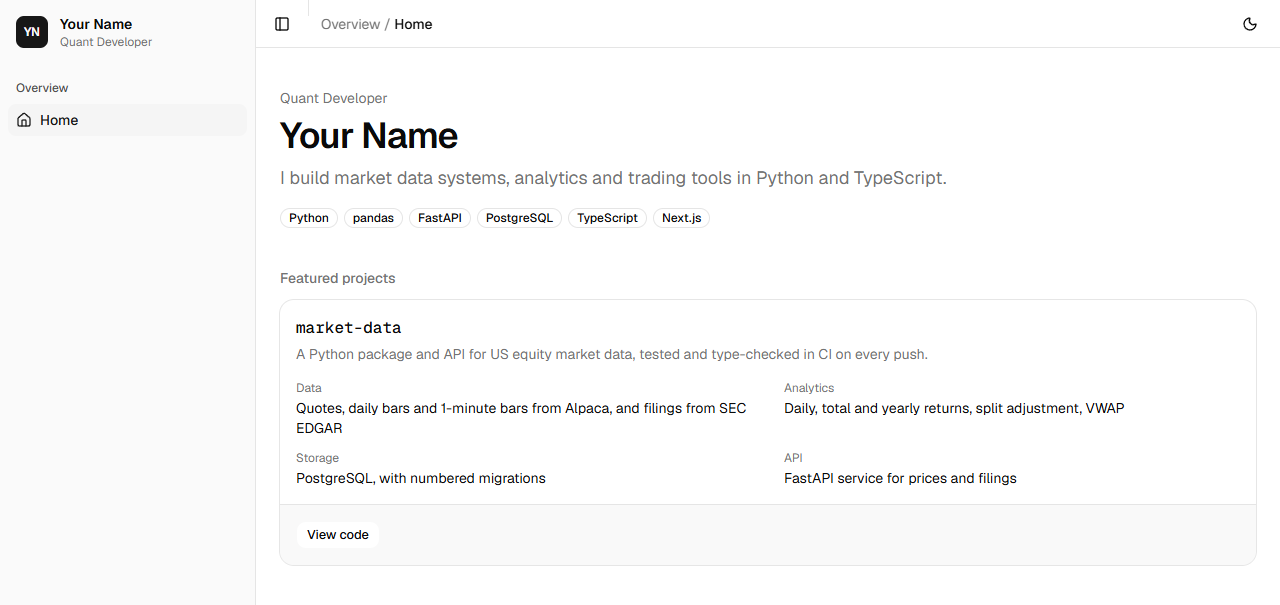
Shown for the course’s sample data. Yours shows the latest. Next.js says it collects anonymous usage data;
npx next telemetry disableturns that off.
Session 3 A prices page that reads your API
The idea
Step 1 Server components
In Next.js a component runs on the server unless its file starts "use client". A server component can be async and wait for data, so the prices page asks your API from the server and sends the browser a finished page.
An environment variable is a setting given to a program from outside its code. Next.js reads them from .env.local, which Git ignores. src/lib/env.ts reads MARKET_API_URL from there, and import "server-only" stops the build if code that runs in the browser imports it, so the address never reaches a visitor.
.env.example lists the same settings with example values and is saved in Git, so anyone who clones the project knows what to set, as on Day 4.
Practice
Problem 3
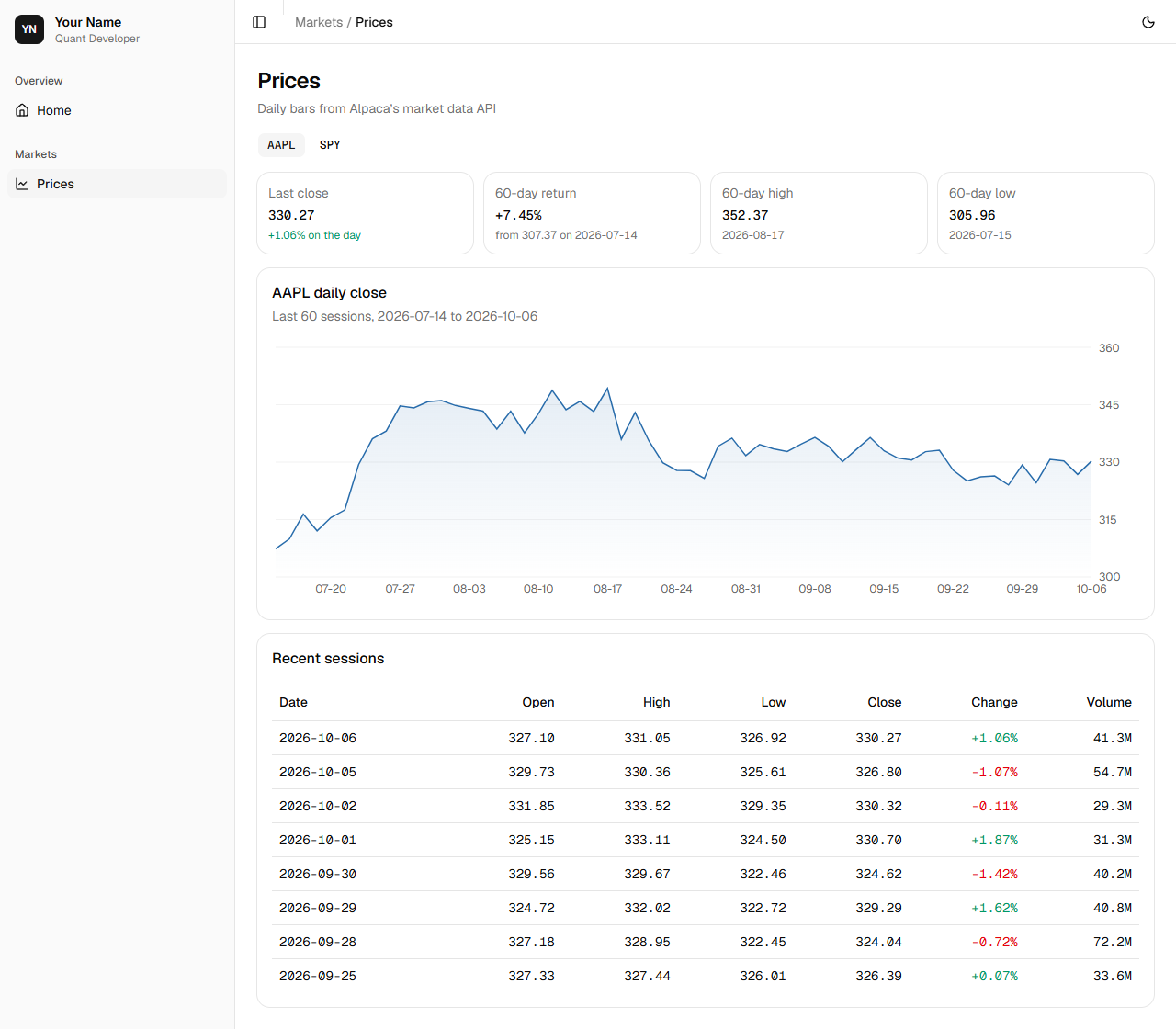
2 pointsThe prices page shows AAPL’s 60-day return: from the close of the first of its 60 sessions, 307.37, to the close of the last, 330.27. What return does it show, in percent?
Hint 1
A return is the last price divided by the first, minus 1.
Hint 2
Multiply by 100 for a percent.
Solution
return = 330.27 ÷ 307.37 − 1
= 1.0745 − 1
= 0.0745
× 100 = 7.45%
Problem 4
2 pointsThe prices page waits 80 milliseconds for the list of symbols, then 300 for the chosen symbol’s prices. Its header is outside Suspense; the rest is inside. How many milliseconds after the request does the reader see the prices?
Hint 1
The prices can’t be asked for until the page knows which symbol to show.
Hint 2
So the two waits come one after the other.
Solution
the header is sent at once, with a placeholder where the prices go
the symbols arrive after 80 ms
the prices are asked for then, and arrive 300 ms later
80 + 300 = 380 ms
What does `import "server-only"` at the top of env.ts do?
Show the answer
B: It stops the build if code that runs in the browser imports the file A file of settings must never reach the browser, where anyone could read it. server-only makes that mistake fail the build instead.
The project, step by step
Build it yourself from this brief, then check it against the steps.
- Add shadcn/ui’s chart, table and alert components, the server-only package, and openapi-typescript as a development tool.
- Set MARKET_API_URL in .env.local, list it in a .env.example, and let Git save the example with
!.env.exampleunder.env*in .gitignore. - With the API running, generate src/lib/api.d.ts from its OpenAPI schema. Read the API in src/lib/market.ts, on the server only, with the generated types.
- Make /prices: a button for each symbol the API has, and for the chosen one its last close, 60-day return, high and low, a chart of its daily closes, and a table of its latest sessions, inside Suspense, with an error page for when the API isn’t running. Add it to nav.ts, lint and commit.
Step 1 More components
Add the components the prices page uses, server-only, and openapi-typescript.
--save-devmarks it a development tool, used to build the site and never sent to visitors:npx --yes shadcn@4 add chart table alert- Checking registry.✔ Checking registry.- Installing dependencies.- Installing dependencies.✔ Installing dependencies.- Updating files.✔ Created 3 files: - src/components/ui/table.tsx - src/components/ui/alert.tsx - src/components/ui/chart.tsxℹ Skipped 1 file: (files might be identical, use --overwrite to overwrite) - src/components/ui/card.tsxnpm install server-only added 1 package, and audited 639 packages in 1s 237 packages are looking for funding run `npm fund` for details 9 high severity vulnerabilities To address all issues (including breaking changes), run: npm audit fix --force Run `npm audit` for details.npm warn install-scripts 1 package has install scripts not yet covered by allowScripts:npm warn install-scripts [email protected] (postinstall: node postinstall.js)npm warn install-scriptsnpm warn install-scripts Run `npm install-scripts ls` to review, or `npm install-scripts approve <pkg>` to allow.npm install --save-dev openapi-typescript@7 added 19 packages, and audited 658 packages in 3s 241 packages are looking for funding run `npm fund` for details 9 high severity vulnerabilities To address all issues (including breaking changes), run: npm audit fix --force Run `npm audit` for details.npm warn install-scripts 1 package has install scripts not yet covered by allowScripts:npm warn install-scripts [email protected] (postinstall: node postinstall.js)npm warn install-scriptsnpm warn install-scripts Run `npm install-scripts ls` to review, or `npm install-scripts approve <pkg>` to allow.
The chart component draws with Recharts, a charting library, which shadcn installed with it.
Step 2 Settings, kept out of Git
Make
.env.localin the portfolio folder, with your API’s address:.env.localMARKET_API_URL=http://127.0.0.1:8000And
.env.example, the same settings with example values, for anyone who clones the project:.env.example# Copy to .env.local and set your own values. .env.local is in .gitignore; this file is not.MARKET_API_URL=http://127.0.0.1:8000create-next-app’s .gitignore has the line
.env*, which keeps every file whose name starts .env out of Git, the example too. Add a line under it,!.env.example:!makes an exception. Then check:git status --short M .gitignore M package-lock.json M package.json?? .env.example?? src/components/ui/alert.tsx?? src/components/ui/chart.tsx?? src/components/ui/table.tsx
.env.example is listed, to be committed; .env.local is not, so it stays on your computer.
Step 3 Types from the API’s schema
Start the API in one terminal, from market-data, with
uv run fastapi dev src/market_data/api.py. In another, in the portfolio folder, generate the types:npx openapi-typescript http://127.0.0.1:8000/openapi.json -o src/lib/api.d.ts✨ openapi-typescript 7.13.0🚀 http://127.0.0.1:8000/openapi.json → src/lib/api.d.ts [73.1ms]
Open src/lib/api.d.ts. Each path and each model of the API is there, with its fields and their types. When the API changes, run the command again.
Step 4 Read the API on the server
Make src/lib/env.ts, the one file that reads the site’s settings:
src/lib/env.tsimport "server-only"; // The site's settings, read on the server only.export const env = { // The market-data API's address, from .env.local. MARKET_API_URL: process.env.MARKET_API_URL,};Then src/lib/market.ts:
src/lib/market.tsimport "server-only"; import type { components } from "@/lib/api";import { env } from "@/lib/env"; // The market-data API's models, generated from its OpenAPI schema into api.d.ts.export type Price = components["schemas"]["Price"]; async function get<T>(path: string): Promise<T> { const response = await fetch(`${env.MARKET_API_URL}${path}`); if (!response.ok) { throw new Error(`GET ${path}: ${response.status} ${response.statusText}`); } return (await response.json()) as T;} export function getSymbols(): Promise<string[]> { return get("/symbols");} export function getPrices(symbol: string, days: number): Promise<Price[]> { return get(`/prices/${encodeURIComponent(symbol)}?days=${days}`);}- Line 1
- This file runs on the server only.
- Line 7
- The API’s Price model, from the generated types.
exportlets other files import it. - Lines 9 to 14
- Ask the API for a path and return its JSON as the type the caller expects. An answer that isn’t OK stops it with an error naming the path and the status.
- Lines 17 to 19
- The symbols with prices.
- Lines 21 to 22
- A symbol’s latest days.
encodeURIComponentwrites the symbol safely into the address.
And src/lib/format.ts, so a price or a change reads the same on every page:
src/lib/format.ts// Number formats shared by every page, so a price or a change reads the same everywhere. export function price(value: number): string { return value.toLocaleString("en-US", { minimumFractionDigits: 2, maximumFractionDigits: 2, });} export function percent(fraction: number): string { return `${fraction >= 0 ? "+" : ""}${(fraction * 100).toFixed(2)}%`;} export function volume(value: number): string { return new Intl.NumberFormat("en-US", { notation: "compact", maximumFractionDigits: 1, }).format(value);} // Gains in green, losses in red, each a shade lighter on a dark background.export function tone(value: number): string { return value >= 0 ? "text-emerald-600 dark:text-emerald-400" : "text-red-600 dark:text-red-400";}- Lines 3 to 7
- Two decimal places, with commas: 1,234.50.
- Lines 10 to 11
- A fraction as a percent with its sign: 0.0123 is +1.23%.
- Lines 14 to 18
- Large numbers short: 42,600,000 is 42.6M.
- Lines 22 to 26
- The classes for a gain in green or a loss in red, a shade lighter on a dark background.
Step 5 The prices page
Make src/components/stat.tsx, one figure with its label and a note:
src/components/stat.tsximport { Card, CardDescription, CardHeader, CardTitle,} from "@/components/ui/card";import { cn } from "@/lib/utils"; export function Stat({ label, value, note, noteClass,}: { label: string; value: string; note?: string; noteClass?: string;}) { return ( <Card size="sm"> <CardHeader> <CardDescription>{label}</CardDescription> <CardTitle className="font-mono text-2xl font-medium tabular-nums"> {value} </CardTitle> {note && ( <p className={cn( "text-xs text-muted-foreground tabular-nums", noteClass, )} > {note} </p> )} </CardHeader> </Card> );}And src/components/price-chart.tsx:
src/components/price-chart.tsx"use client"; import { Area, AreaChart, CartesianGrid, XAxis, YAxis } from "recharts";import { type ChartConfig, ChartContainer, ChartTooltip, ChartTooltipContent,} from "@/components/ui/chart"; // The line's colour: a steel blue, lighter on a dark background.const config = { close: { label: "Close", theme: { light: "oklch(0.52 0.12 250)", dark: "oklch(0.72 0.11 250)" }, },} satisfies ChartConfig; export type Point = { label: string; close: number }; export function PriceChart({ data }: { data: Point[] }) { return ( <ChartContainer config={config} className="aspect-auto h-72 w-full"> <AreaChart data={data} margin={{ top: 8, left: 4, right: 4 }}> <defs> <linearGradient id="close-fill" x1="0" y1="0" x2="0" y2="1"> <stop offset="0%" stopColor="var(--color-close)" stopOpacity={0.2} /> <stop offset="100%" stopColor="var(--color-close)" stopOpacity={0} /> </linearGradient> </defs> <CartesianGrid vertical={false} /> <XAxis dataKey="label" tickLine={false} axisLine={false} minTickGap={40} /> <YAxis orientation="right" domain={["auto", "auto"]} tickLine={false} axisLine={false} width={48} tickFormatter={(value: number) => value.toFixed(0)} /> <ChartTooltip content={<ChartTooltipContent indicator="line" />} /> <Area dataKey="close" type="linear" stroke="var(--color-close)" strokeWidth={1.5} fill="url(#close-fill)" isAnimationActive={false} /> </AreaChart> </ChartContainer> );}- Line 1
- Recharts draws in the browser, so the chart is a client component.
- Lines 12 to 17
- The line’s name and colour, a steel blue in light and dark.
satisfieschecks the object has the shape shadcn’s chart expects. - Lines 24 to 63
- An area chart: the line, a fill fading to nothing below it, a grid, the dates along the bottom, and prices on the right, where trading screens put them.
Then the page, src/app/prices/page.tsx:
src/app/prices/page.tsximport type { Metadata } from "next";import Link from "next/link";import { Suspense } from "react";import { PageHeader } from "@/components/page-header";import { PriceChart } from "@/components/price-chart";import { Stat } from "@/components/stat";import { Alert, AlertDescription, AlertTitle } from "@/components/ui/alert";import { buttonVariants } from "@/components/ui/button";import { Card, CardContent, CardDescription, CardHeader, CardTitle,} from "@/components/ui/card";import { Skeleton } from "@/components/ui/skeleton";import { Table, TableBody, TableCell, TableHead, TableHeader, TableRow,} from "@/components/ui/table";import { percent, price, tone, volume } from "@/lib/format";import { getPrices, getSymbols } from "@/lib/market";import { cn } from "@/lib/utils"; export const metadata: Metadata = { title: "Prices" }; const SESSIONS = 60; export default function Prices({ searchParams }: PageProps<"/prices">) { return ( <div className="grid gap-4"> <PageHeader title="Prices" description="Daily bars from Alpaca’s market data API" /> <Suspense fallback={<Skeleton className="h-96" />}> <History searchParams={searchParams} /> </Suspense> </div> );} // The symbol in the address, as in /prices?symbol=SPY, or else the first one the API has prices for.async function History({ searchParams,}: Pick<PageProps<"/prices">, "searchParams">) { const [symbols, params] = await Promise.all([getSymbols(), searchParams]); if (symbols.length === 0) { return ( <Alert className="max-w-2xl"> <AlertTitle>No prices yet</AlertTitle> <AlertDescription> Run the recorder in market-data to save some. </AlertDescription> </Alert> ); } const symbol = typeof params.symbol === "string" && symbols.includes(params.symbol) ? params.symbol : symbols[0]; const days = await getPrices(symbol, SESSIONS); // Each session after the first, with its change from the session before. const sessions = days .slice(1) .map((d, k) => ({ ...d, change: d.close / days[k].close - 1 })); const first = days[0]; const last = sessions[sessions.length - 1]; const high = days.reduce((a, b) => (b.high > a.high ? b : a)); const low = days.reduce((a, b) => (b.low < a.low ? b : a)); const periodChange = last.close / first.close - 1; return ( <> <nav aria-label="Symbols" className="flex flex-wrap gap-1"> {symbols.map((s) => ( <Link key={s} href={`/prices?symbol=${encodeURIComponent(s)}`} aria-current={s === symbol ? "page" : undefined} className={cn( buttonVariants({ variant: s === symbol ? "secondary" : "ghost", size: "sm", }), "font-mono", )} > {s} </Link> ))} </nav> <div className="grid gap-3 sm:grid-cols-2 xl:grid-cols-4"> <Stat label="Last close" value={price(last.close)} note={`${percent(last.change)} on the day`} noteClass={tone(last.change)} /> <Stat label={`${days.length}-day return`} value={percent(periodChange)} note={`from ${price(first.close)} on ${first.day}`} /> <Stat label={`${days.length}-day high`} value={price(high.high)} note={high.day} /> <Stat label={`${days.length}-day low`} value={price(low.low)} note={low.day} /> </div> <Card> <CardHeader> <CardTitle>{symbol} daily close</CardTitle> <CardDescription> Last {days.length} sessions, {first.day} to {last.day} </CardDescription> </CardHeader> <CardContent> <PriceChart data={days.map((d) => ({ label: d.day.slice(5), close: d.close }))} /> </CardContent> </Card> <Card> <CardHeader> <CardTitle>Recent sessions</CardTitle> </CardHeader> <CardContent> <Table> <TableHeader> <TableRow> <TableHead>Date</TableHead> <TableHead className="text-right">Open</TableHead> <TableHead className="text-right">High</TableHead> <TableHead className="text-right">Low</TableHead> <TableHead className="text-right">Close</TableHead> <TableHead className="text-right">Change</TableHead> <TableHead className="text-right">Volume</TableHead> </TableRow> </TableHeader> <TableBody className="font-mono tabular-nums"> {sessions .slice(-8) .reverse() .map((d) => ( <TableRow key={d.day}> <TableCell>{d.day}</TableCell> <TableCell className="text-right"> {price(d.open)} </TableCell> <TableCell className="text-right"> {price(d.high)} </TableCell> <TableCell className="text-right">{price(d.low)}</TableCell> <TableCell className="text-right"> {price(d.close)} </TableCell> <TableCell className={cn("text-right", tone(d.change))}> {percent(d.change)} </TableCell> <TableCell className="text-right"> {volume(d.volume)} </TableCell> </TableRow> ))} </TableBody> </Table> </CardContent> </Card> </> );}- Line 29
- The page’s title, which fills the layout’s template: Prices · Your Name.
- Lines 33 to 44
- The page: its header, sent at once, and the prices inside Suspense, with a placeholder until they arrive.
searchParamsis the part of the address after ?, given as a promise. - Lines 48 to 66
- Ask for the symbols and the address’s symbol together, with
Promise.all. With no prices yet, say how to save some. The symbol is the address’s, if the API has it, or else the first; then its last 60 days. - Lines 68 to 75
- Each session’s change from the one before; the first and last sessions; the day with the highest high and the one with the lowest low; and the return over the 60 sessions.
- Lines 78 to 95
- A button for each symbol, linking to /prices?symbol=…, with the open one highlighted.
aria-currenttells screen readers which it is. - Lines 96 to 118
- Four figures in a row, two on a narrow screen: the last close and its change on the day, in green or red, the 60-day return, and the high and the low with their days.
- Line 127
- The chart of the closes, each labelled with its month and day.
- Lines 150 to 166
- The latest 8 sessions, newest first.
Make src/app/prices/error.tsx. Next.js shows it in the page’s place if anything in it fails, such as the API not running:
src/app/prices/error.tsx"use client"; import { Alert, AlertDescription, AlertTitle } from "@/components/ui/alert";import { Button } from "@/components/ui/button"; // Shown in place of the page when loading it fails, such as when the API isn't running.export default function PricesError({ reset,}: { error: Error; reset: () => void;}) { return ( <Alert variant="destructive" className="max-w-2xl"> <AlertTitle>Market data unavailable</AlertTitle> <AlertDescription className="grid gap-3"> <p> The market-data API isn’t responding. Check that it’s running, then try again. </p> <Button variant="outline" size="sm" className="w-fit" onClick={reset}> Try again </Button> </AlertDescription> </Alert> );}resettries the page again. Add the page to nav.ts, in a Markets section:src/lib/nav.tsimport { ChartLine, House, type LucideIcon } from "lucide-react"; export type NavItem = { title: string; href: string; icon: LucideIcon };export type NavGroup = { label: string; description?: string; items: NavItem[];}; // The site's sections, in the sidebar's order. A new page is added here.export const NAV: NavGroup[] = [ { label: "Overview", items: [{ title: "Home", href: "/", icon: House }] }, { label: "Markets", description: "Daily prices from my market-data API.", items: [{ title: "Prices", href: "/prices", icon: ChartLine }], },];With the API running in one terminal, run
npm run devin another, in the portfolio folder, and open http://localhost:3000/prices:Shown for the course’s sample data. Yours shows the latest. Choose SPY to see its prices; the address becomes /prices?symbol=SPY. The home page has a Markets card now too, from nav.ts. Lint, check the formatting, and commit:
git status --short M .gitignore M package-lock.json M package.json M src/lib/nav.ts?? .env.example?? src/app/prices/?? src/components/price-chart.tsx?? src/components/stat.tsx?? src/components/ui/alert.tsx?? src/components/ui/chart.tsx?? src/components/ui/table.tsx?? src/lib/api.d.ts?? src/lib/env.ts?? src/lib/format.ts?? src/lib/market.tsnpm run lint > [email protected] lint> eslintnpm run format:check > [email protected] format:check> prettier --check . Checking formatting...All matched files use Prettier code style!git add .git commit -m "Add a prices page that reads the market-data API"[main 6c24dec] Add a prices page that reads the market-data API 16 files changed, 1774 insertions(+), 2 deletions(-) create mode 100644 .env.example create mode 100644 src/app/prices/error.tsx create mode 100644 src/app/prices/page.tsx create mode 100644 src/components/price-chart.tsx create mode 100644 src/components/stat.tsx create mode 100644 src/components/ui/alert.tsx create mode 100644 src/components/ui/chart.tsx create mode 100644 src/components/ui/table.tsx create mode 100644 src/lib/api.d.ts create mode 100644 src/lib/env.ts create mode 100644 src/lib/format.ts create mode 100644 src/lib/market.ts
Walkthrough
The whole solution, explained line by line. Open it once you have tried.
Show the walkthrough
The finished api.py:
"""Prices and SEC filings over HTTP, as JSON. Usage: uv run fastapi dev src/market_data/api.py Interactive documentation is at http://127.0.0.1:8000/docs.""" from collections.abc import AsyncIterator, Iteratorfrom contextlib import asynccontextmanagerfrom datetime import datefrom typing import Annotated import psycopgfrom fastapi import Depends, FastAPI, HTTPException, Query, Requestfrom psycopg.rows import dict_rowfrom psycopg_pool import ConnectionPoolfrom pydantic import BaseModel from market_data.config import get_settingsfrom market_data.filings import describe PRICES = """SELECT day, open, high, low, close, volumeFROM pricesWHERE symbol = %sORDER BY day DESCLIMIT %s""" FILINGS = """SELECT filed, symbol, form, items, urlFROM filingsORDER BY filed DESC, symbol, accession DESCLIMIT %s""" class Price(BaseModel): """One day's bar.""" day: date open: float high: float low: float close: float volume: int class Filing(BaseModel): """An SEC filing and its main document.""" filed: date symbol: str form: str description: str url: str @asynccontextmanagerasync def lifespan(app: FastAPI) -> AsyncIterator[None]: """Open a pool of database connections on startup; close it on shutdown.""" with ConnectionPool(get_settings().database_url) as pool: app.state.pool = pool yield app = FastAPI(title="market-data", lifespan=lifespan) def get_conn(request: Request) -> Iterator[psycopg.Connection]: """A pooled connection for the length of one request.""" with request.app.state.pool.connection() as conn: yield conn Conn = Annotated[psycopg.Connection, Depends(get_conn)] @app.get("/symbols")def symbols(conn: Conn) -> list[str]: """Every symbol with daily prices.""" rows = conn.execute("SELECT DISTINCT symbol FROM prices ORDER BY symbol") return [symbol for (symbol,) in rows] @app.get("/prices/{symbol}")def prices( conn: Conn, symbol: str, days: Annotated[int, Query(ge=1, le=6000)] = 30) -> list[Price]: """A symbol's latest daily bars, oldest first.""" rows = conn.cursor(row_factory=dict_row).execute(PRICES, (symbol, days)) latest = [Price(**row) for row in rows] if not latest: raise HTTPException(status_code=404, detail=f"No prices for {symbol}") return latest[::-1] @app.get("/filings")def filings( conn: Conn, limit: Annotated[int, Query(ge=1, le=100)] = 10) -> list[Filing]: """The newest filings across the watchlist.""" rows = conn.cursor(row_factory=dict_row).execute(FILINGS, (limit,)) return [ Filing( filed=row["filed"], symbol=row["symbol"], form=row["form"], description=describe(row["form"], row["items"]), url=row["url"], ) for row in rows ]- Lines 24 to 29
- A symbol’s latest days.
- Lines 32 to 36
- The newest filings.
- Lines 40 to 48
- A day’s prices, as the API sends them.
- Lines 51 to 58
- A filing, as the API sends it.
- Lines 62 to 66
- A pool of connections, open while the API runs.
- Lines 72 to 75
- A connection from the pool for each request.
- Lines 81 to 85
- The symbols with prices.
- Lines 88 to 97
- A symbol’s latest days, oldest first, or 404.
- Lines 100 to 114
- The newest filings, described.
The finished prices page:
import type { Metadata } from "next";import Link from "next/link";import { Suspense } from "react";import { PageHeader } from "@/components/page-header";import { PriceChart } from "@/components/price-chart";import { Stat } from "@/components/stat";import { Alert, AlertDescription, AlertTitle } from "@/components/ui/alert";import { buttonVariants } from "@/components/ui/button";import { Card, CardContent, CardDescription, CardHeader, CardTitle,} from "@/components/ui/card";import { Skeleton } from "@/components/ui/skeleton";import { Table, TableBody, TableCell, TableHead, TableHeader, TableRow,} from "@/components/ui/table";import { percent, price, tone, volume } from "@/lib/format";import { getPrices, getSymbols } from "@/lib/market";import { cn } from "@/lib/utils"; export const metadata: Metadata = { title: "Prices" }; const SESSIONS = 60; export default function Prices({ searchParams }: PageProps<"/prices">) { return ( <div className="grid gap-4"> <PageHeader title="Prices" description="Daily bars from Alpaca’s market data API" /> <Suspense fallback={<Skeleton className="h-96" />}> <History searchParams={searchParams} /> </Suspense> </div> );} // The symbol in the address, as in /prices?symbol=SPY, or else the first one the API has prices for.async function History({ searchParams,}: Pick<PageProps<"/prices">, "searchParams">) { const [symbols, params] = await Promise.all([getSymbols(), searchParams]); if (symbols.length === 0) { return ( <Alert className="max-w-2xl"> <AlertTitle>No prices yet</AlertTitle> <AlertDescription> Run the recorder in market-data to save some. </AlertDescription> </Alert> ); } const symbol = typeof params.symbol === "string" && symbols.includes(params.symbol) ? params.symbol : symbols[0]; const days = await getPrices(symbol, SESSIONS); // Each session after the first, with its change from the session before. const sessions = days .slice(1) .map((d, k) => ({ ...d, change: d.close / days[k].close - 1 })); const first = days[0]; const last = sessions[sessions.length - 1]; const high = days.reduce((a, b) => (b.high > a.high ? b : a)); const low = days.reduce((a, b) => (b.low < a.low ? b : a)); const periodChange = last.close / first.close - 1; return ( <> <nav aria-label="Symbols" className="flex flex-wrap gap-1"> {symbols.map((s) => ( <Link key={s} href={`/prices?symbol=${encodeURIComponent(s)}`} aria-current={s === symbol ? "page" : undefined} className={cn( buttonVariants({ variant: s === symbol ? "secondary" : "ghost", size: "sm", }), "font-mono", )} > {s} </Link> ))} </nav> <div className="grid gap-3 sm:grid-cols-2 xl:grid-cols-4"> <Stat label="Last close" value={price(last.close)} note={`${percent(last.change)} on the day`} noteClass={tone(last.change)} /> <Stat label={`${days.length}-day return`} value={percent(periodChange)} note={`from ${price(first.close)} on ${first.day}`} /> <Stat label={`${days.length}-day high`} value={price(high.high)} note={high.day} /> <Stat label={`${days.length}-day low`} value={price(low.low)} note={low.day} /> </div> <Card> <CardHeader> <CardTitle>{symbol} daily close</CardTitle> <CardDescription> Last {days.length} sessions, {first.day} to {last.day} </CardDescription> </CardHeader> <CardContent> <PriceChart data={days.map((d) => ({ label: d.day.slice(5), close: d.close }))} /> </CardContent> </Card> <Card> <CardHeader> <CardTitle>Recent sessions</CardTitle> </CardHeader> <CardContent> <Table> <TableHeader> <TableRow> <TableHead>Date</TableHead> <TableHead className="text-right">Open</TableHead> <TableHead className="text-right">High</TableHead> <TableHead className="text-right">Low</TableHead> <TableHead className="text-right">Close</TableHead> <TableHead className="text-right">Change</TableHead> <TableHead className="text-right">Volume</TableHead> </TableRow> </TableHeader> <TableBody className="font-mono tabular-nums"> {sessions .slice(-8) .reverse() .map((d) => ( <TableRow key={d.day}> <TableCell>{d.day}</TableCell> <TableCell className="text-right"> {price(d.open)} </TableCell> <TableCell className="text-right"> {price(d.high)} </TableCell> <TableCell className="text-right">{price(d.low)}</TableCell> <TableCell className="text-right"> {price(d.close)} </TableCell> <TableCell className={cn("text-right", tone(d.change))}> {percent(d.change)} </TableCell> <TableCell className="text-right"> {volume(d.volume)} </TableCell> </TableRow> ))} </TableBody> </Table> </CardContent> </Card> </> );}- Lines 33 to 44
- The header, and the prices in Suspense.
- Lines 48 to 75
- The symbol, its 60 days, and the figures worked from them.
- Lines 78 to 95
- The symbols, as links.
- Lines 119 to 131
- The chart.
Check yourself
Questions an interviewer could ask about today’s work.
01What is an API, and why put one in front of a database?Show answer
An API is how one program asks another for data, here over HTTP in JSON. In front of a database it decides what each caller may ask and how the answer looks, so pages and other programs never need the database’s password or tables, and the database can change without breaking them.
02What do the status codes 200, 404 and 422 mean?Show answer
200 OK: the request worked. 404 Not Found: nothing is at that address. 422: the request was refused because something in it was wrong, such as days=0 where days must be 1 or more.
03What is the difference between a server component and a client component?Show answer
A server component runs on the server, can wait for data there, and sends finished HTML; its code and any settings it reads never reach the browser. A client component, marked "use client", runs in the browser too, so it can respond to clicks and change on its own, and everything it uses is visible to the reader.
04Why generate the site’s types from the API’s OpenAPI schema?Show answer
The API is then the one place its data’s shape is written. When a model changes, generating the types again makes TypeScript point at every place in the site that must change, instead of a page failing for a visitor.
05What does Suspense do on a page that waits for data?Show answer
It shows a fallback, such as a grey placeholder, for the part that waits, and sends that part as soon as its data arrives. The rest of the page appears at once.
Learning points
- An API answers HTTP requests in JSON. A request has a method, a path and a query; an answer a status code and a body.
- FastAPI reads a function’s type hints to fill its arguments, refuse bad requests with 422, and write /docs. A pool lends each request a database connection.
- Test an API against a database of the tests’ own, made and dropped by a fixture, and give CI a database to run them on every push.
- shadcn/ui copies components into your project; a layout puts the sidebar and header round every page; nav.ts decides what the sidebar lists.
- A server component reads the API with types generated from its schema, and Suspense shows a placeholder until the data arrives. Settings go in .env.local, and their example in .env.example.
Keep going
Reading the site’s code
Today you used TypeScript, React and Tailwind without studying them, and that is how most engineers meet a new codebase: read what each part does, change one thing, and see what happens. Change your title in site.ts, or a class such as text-4xl on the home page, and watch the page as you save.
When a page shows nothing, open the browser’s developer tools (F12) and read the Console: an error there names the file and line. When the prices page shows Market data unavailable, check that the API is running and that MARKET_API_URL in .env.local is right.
Ship it
Push market-data, and on GitHub check that the Checks workflow passed with its PostgreSQL service. The portfolio site stays on your computer until Day 7, when it goes on GitHub and online.
Tomorrow the site gets an intraday page that updates itself, your code learns to survive a failing server, and a scheduled job saves each day’s 1-minute bars.
For education only. Not investment advice. Terms of Use